
MQTT Authentication: Password, JWT, and SCRAM
Compare None, Password, JWT, and SCRAM, configure the matching Mqttable fields, and verify an authenticated MQTT 5 connection.
- Author:
- Mqttable
- Updated:
On this page7 sections
Loading...
Compare None, Password, JWT, and SCRAM, configure the matching Mqttable fields, and verify an authenticated MQTT 5 connection.
Loading...
This guide follows the current Authentication Method control in Mqttable. Select MQTT 5.0 to use it; Mqttable hides the control for MQTT 3.1 and 3.1.1, and SCRAM is an MQTT 5 enhanced-authentication flow.
You are done when the Connection reaches Connected, Trace shows an accepted CONNACK, and a separate subscribe/publish test confirms that the authenticated identity also has the required Topic permissions.
New clients default to Password. Use the method and exact credential format configured by the Broker operator. A method name alone is not enough: JWT claims and SCRAM hash variants must also match the listener policy.
Use only when the listener explicitly permits anonymous clients. Clear
Username; choosing None disables the password controls and sends no
password. Saved credentials are kept, but a non-empty Username can still
be included in CONNECT.
Use the username and password issued by the Broker operator. Mqttable
sends them in CONNECT, so use TLS and prefer a saved
SecretRef over repeatedly pasting a raw password.
Use when the Broker expects a JWT in the MQTT password field. The operator defines the signing algorithm, key, claims, audience, issuer, subject, and expiry policy.
Prefer the exact stronger variant enabled by the Broker. Mqttable uses the
username and password locally for the challenge-response exchange; the
password is not placed in CONNECT.
Use only for compatibility with a Broker that explicitly requires this legacy hash. Do not substitute a different SCRAM variant: both peers must advertise the same method.
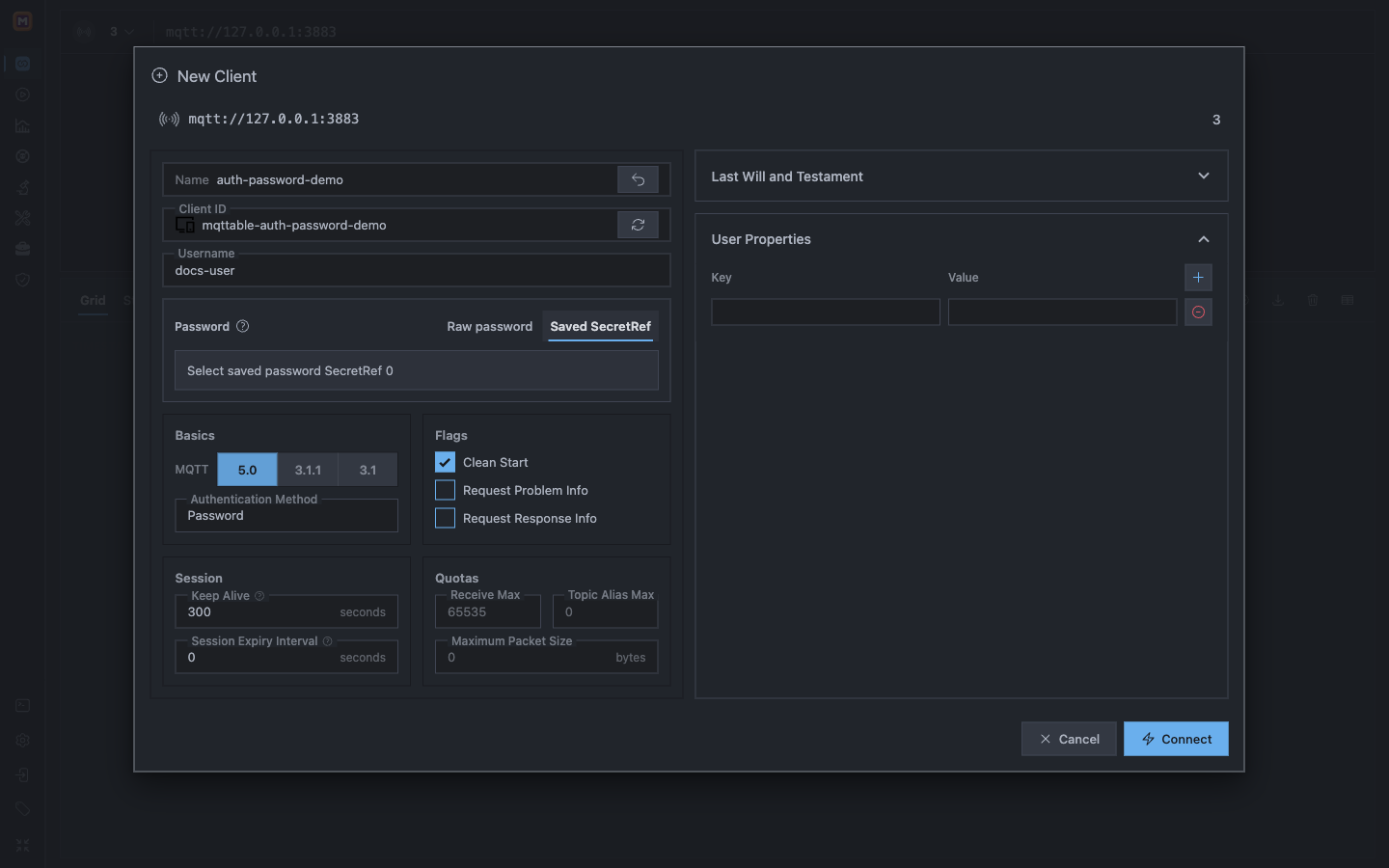
Password authentication sends the configured username and password in CONNECT; a Saved SecretRef keeps the raw value out of the form.
If the Broker operator gives you a complete token, paste it into Password or store it as a password SecretRef. Do not re-sign it.
Use JWT Tools only when you own the correct signing material and know the Broker's required claims:
username, iat, and exp rows are editable defaults, not proof that the Broker accepts them.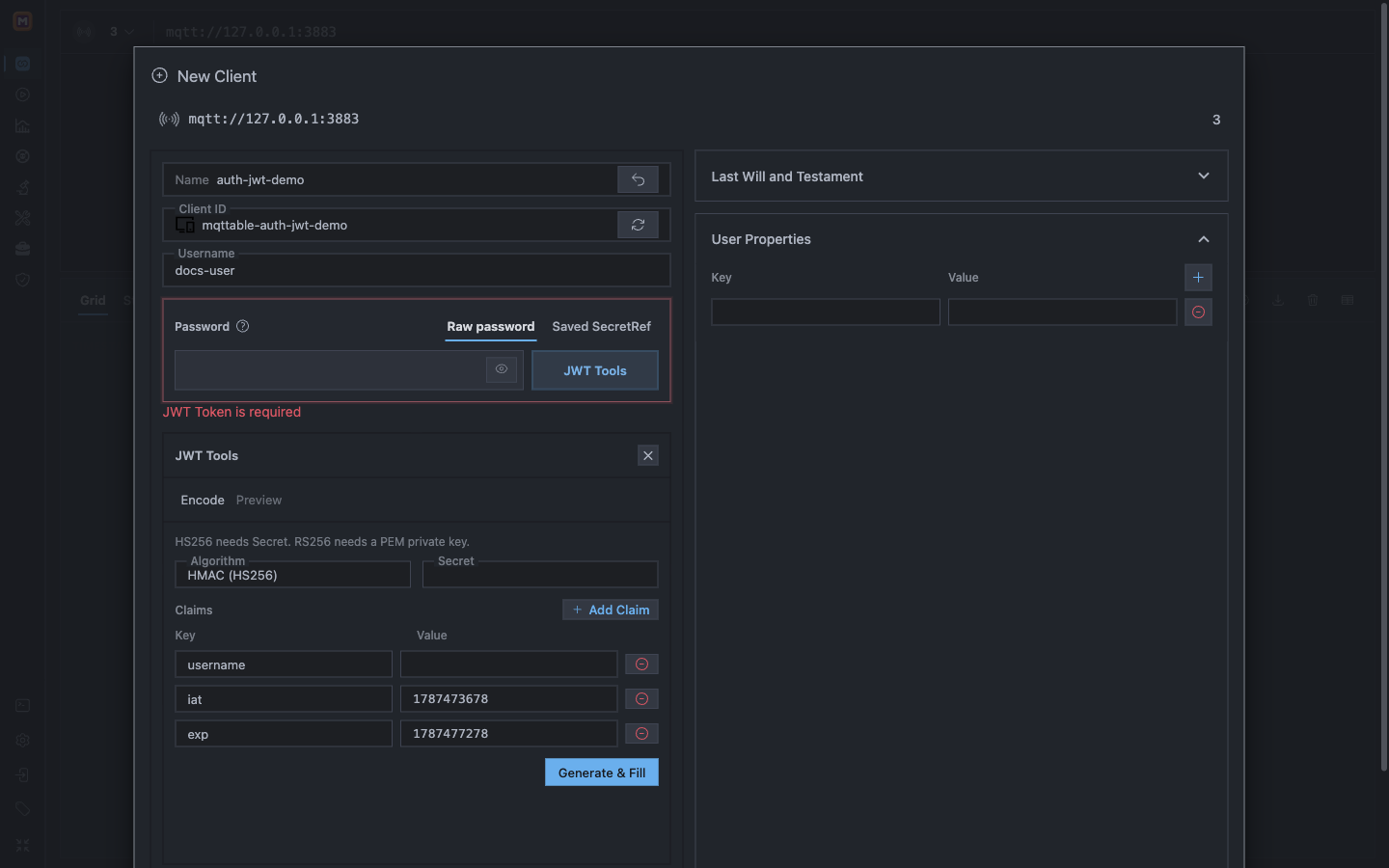
JWT Tools can sign HS256 or RS256 tokens locally; the Broker policy still determines the valid key, claims, and expiry.
The current source adds Open in JWT Debugger to the inline JWT Tools, preserving the generator and preview shown above. Inspect the current token’s signature and expiry, then return with the original draft or explicitly fill the password draft with the token. This does not save, connect, retrieve hidden saved credentials or pass signing keys to the debugger. Existing installers may not include this navigation yet; see Local tools for the workflow and temporary-data boundaries.
Never invent iss, aud, sub, or signing keys. A structurally valid JWT can still be rejected because its signature, claims, or clock window does not match Broker policy.
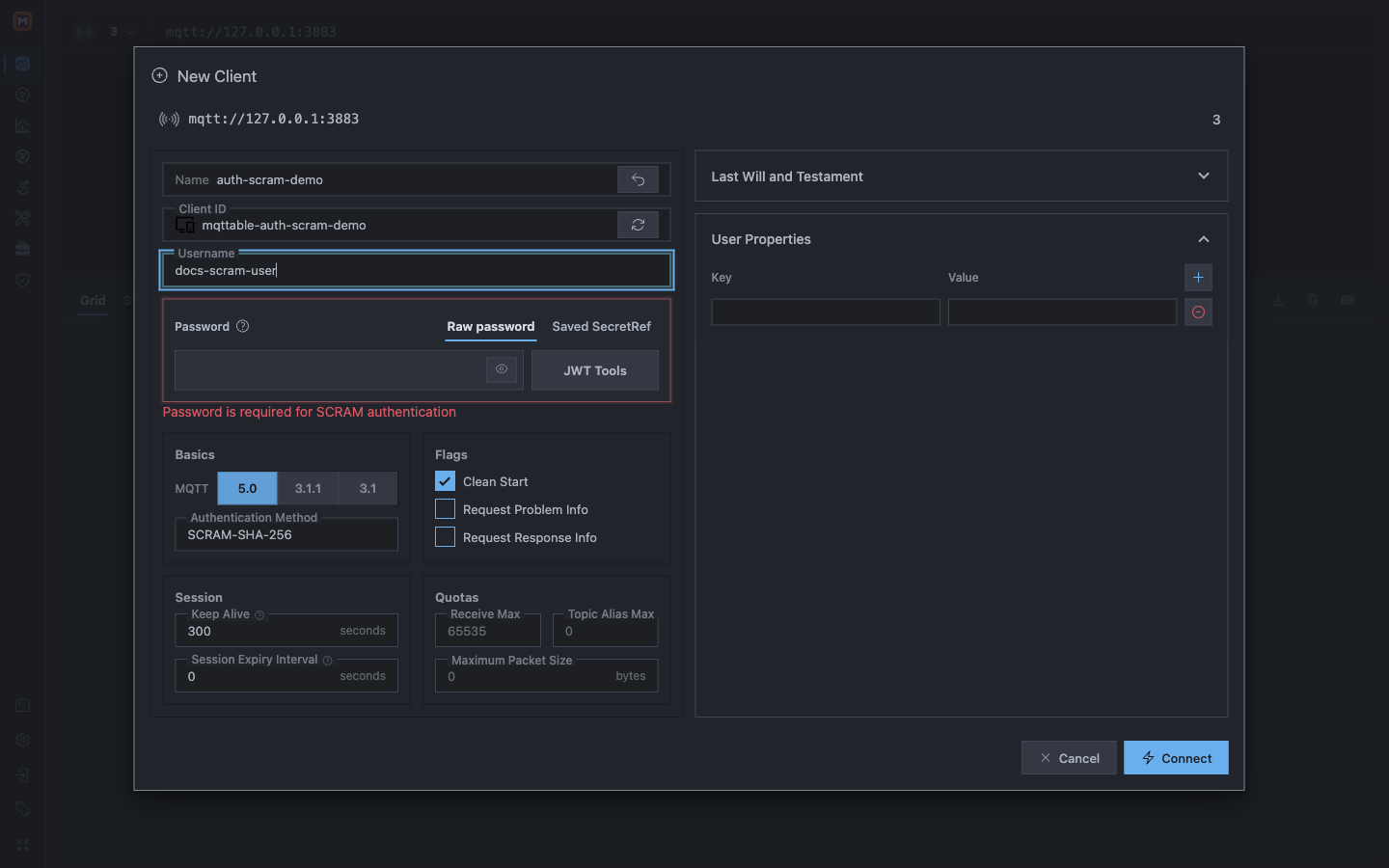
SCRAM requires MQTT 5, an exact method match, and both username and password; the inline error stops an incomplete setup.
Test Connection on the Broker form verifies the endpoint, transport, and TLS path only. It does not send the New Client authentication settings.
CONNECT and incoming CONNACK.Connection Accepted. For SCRAM, also treat a completed enhanced-authentication exchange as part of the evidence.Paste a complete token, select a populated SecretRef, or generate one with the correct key and claims. The form stops before connection.
Enter both Username and Password and keep MQTT 5.0 selected.
0x86 Bad User Name or Password
Recheck the client identity, secret or token, JWT signature and expiry, and whether the credential is enabled on this listener.
0x87 Not authorized
The Broker rejected the identity or its connection permission. If the client is already Connected and only publish or subscribe fails, inspect the Topic ACL instead.
0x8C Bad authentication method
Confirm MQTT 5 support and the exact SCRAM method configured on the listener. SHA-1, SHA-256, and SHA-512 are not interchangeable.
Authentication has not been reached. Fix the endpoint, CA trust, server name, or mTLS setup with the TLS certificate guide.
Authentication proves a client identity to the Broker. TLS protects the network path and verifies the server; mTLS can additionally authenticate a client certificate. Passwords and JWTs still need a protected transport.
An accepted CONNACK proves that the client may connect. SUBACK, PUBACK, or Broker policy may still reject a Topic operation. Verify both stages instead of replacing a valid password when the real failure is an ACL.
Use Saved SecretRef for reusable password or token material. Do not paste passwords, JWTs, HMAC secrets, or RSA private keys into tickets, chat, or screenshots. Rotate exposed material at the Broker, then replace the stored secret.
Continue with TLS certificates, Credentials, or the first MQTT message tutorial.