Create and run your first MQTT benchmark in 5 minutes
Use an authorized, reachable Broker to create a safe 25-client Fan-out baseline, pass Preflight, and verify live MQTT traffic in five minutes.
Author:
Mqttable
Updated:
On this page9 sections
Loading...
Create a small, repeatable MQTT benchmark with one Publisher and 24 Subscribers. Connect your authorized Broker, load the Fan-out scenario, pass Preflight, and confirm the expected live traffic.
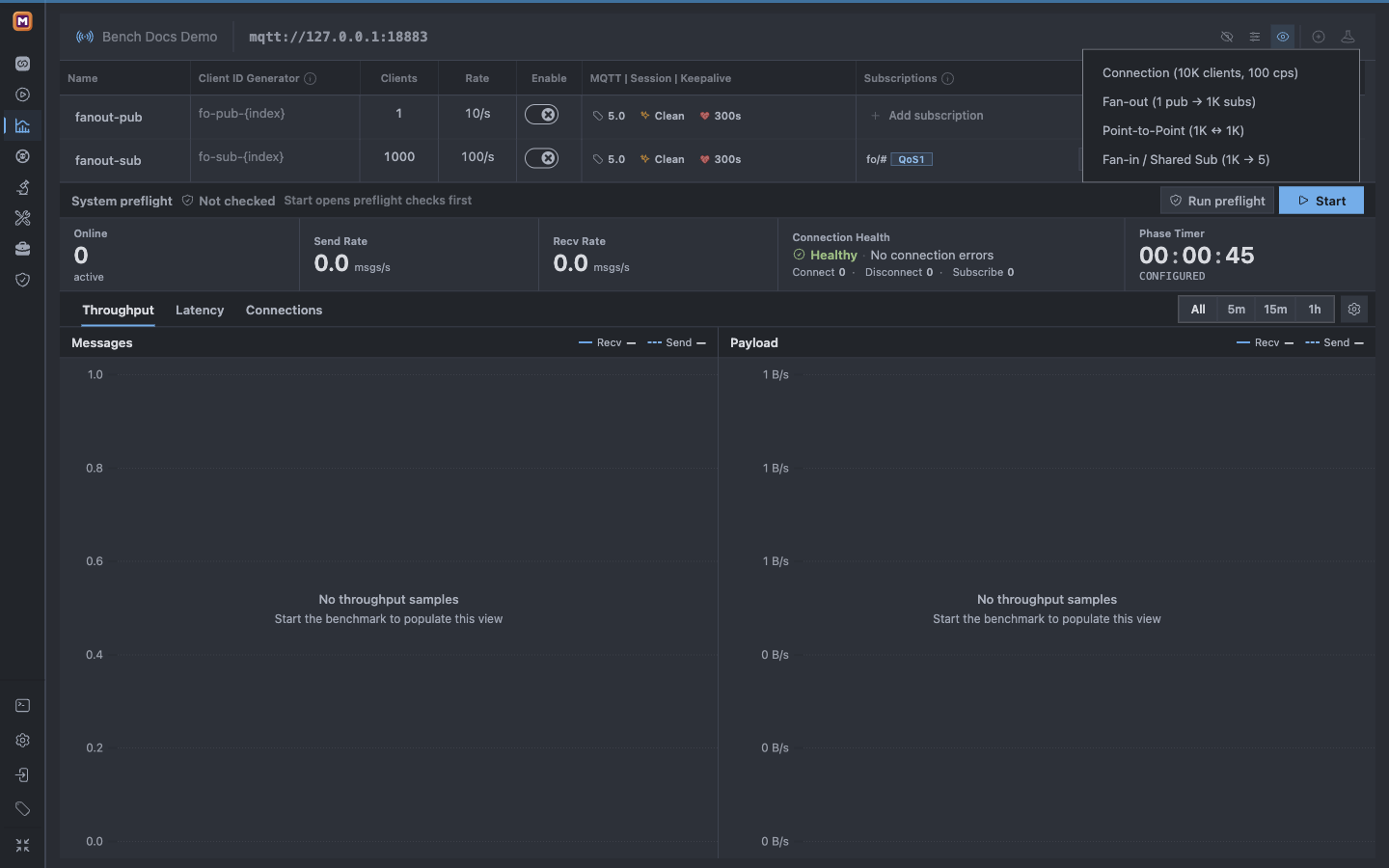
Open Bench from the Mqttable sidebar. If the Runtime has no saved Benchmark target, select Benchmark Now.
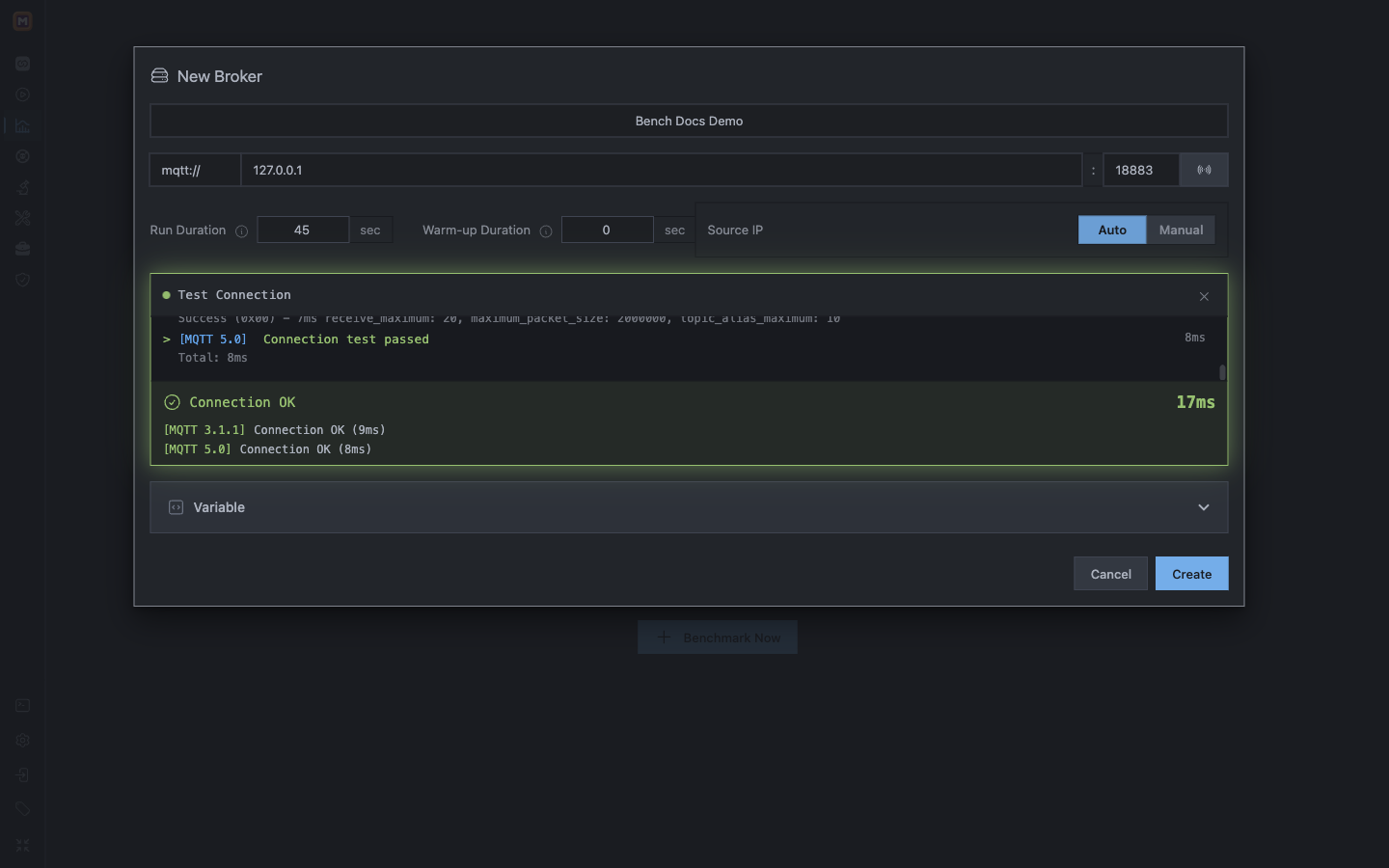
In New Broker, enter:
Name: a clear name for this target, such as First Fan-out;
Protocol, Host, and Port: the exact endpoint of your authorized test Broker;
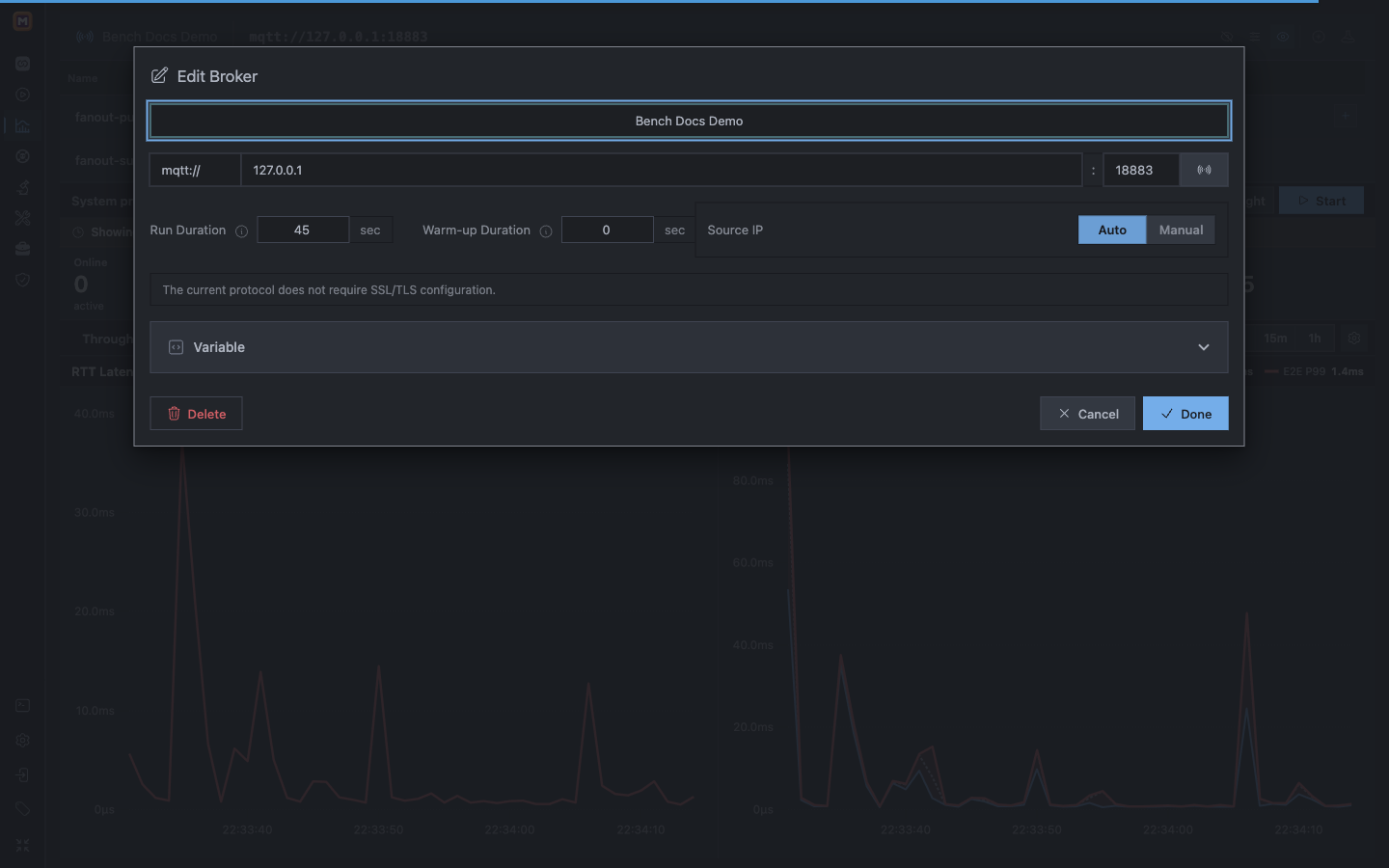
Run Duration:45 seconds;
Warm-up Duration:0 seconds;
Source IP:Auto;
the TLS and Credential refs required by your target, if any.
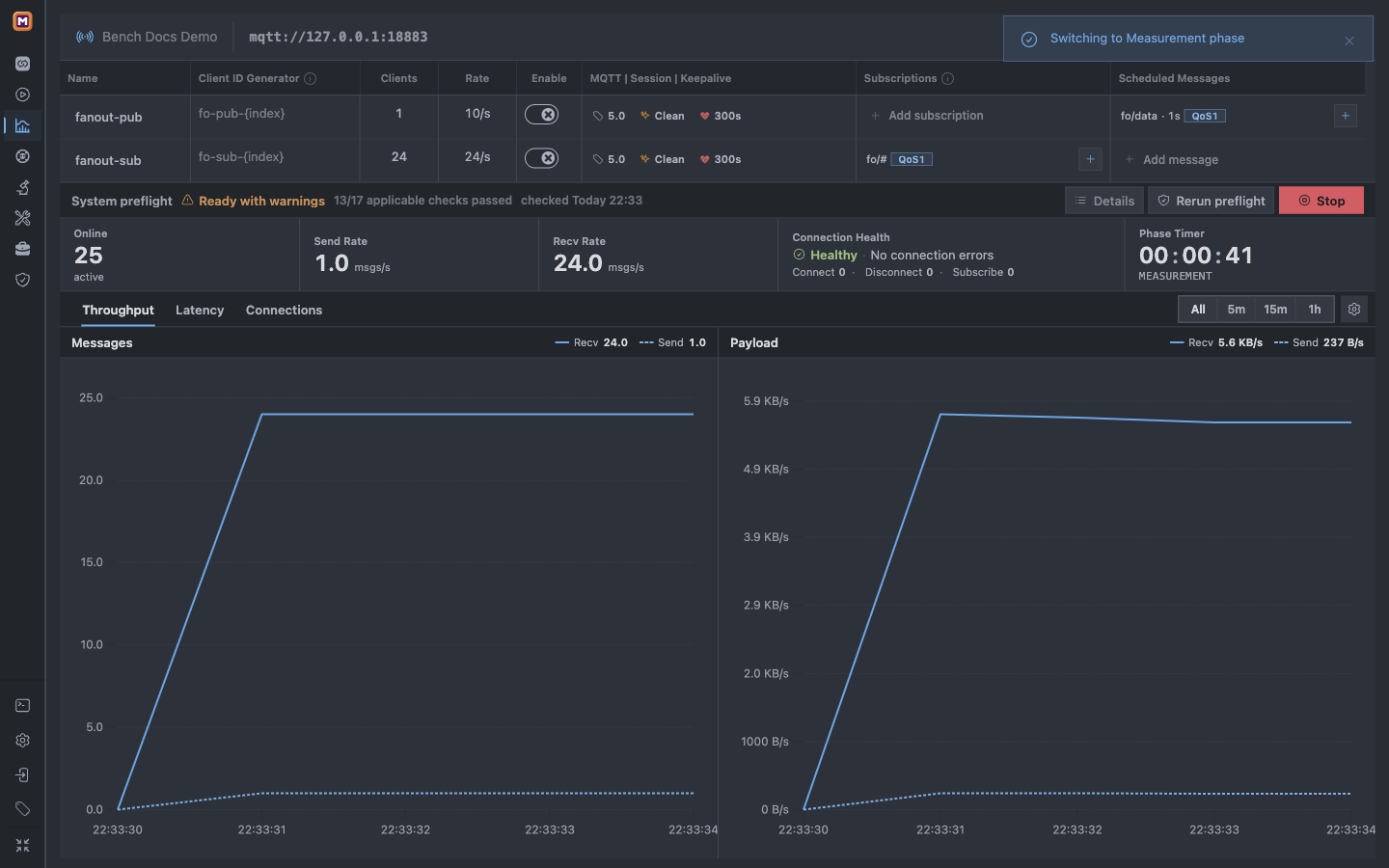
Benchmark Now does not start or provision a Broker. The screenshot uses the disposable documentation target Bench Docs Demo at mqtt://127.0.0.1:18883; do not copy that endpoint unless you already started your own listener there.
Select Test Connection. For this tutorial endpoint, expect both MQTT versions to report Connection OK, then select Create.
The Benchmark Broker test sends no MQTT username or password and uses the configured TLS settings. Authentication refusal is not a save restriction: configure the Benchmark client credentials separately. This page does not provide the standalone Client test action, and a successful endpoint probe does not verify message permissions.
Load the complete Fan-out plan, then reduce its Subscriber scale before Preflight or Start.
1Choose Fan-out to create the Publisher, Subscriber, message, and subscription together.
2The template starts with 1,000 Subscribers; do not run it yet.
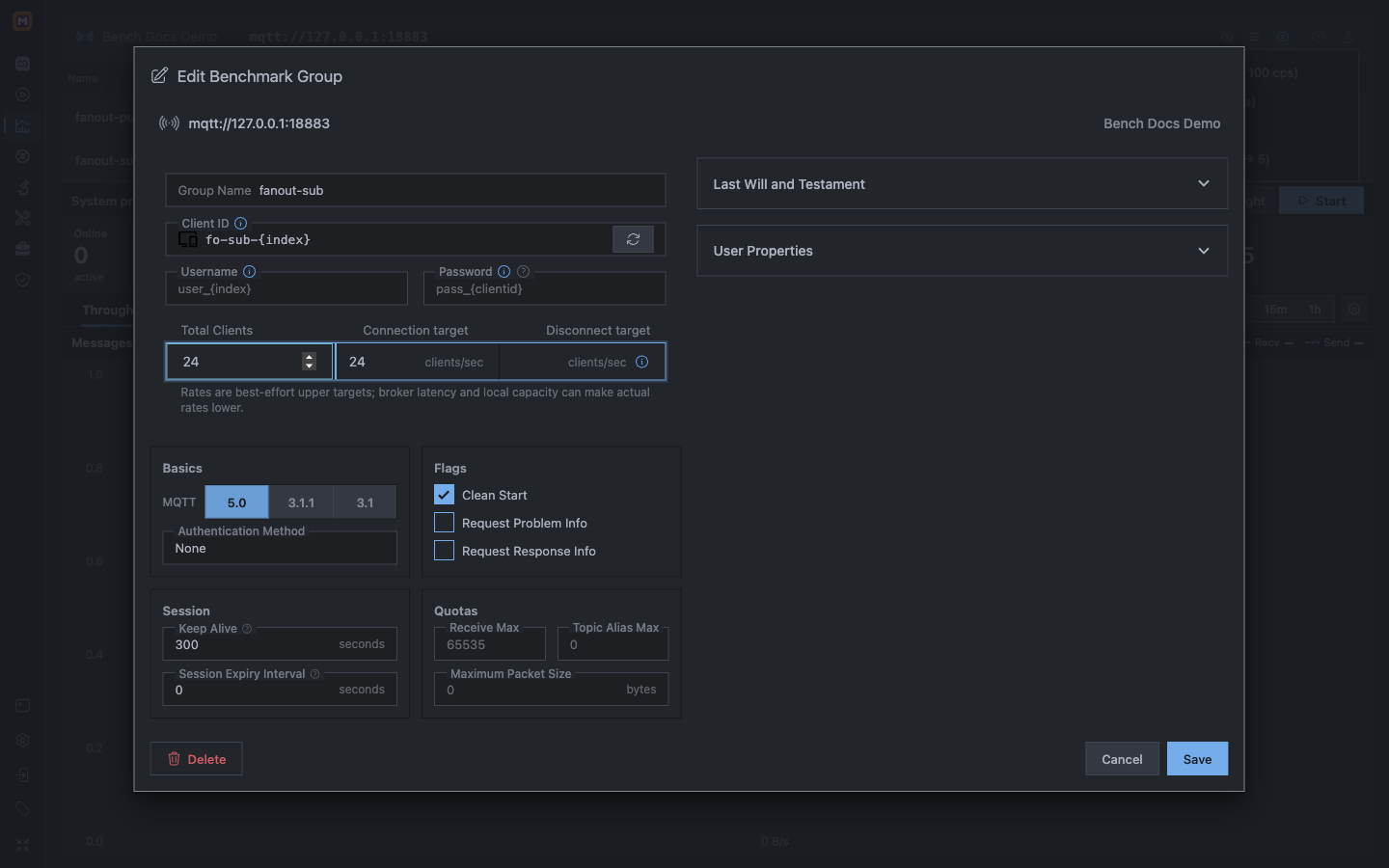
Open fanout-sub and change exactly these two values:
Total Clients:1000 → 24;
Connection target:100 → 24 clients/sec.
Save the Group. Leave fo-sub-{index}, MQTT 5.0, Clean Start, and the 300-second Keep Alive unchanged. The template already supplies the matching fo/data Scheduled Message and fo/# Subscription; you do not need to open or recreate them for this first run.
The first-run safety boundary is 24 Subscribers at a target of 24 new connections per second.
1Set Total Clients to 24 before this workload can run.
2Set the connection target to 24 clients/sec and save the Group.
3. Preflight and start
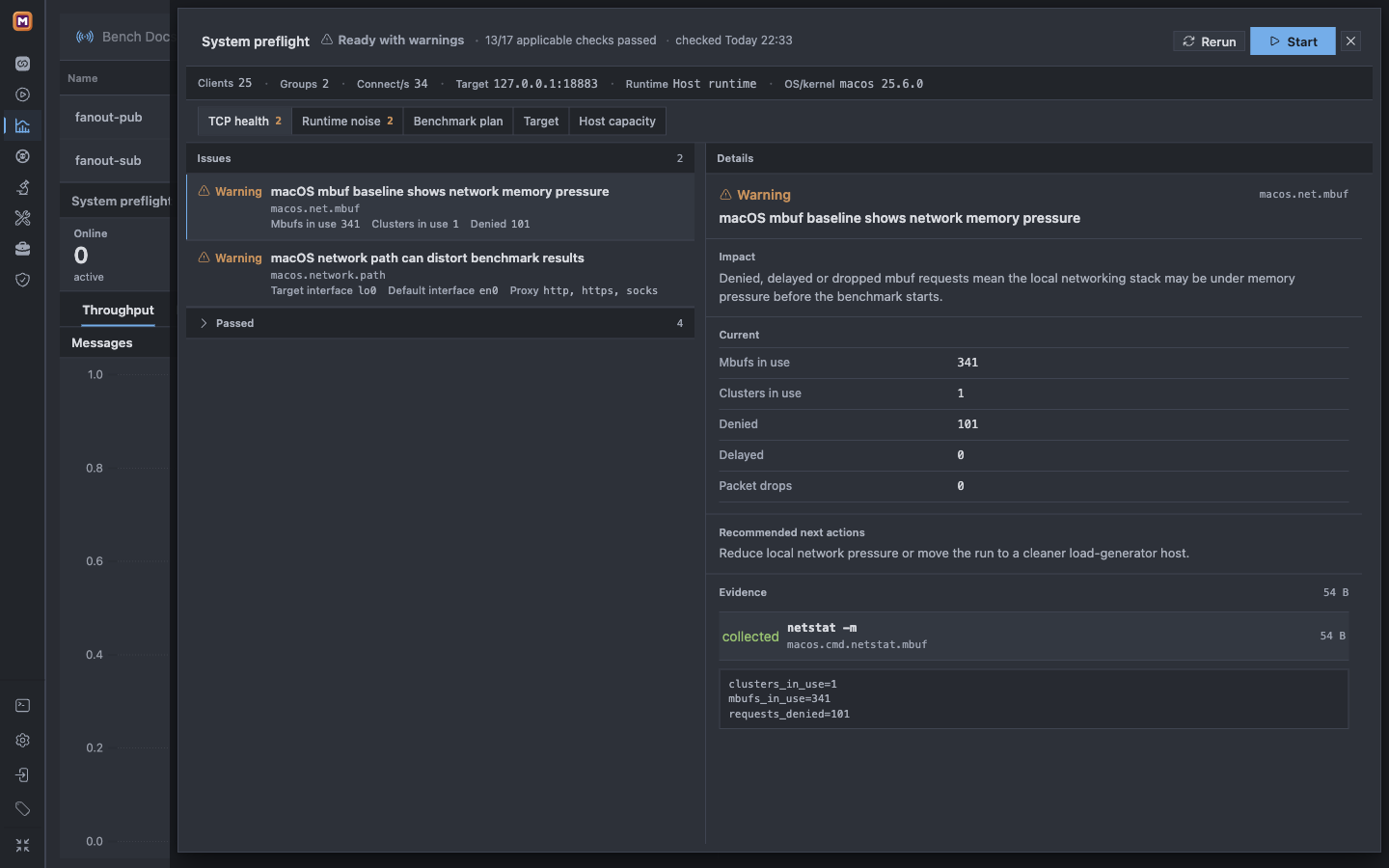
Select Run preflight. Before creating load, confirm the summary shows:
25 Clients: 1 Publisher + 24 Subscribers;
2 Groups:fanout-pub and fanout-sub;
34 connects/s: the two Groups' connection targets combined;
your exact Broker endpoint and the intended Runtime.
Use the result as a gate:
Ready: select Start;
Ready with warnings: open Details and continue only when every warning is acceptable for this run;
Blocker: stop and correct the reported problem;
Stale: the configuration changed, so run Preflight again.
The local capture's warnings concern the macOS load generator's mbuf baseline and loopback network path. They did not block this small functional demo, but they would make a Broker capacity comparison unreliable. Resolve host warnings before using a benchmark as performance evidence.
The relationship between Online, Send Rate, and Recv Rate proves that the baseline is running as configured.
1Online 25 matches one Publisher plus 24 Subscribers.
2Send 1.0, Recv 24.0, and zero errors are the first-run success signal.
Success: your first Benchmark is now running against your authorized Broker. You can stop here—the five-minute path is complete. Continue only if you want to interpret, export, customize, troubleshoot, or remove it.
Understand and export the result
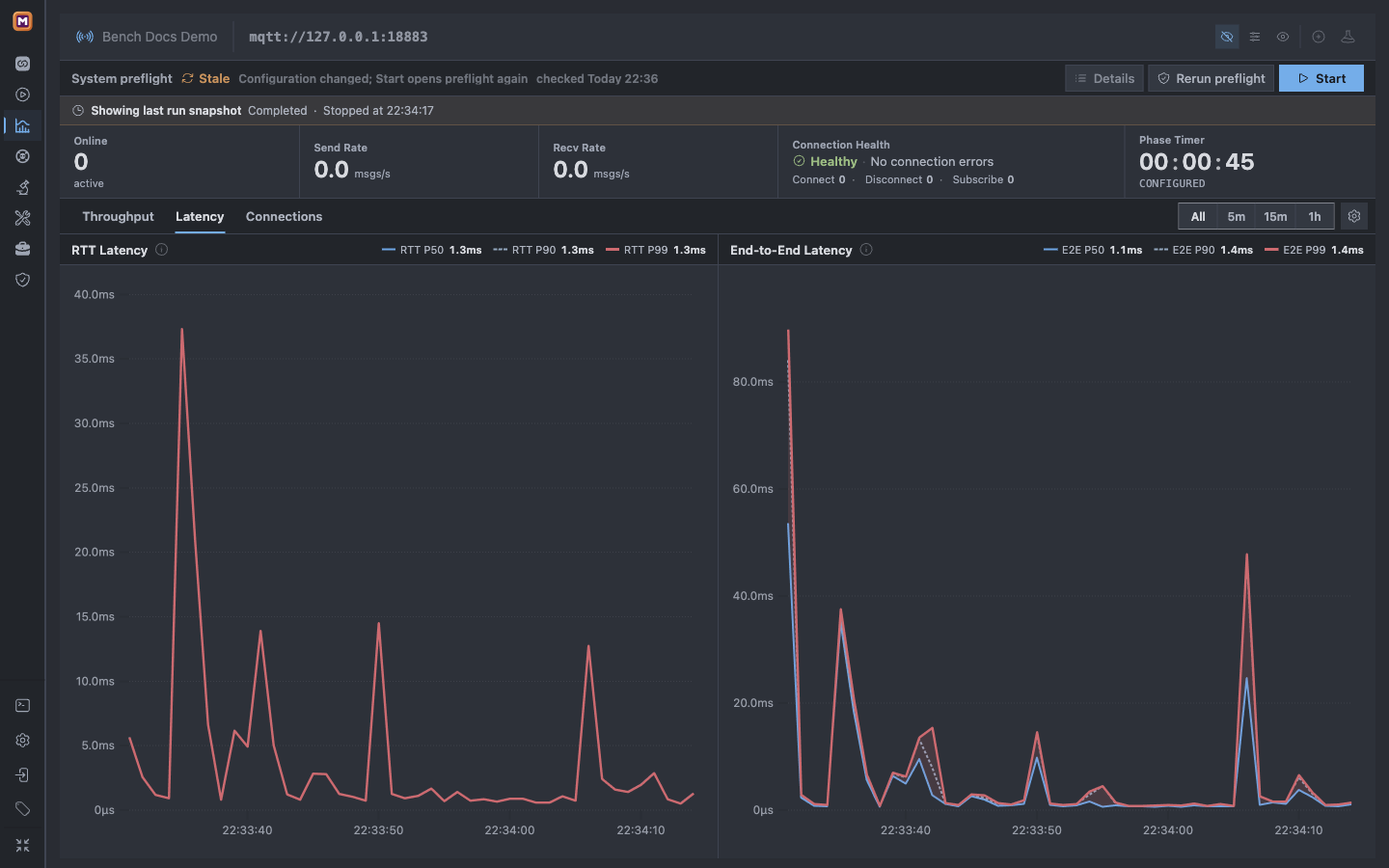
After 45 seconds, require Showing last run snapshot · Completed and a Phase Timer of 00:00:45. The live Online, Send Rate, and Recv Rate correctly return to zero after Disconnecting; use the retained charts to judge the finished Measurement.
Completed and the retained charts prove the Measurement finished; zero live rates show teardown completed.
1Completed and 00:00:45 are the terminal evidence for this run.
2RTT covers the acknowledgement path; E2E covers delivery to Subscribers.
These values describe only this run. A loopback result is not a remote Broker capacity claim. Keep the Broker, network path, Payload, QoS, scale, duration, and load-generator host comparable before comparing two runs.
The completed screenshot shows Stale in the Preflight strip even though the last-run snapshot is Completed. The snapshot remains evidence of this finished run; Preflight must be rerun before another Start.
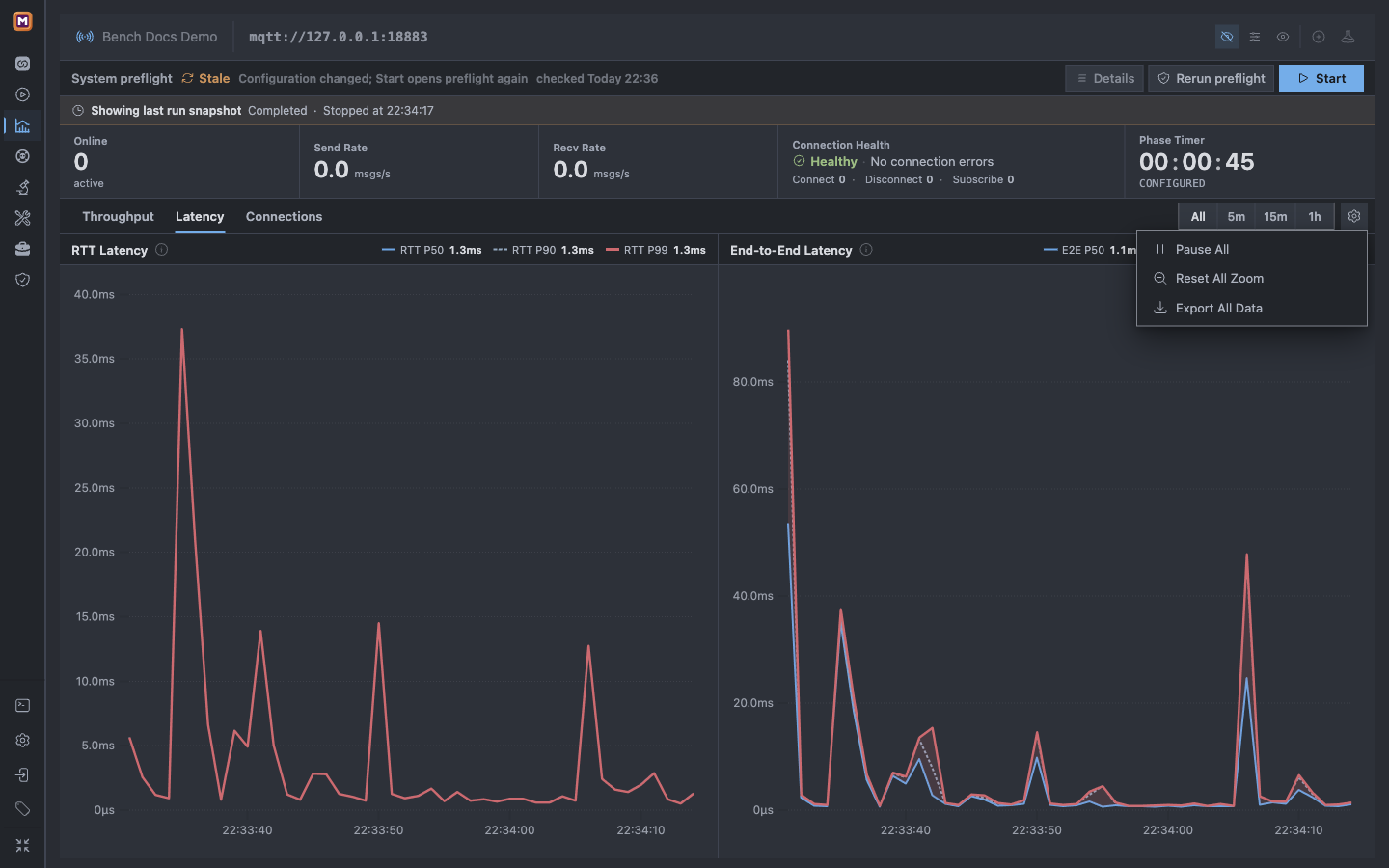
To keep portable evidence, open Chart actions → Export All Data. Mqttable downloads benchmark_all_charts_data.csv; the formal export contains Measurement rows and excludes Warm-up rows.
Export All Data preserves the completed Measurement outside the live chart.
1Choose the time window, then use Export All Data for the Measurement CSV.
Customize, troubleshoot, and clean up
Turn the baseline into your Benchmark
Change one dimension at a time so the next result remains explainable:
edit the Broker when the endpoint, transport, or Credential refs change;
edit Group totals and connection targets to change connection scale;
edit the Scheduled Message to change Topic, interval, Payload, or QoS;
edit the Subscription to keep its Topic filter and QoS aligned with the Publisher;
load another built-in example only after reviewing and reducing its default scale.
Every configuration change makes the previous Preflight stale. Run it again before Start.
Fix the first common failures
Start fails or the run stops unexpectedly: read the reason in the last-run snapshot strip, then expand Stop details for the phase, affected Group, safe reason code and suggested action. For bad_username_or_password, check the Benchmark target credentials and Broker authentication settings. The details remain available after dismissing the notification or refreshing the page, until another run replaces the snapshot or the app exits.
Connection test fails: verify protocol, host, port, Broker listener, TLS refs, and authentication before creating load.
Online remains below 25: inspect Connect and Subscribe errors, then verify the Group Client ID generators and credentials.
Send is near 1 but Recv is 0: verify that the publish Topic matches the Subscription filter; the baseline requires fo/data against fo/#.
Preflight reports a warning or Blocker: review the exact host and target evidence. Never bypass a Blocker, and stop when errors or resource use reach an unacceptable limit.
Keep or remove the baseline
Keep the target if you want to edit and rerun it. To remove it, stop any active run, select the exact Broker identity you created in step 1, then choose Delete in Edit Broker. The screenshot shows the documentation identity Bench Docs Demo; select your own exact name instead.
Delete only the exact tutorial target; this also removes its Groups, Clients, and related Benchmark data.
1Confirm the selected identity is the target you created before deleting it.
2Delete is irreversible and removes the target with its related Benchmark state.
Capability and safety boundaries:
Run load only against a Broker you own or are explicitly authorized to test. Never use a public or production Broker for this tutorial.
Free supports 1–600 seconds of Measurement per run. Pro removes that duration limit; Run Duration = 0 means unlimited Measurement and therefore requires Pro.
This path uses Local Runtime. Authenticated Remote Runtime requires a current online Pro entitlement and the required permissions.
Preflight and Monitor describe the load-generator Runtime host, not a remote Broker's internal CPU, memory, or storage.
Stopping during Setup or Warm-up leaves no formal result; stopping during Measurement leaves incomplete evidence. A full Measurement and teardown becomes Completed.
After this baseline, use Monitor to correlate Runtime resources with Benchmark phases, or Proxy to introduce controlled network faults.