Credentials: where they come from and how to use them
Understand the four credential types in Mqttable, store Broker or PKI material as local references, and use them safely for MQTT authentication and TLS.
Author:
Mqttable
Updated:
On this page8 sections
Loading...
Mqttable does not create Broker accounts or issue certificates. Credentials is a local secure registry in the active Runtime: enter a password, CA, client certificate, or private key once, then let Connections, Proxy profiles, and Bench profiles bind opaque references.
After this guide, you should be able to identify the material you received, know where it came from, select the correct saved reference, and verify a connection without copying the raw value again.
Understand Credentials first
A credential has three different kinds of “source.” Keep them separate:
External issuer: Who supplied the material, such as a Broker operator, cloud console, identity provider, or organizational PKI.
Intake source: How the material entered a Runtime: Dashboard, MCP intake, or CLI intake. The Source shown on the Credentials page means this, not who issued the certificate.
Reference: The SecretRef, CertRef, or KeyRef returned after storage. Consumers bind the reference instead of reading the raw material.
Username, Client ID, SNI, and ALPN are connection settings, not Credentials entries. System CA is the operating-system trust store and does not appear in the Credentials registry either.
Choose the credential types you need
The four Mqttable credential types, their common sources, uses, and
reference types
Mqttable type
Where it usually comes from
What it does
Stored as
Password Secret
A password, token, or JWT issued by a Broker operator, cloud console,
or identity provider.
Works with a Username to prove the identity of an MQTT Connection. A
normal login does not require a client certificate.
SecretRef
CA Certificate
A CA certificate or bundle supplied by the Broker operator, a private
PKI, or a self-signed deployment.
Validates the Broker server certificate. Do not store one when the
public CA is already trusted by the system.
CertRef
Client Certificate
A certificate issued to this client by an organizational PKI or Broker
mTLS enrollment process.
Proves the client identity to the Broker during mTLS and must match a
Private Key.
CertRef
Private Key
Usually generated locally with the certificate request, or delivered
through an approved secure process.
Proves possession of the key matching the Client Certificate. A Broker
Server Key is never a substitute.
KeyRef
A typical cloud Broker needs only a Username, Password Secret, and System CA. Add a CA, Client Certificate, and Private Key only when the operator explicitly requires a private CA or mTLS. If the certificate roles are still unclear, start with Understand and configure MQTT TLS certificates.
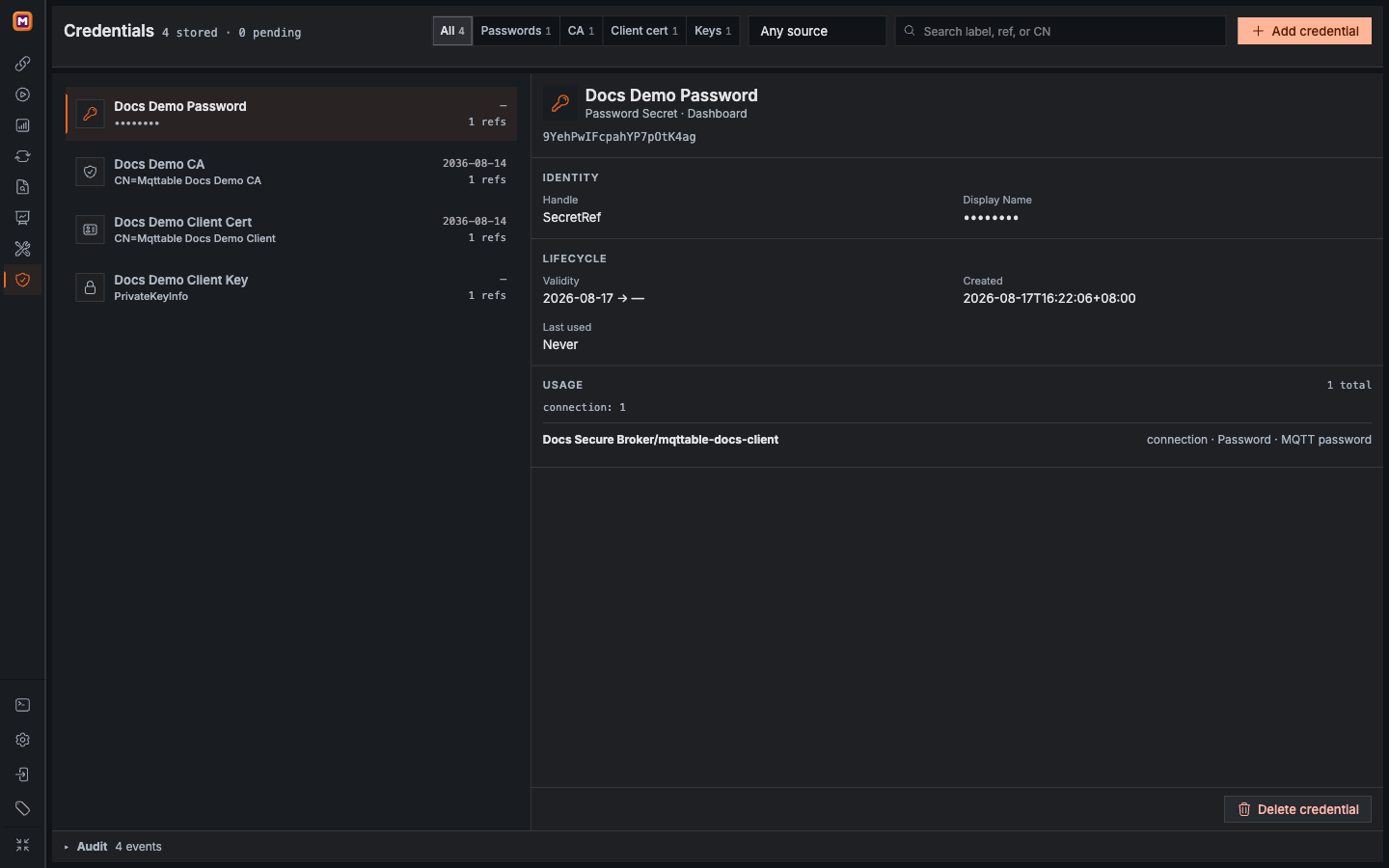
The registry shows all four types, safe metadata, and real consumers without rendering raw material.
1Counts and filters for all four credential types.
2The selected item exposes only an opaque Ref and mask.
3Usage identifies the Connection consuming this Ref.
Store raw material as a reference
Open Credentials and select Add credential.
Choose the Type that matches the material.
Use an environment-and-purpose label such as Production EMQX Password. A Label is searchable metadata; never put a password, token, PEM block, or private key in it.
Enter a Password Secret in the password field. Paste or upload certificate and private-key material.
Reopen the saved item and confirm that the page shows only a mask, certificate Subject, Issuer, Fingerprint, validity, Key Type, and Ref.
Uploading or pasting material in a TLS form also turns it into a local Ref. Raw password in a Connection is a direct path for that one Connection and does not create a reusable Credentials entry. Use Saved SecretRef when reuse, Usage inspection, or controlled rotation matters.
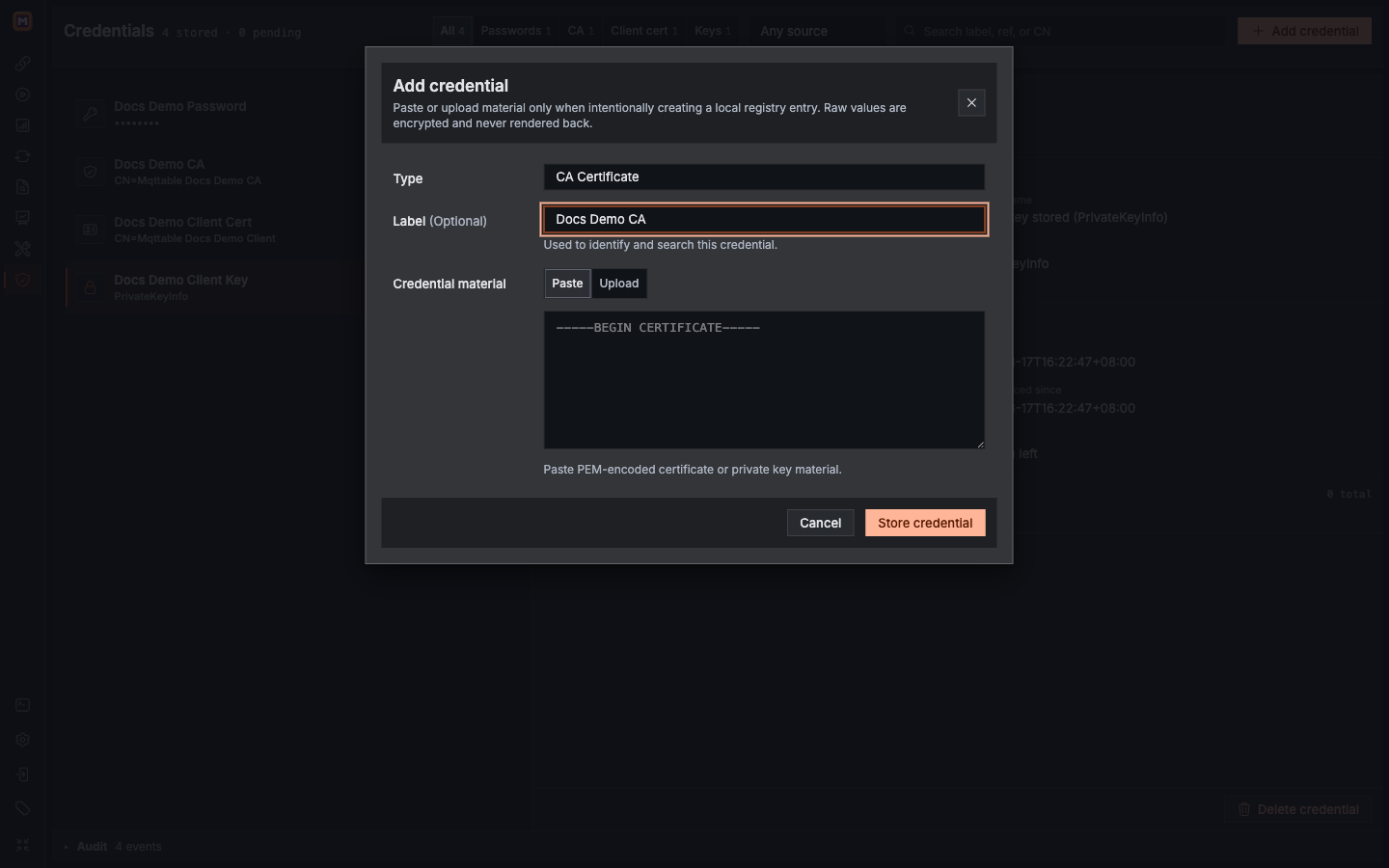
Raw material enters this controlled intake once; the rest of the product uses the resulting Ref.
1Choose the Type that matches the material.
2Describe the purpose without putting a secret in the Label.
3Use Paste or Upload for certificates and keys.
Source may be Dashboard, MCP intake, or CLI intake. That label identifies the intake channel; a Client Certificate with Source dashboard may still have been issued by an organizational PKI.
Use a Password Secret
A Password Secret belongs to a specific MQTT Connection, not to the Broker TLS settings:
Create or edit a Connection and set its Username and Client ID.
Under Password, choose Saved SecretRef.
Select the correct Password Secret.
Save and connect, then wait for Connected.
Perform one authorized subscribe or publish check and confirm the result in Trace.
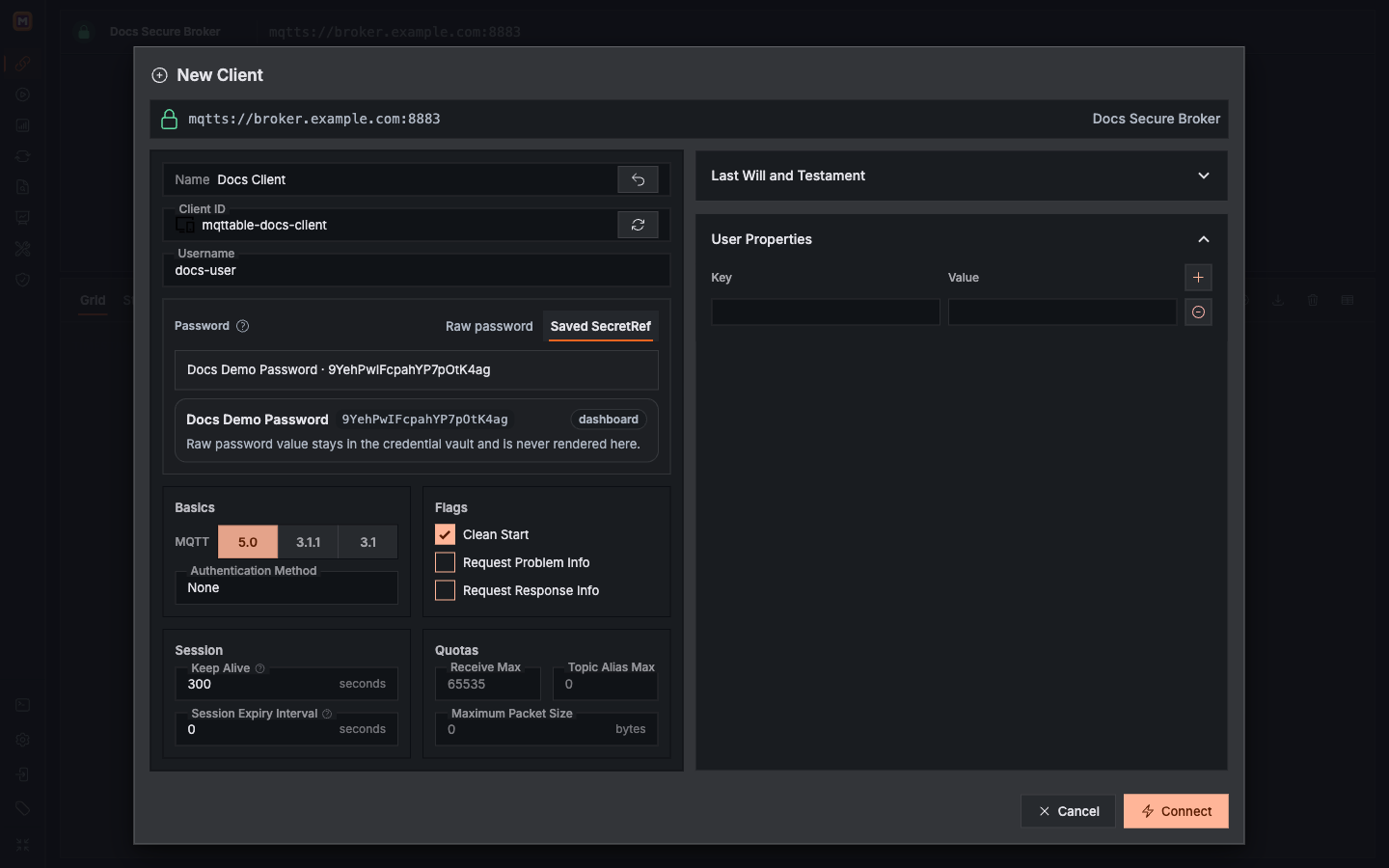
Username remains a normal setting; Password uses a saved SecretRef and never renders the raw value.
1Username is a connection setting, not a Credential.
2Choose Saved SecretRef instead of re-entering the password.
3The summary shows Label, Ref, and Source, never the raw value.
When a Broker carries a token or JWT in the MQTT Password field, store it as a Password Secret too. A successful login proves that the identity was accepted; Broker ACLs still decide which Topics that identity may access.
Use TLS Credentials
TLS Credentials belong to the Broker definition and are shared by Connections under that Broker:
Public or managed Broker: Use mqtts, wss, or the required secure Transport, keep Verify server identity enabled, and select System CA. You normally do not need a stored certificate.
Private CA or self-signed Broker: Select Custom CA, then choose the CA CertRef from Saved.
mTLS Broker: Keep server verification, enable Client Authentication (mTLS), and select both the Client Certificate CertRef and matching Private Key KeyRef.
Change SNI or ALPN only when the operator gives you exact values. They are TLS settings, not Credentials. Never solve a hostname, chain, or CA error by disabling server verification.
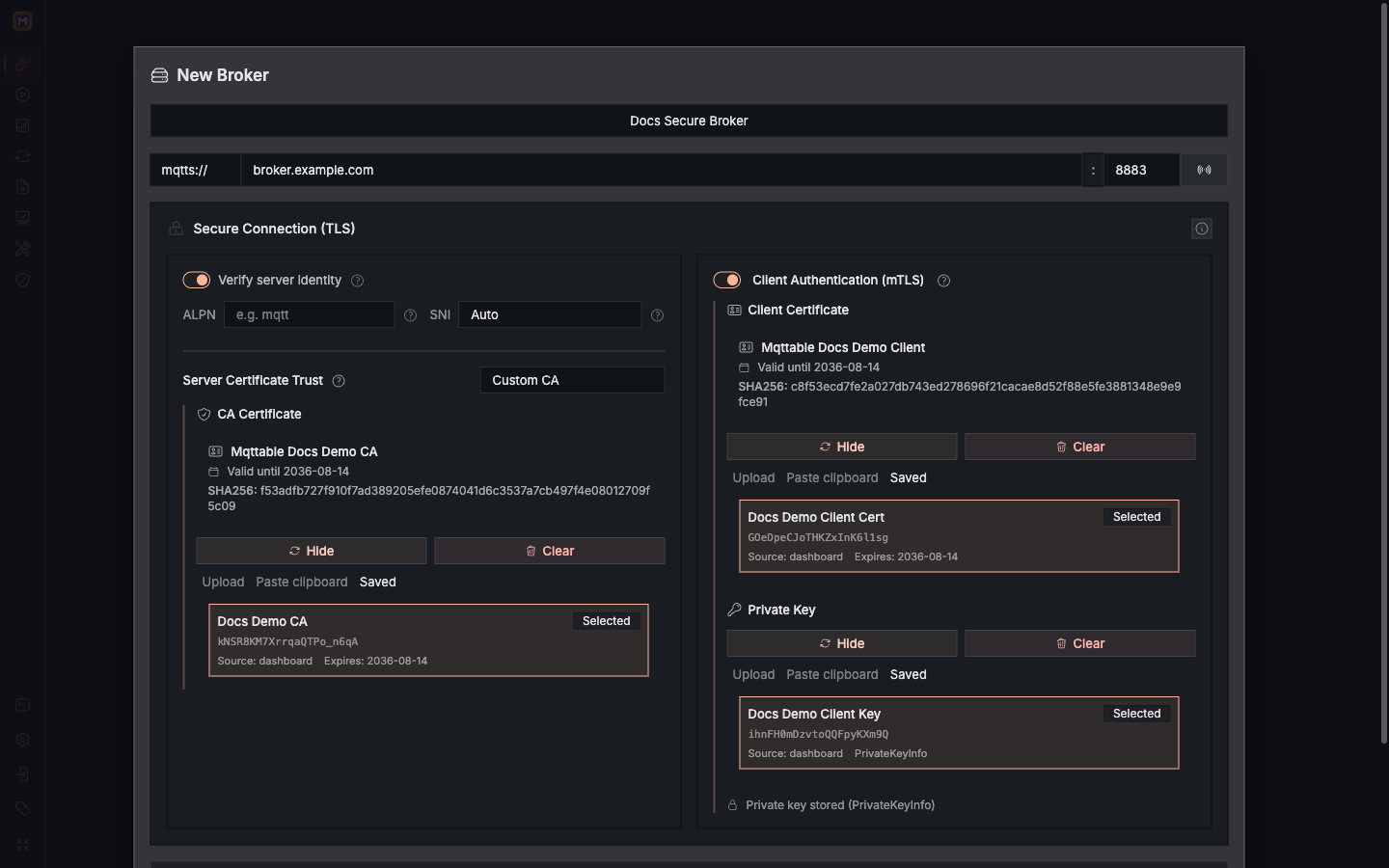
The Custom CA validates the Broker; the Client Certificate and Private Key pair completes mTLS.
1Keep server verification and bind the saved Custom CA.
2The Client Certificate represents the client identity.
3The Private Key must match that client certificate.
The same Ref kinds can be reused in Proxy upstream TLS and Bench profiles. Select an item in Credentials to see its exact Connection, Proxy, and Benchmark consumers under Usage.
How Mqttable protects credentials
Mqttable uses several boundaries to reduce raw-material exposure. These controls do not replace responsible operation:
Controlled intake: Dashboard accepts dedicated password fields, Paste, or Upload, not arbitrary server file paths. TLS material is size-checked and parsed as a certificate or supported private key.
Authenticated encryption: Stored credentials use AES-256-GCM authenticated encryption with a distinct context for each Ref. The data directory and credential files use restricted permissions.
Key separation: Desktop keeps the encryption key in the operating-system credential store and passes it to the local Runtime through standard input. A Web or Remote Runtime receives its Credential Key from the deployment administrator.
Fail closed: When encrypted data exists but the key is missing or does not authenticate it, the Runtime does not silently create a new key over the old vault.
No reveal or raw export: Registry, MCP, and CLI surfaces return masks, safe metadata, and Refs. The Dashboard/agent registry has no raw-export path.
Dependency protection: Deletion rechecks Connection, Proxy, and Benchmark Usage. A credential with active references cannot be deleted.
Audit and cleanup: Create, delete, and automatic cleanup record bounded metadata. Unreferenced TLS Refs receive a 24-hour cleanup grace period; Password Secrets are not auto-deleted.
These controls cannot protect copies already outside the intake boundary. Continue to protect source files, clipboard contents, screenshots, chat, issue reports, and backups. A Ref is also a scoped capability in its Runtime, not a portable secret value for another Runtime.
Do not overwrite the old material or delete it before testing the replacement:
Open the old credential and list every Connection, Proxy, and Benchmark consumer under Usage.
Obtain replacement material from the Broker, identity system, or PKI and create a new Ref.
Switch one non-critical Connection to the new Ref.
Connect and complete one bounded, authorized message check.
Update the remaining consumers, then revoke the old password, token, or certificate at its real source.
Delete the old Mqttable Ref only after Usage reaches zero.
Deleting a local Ref does not revoke the password, token, or certificate at the Broker. If material is exposed, rotate or revoke it at the actual issuer or authentication source.
Troubleshoot by failure stage
Credential and TLS troubleshooting by failure stage
Symptom
Check first
TCP connection never starts
Host, Port, DNS, route, firewall, and Listener. MQTT credentials have
not been used yet.
TLS handshake fails
System versus Custom CA, hostname, validity, SNI, and whether the
Client Certificate matches the Private Key.
MQTT authentication is rejected
Username, selected Password Secret, token expiry, Client ID
constraints, and Broker authentication policy.
Connected, but an operation is denied
Topic ACLs and publish or subscribe permissions. Do not change the CA
or disable TLS verification.