MQTT failures often depend on several clients, a specific message order, and precise timing. Replay saves that flow, runs it again against your broker, and shows whether the expected result still holds.
Author:
Mqttable
Updated:
On this page10 sections
Loading...
Some MQTT failures only appear when several clients connect, publish, and respond in a precise order. Repeating that flow by hand makes a fix difficult to verify.
This guide uses the bundled demo to show how Replay runs the same flow again and checks the result. You can read it as a visual tour without installing Mqttable, or follow the same steps in Mqttable Desktop.
The dark screenshots preserve an earlier Replay interface labeled Checks; the new light screenshots show the current Expected results interface. The steps below use the current labels.
What Replay does
A Replay Scenario is a saved sequence of MQTT client actions built from Trace, a Mqttable TraceGrid CSV export, PCAP evidence, or the bundled demo. It can coordinate several clients and preserve or reshape their original timing.
Dry Run resolves the target, clients, credentials, steps, timing, and safety rules without sending Replay traffic. Run Trace then records what the replay clients actually sent and received. An Expected result saves one important received message from that trace so the next run can judge it automatically.
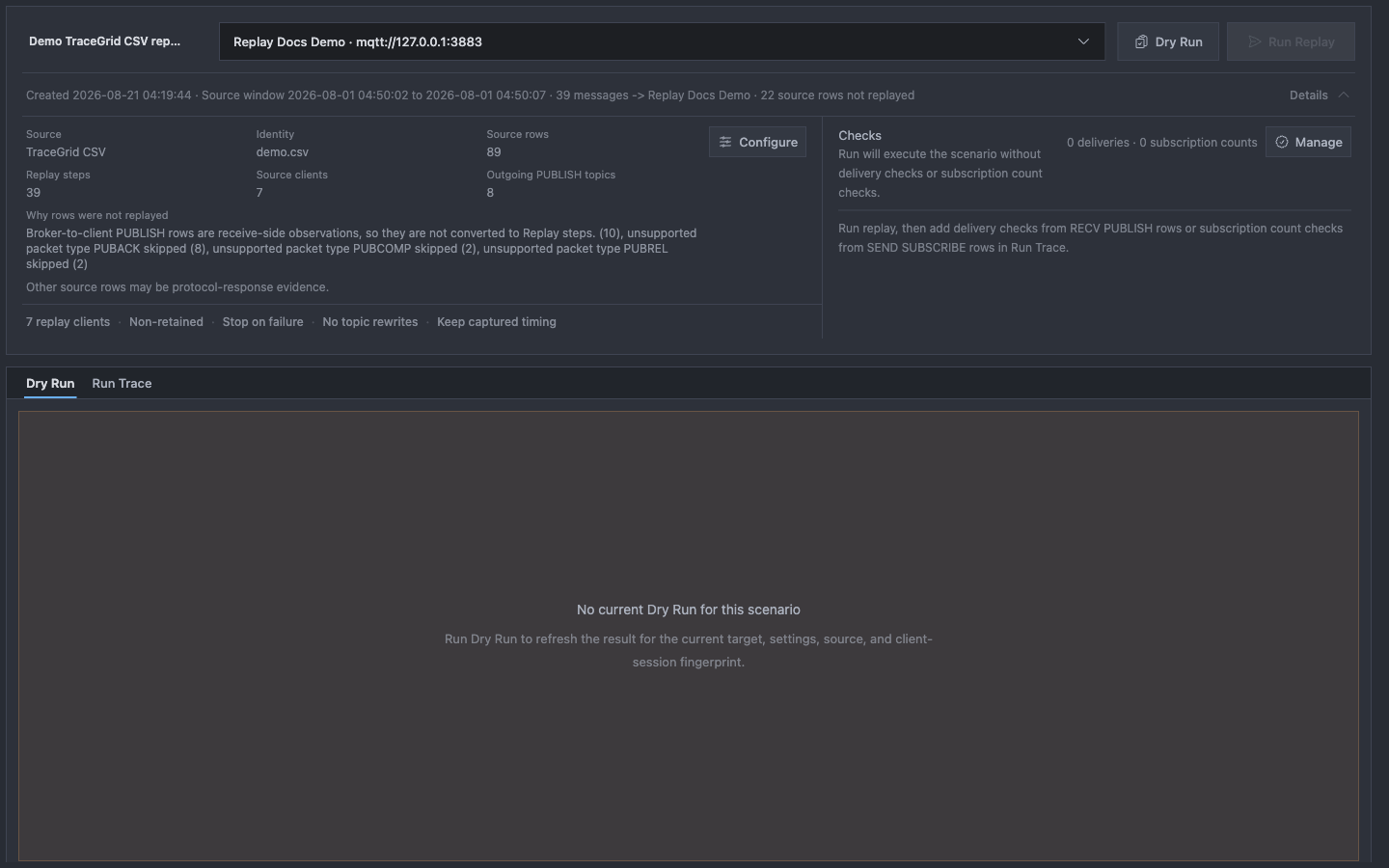
The demo used below contains 89 source rows. Mqttable converts them into 39 executable MQTT steps across 7 clients and 8 outbound PUBLISH Topics. Broker responses and received PUBLISH rows remain evidence instead of becoming duplicate send actions.
an MQTT Broker that you are authorized to use for testing;
one saved Broker target in Connections with at least one enabled MQTT client.
The screenshots use Replay Docs Demo · mqtt://127.0.0.1:3883, an anonymous Broker bound only to loopback. Follow MQTT Quickstart or Brokers and Connections if you still need to create a target.
The bundled Replay demo is a trusted exception to normal plan limits. You can open, configure, Dry Run, and run the complete demo without signing in or buying Pro. Your own Free scenarios can run up to 15 executable Replay Steps.
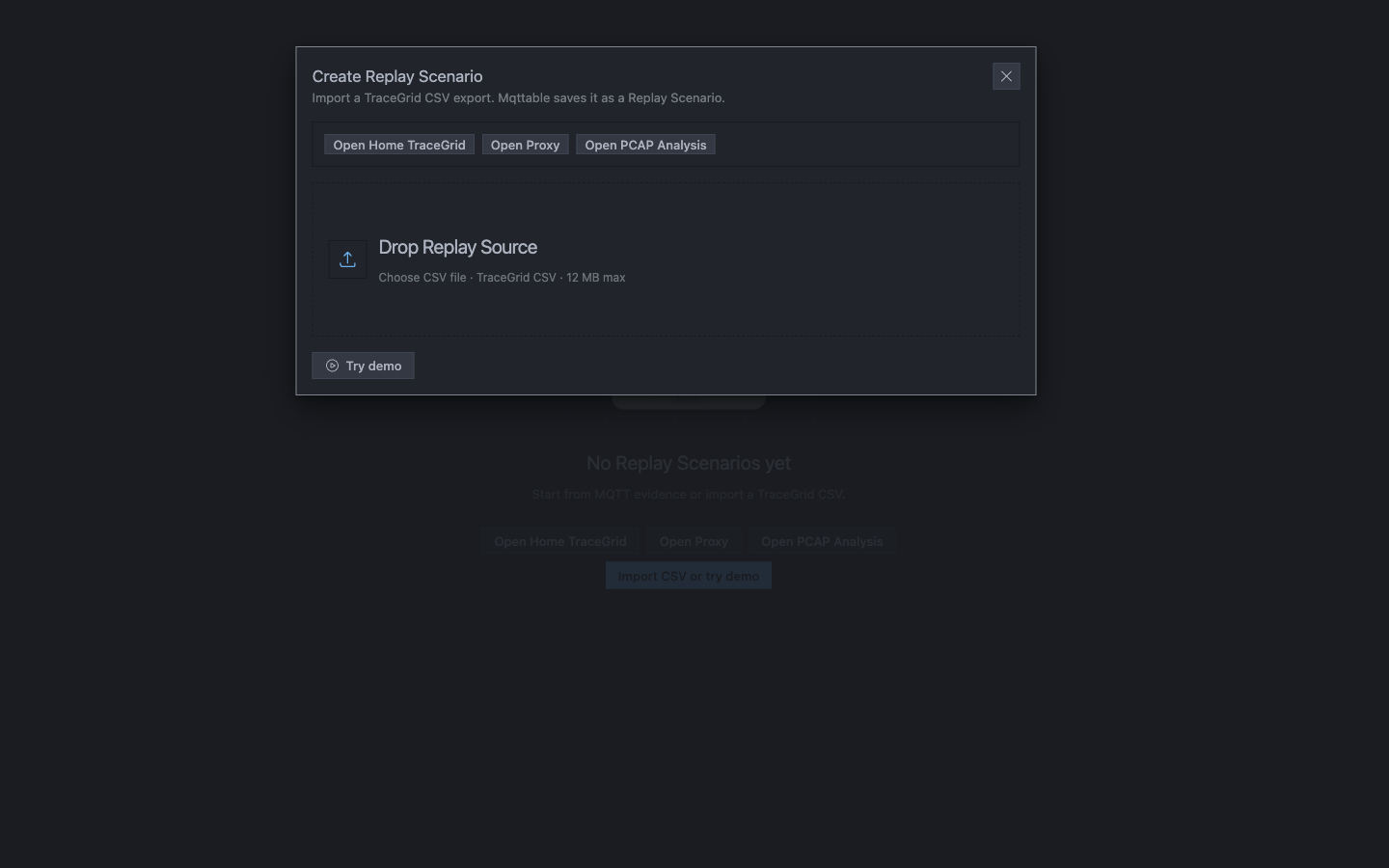
Replay accepts a Mqttable TraceGrid CSV or opens the bundled demo as a saved Scenario.
1Drop a TraceGrid CSV exported by Mqttable when you already have your own evidence.
2Try demo opens the trusted multi-client example without requiring an account.
3Home TraceGrid, Proxy, and PCAP can also hand reviewed evidence into Replay.
Mqttable opens Demo TraceGrid CSV replay as a Scenario tab. No MQTT traffic has been sent yet. If the demo already exists, Try demo opens the saved copy without overwriting your edits.
Review the Scenario and target
The Scenario starts with Details expanded. Read the source facts before choosing Run Replay:
Source rows describe the captured evidence.
Replay steps are the client-originated actions Mqttable can execute.
Source clients become isolated Replay clients by default.
Outbound PUBLISH Topics show the business scope that may receive side effects.
Expected results stay empty until you explicitly add one from a completed Run Trace.
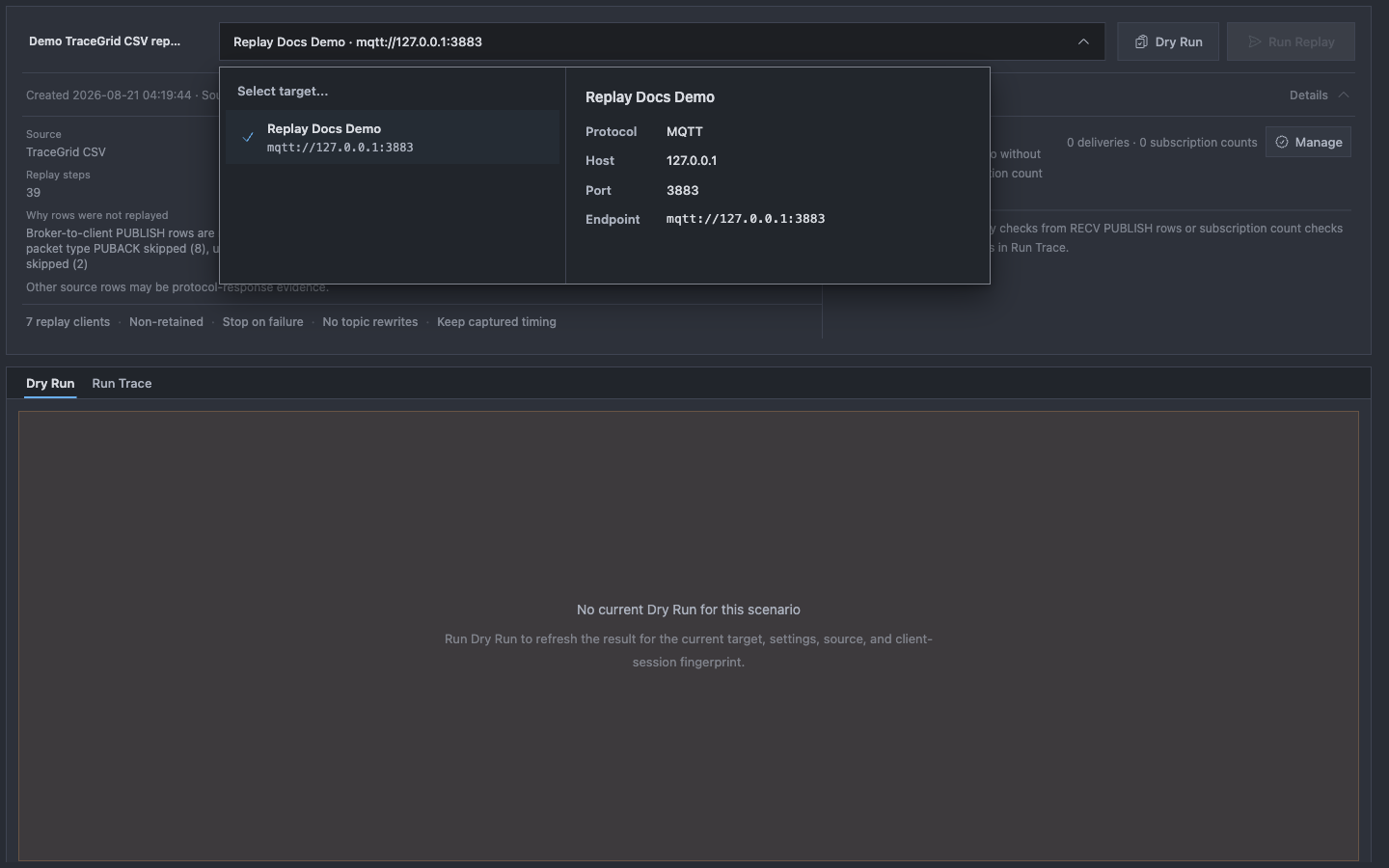
The chooser lists saved Broker names and endpoints; select the isolated loopback listener before sending Replay traffic.
1Select a saved test target, not an unreviewed production Connection.
2Verify mqtt://127.0.0.1:3883 on the Replay Docs Demo row before selection.
3Confirm the target field at the top matches the intended Broker before Dry Run.
If no targets appear, return to Connections, create the test Broker, then reopen Replay. The target also needs at least one enabled MQTT client; otherwise Dry Run reports Add or enable a target MQTT client.
Understand Replay Options
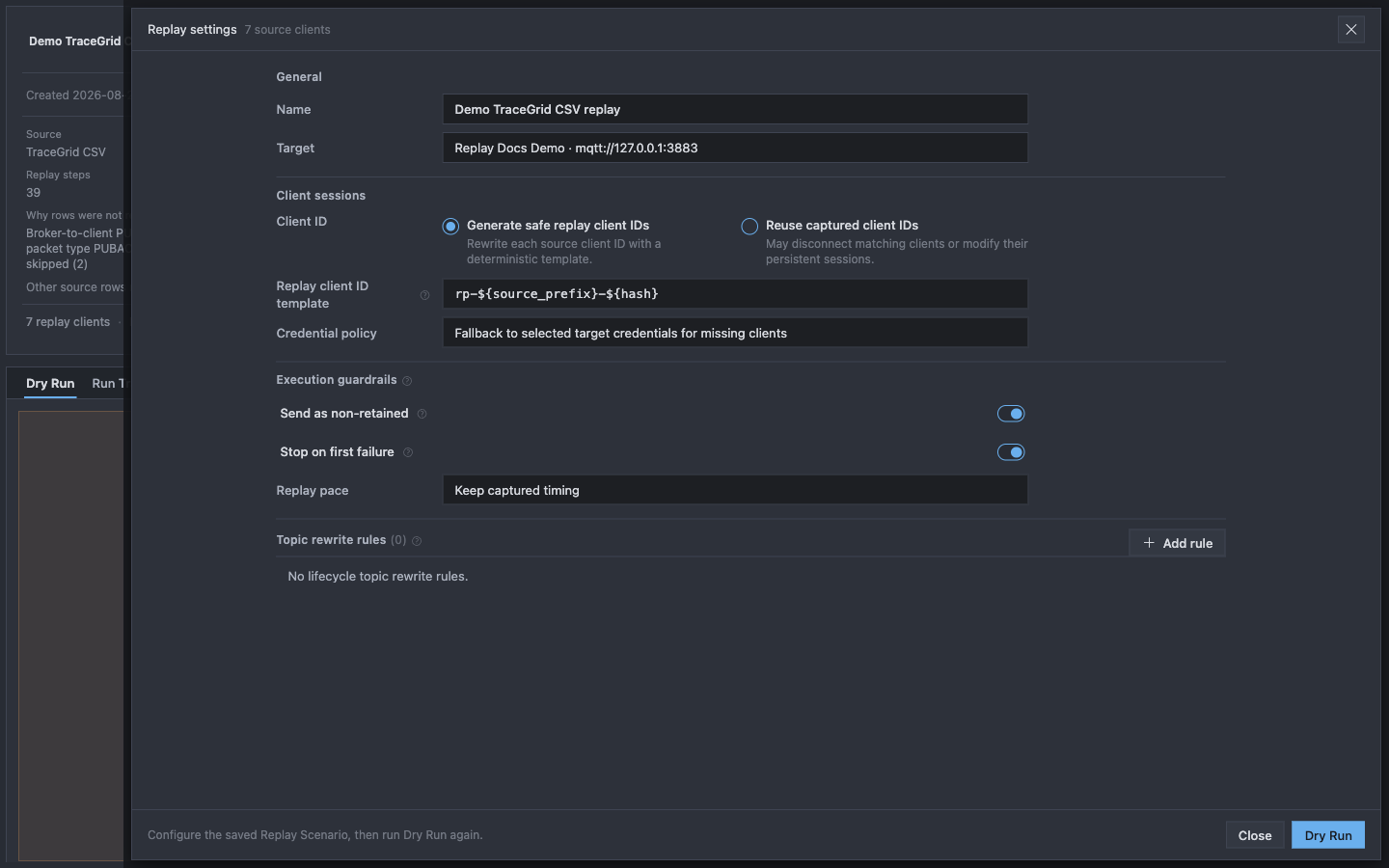
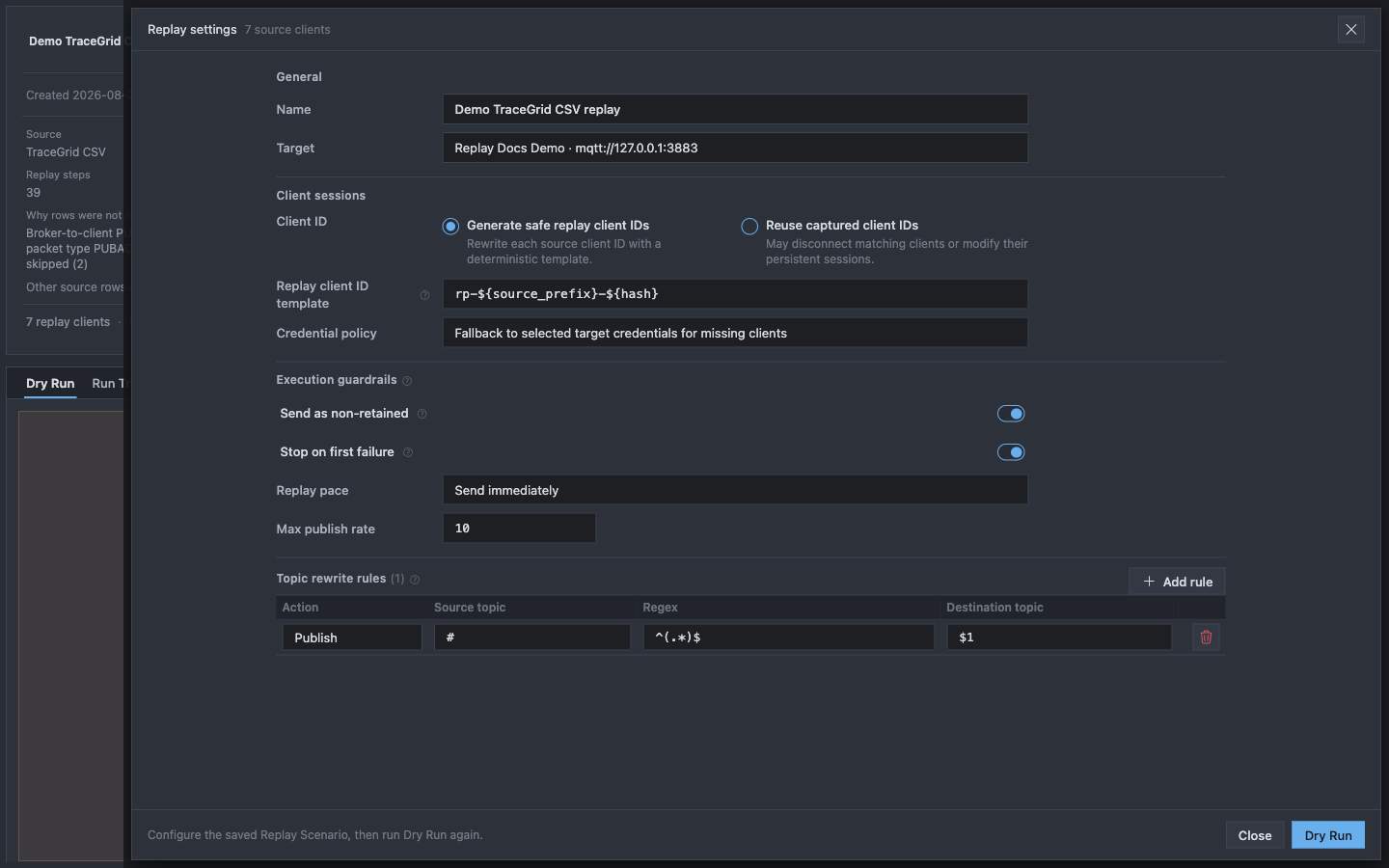
Select Configure. Options control identity, credentials, timing, and Broker side effects. Changing any of these execution inputs requires a new Dry Run.
General selects the saved Scenario and target; Client sessions decide which identities and credentials will connect.
1Name labels the saved Scenario; Target selects the Broker that will receive traffic.
2Generated Replay Client IDs isolate the test from captured live sessions.
3The template controls generated IDs; Credential policy controls how missing client credentials are resolved.
Replay General and Client sessions defaults and effects.
Option
Demo default
What it changes
Name
Demo TraceGrid CSV replay
Changes the saved Scenario label only.
Target
The selected target
Changes the Broker that receives Replay traffic.
Generate safe replay client IDs
On
Rewrites each captured Client ID with an isolated deterministic ID.
Keep this on for ordinary testing.
Reuse captured client IDs
Off
Reuses original identities and may disconnect matching live clients or
alter their persistent Sessions.
Replay client ID template
Product default
Controls generated IDs. The default keeps source mappings distinct
without taking over the source identity.
Credential policy
Fallback to selected target
Uses target credentials when a source client has no saved credential.
Strict mode requires a match for every client.
In the same sheet, review execution guardrails and Topic rewrites. The light screenshot opens one illustrative rule to show its fields; remove that draft before Dry Run.
Guardrails limit side effects and pace; the draft Topic rewrite row shows the available fields but was removed before execution.
1Turn on non-retained publishing for this run; stop-on-first-failure is already on.
2Replay pace decides whether captured gaps are kept, ignored, scaled, or condensed.
3The draft rule exposes Action, Source topic, Regex, and Destination topic; delete it before this run.
Replay execution guardrails, pace controls, and Topic rewrite behavior.
Option
Behavior
Send as non-retained
Clears Retain so the test does not replace Broker retained state.
Stop on first failure
Stops after the first failed MQTT action instead of continuing a
partial flow.
Keep captured timing
Preserves evidence time offsets. This is the demo default.
Send immediately
Ignores captured gaps. Max publish rate limits outgoing PUBLISH
messages.
Scale captured timing
Applies Timing scale. 2.0 is twice as fast; 0.5 is half speed.
Condense idle gaps
Preserves order but shortens pauses longer than Max idle gap.
Topic rewrite rules
Match and replace Topics for Publish, Subscribe, or Unsubscribe. Rules
support $1, $2, and ${clientid}.
Scaled and condensed timing require Pro for ordinary scenarios. The trusted bundled demo can use them without signing in. The newly opened demo initially says Retain as captured; turn on Send as non-retained for this isolated run. The second screenshot briefly opens an illustrative Topic rewrite rule to show the fields, then removes it before Dry Run. Keep the other settings unchanged and select Dry Run to save and verify them.
Dry Run the demo
Select Dry Run. Mqttable resolves the current source, target, Options, credentials, client identities, and safety rules without connecting replay clients or sending Replay traffic.
When Dry Run finishes, select Details to collapse the Scenario summary. This gives the result panel more vertical space. The collapse preference stays in the current app session, survives LiveView updates, and does not change the Scenario or Dry Run result.
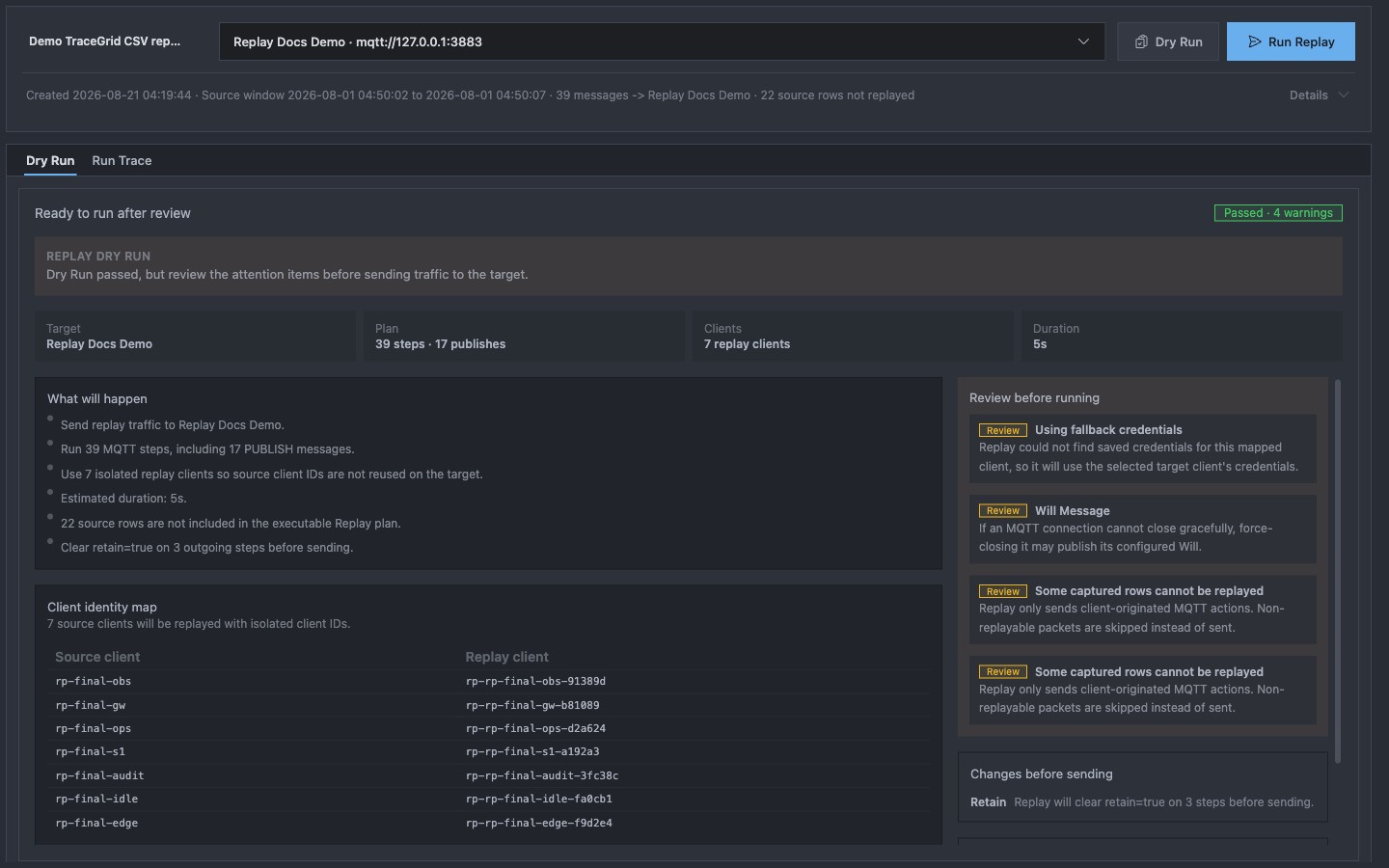
With Details collapsed, the result panel shows readiness, target, plan size, clients, duration, and the start of the review list; scroll to read every warning.
1Dry Run passed; warnings still need review before sending traffic.
2Confirm the target, 39-step plan, 7 Replay clients, and estimated duration.
3The client identity map keeps the seven source IDs isolated; scroll down to review all warnings.
A passed Dry Run unlocks Run Replay. Changing the target, source, client identity, credentials, guardrails, timing, or Topic rules invalidates that approval and requires another Dry Run.
If Dry Run is blocked, read the first blocker before changing anything. Common causes are a missing target, an unreachable Broker, invalid credentials, a Client ID conflict, or an unsafe Scenario option.
Run Replay and read Run Trace
Select Run Replay. The demo connects its isolated clients, performs the MQTT actions in order, records Broker responses and received messages, then disconnects.
Keep Details collapsed while reading the result. Run Trace is the evidence for this execution, not a generic application log.
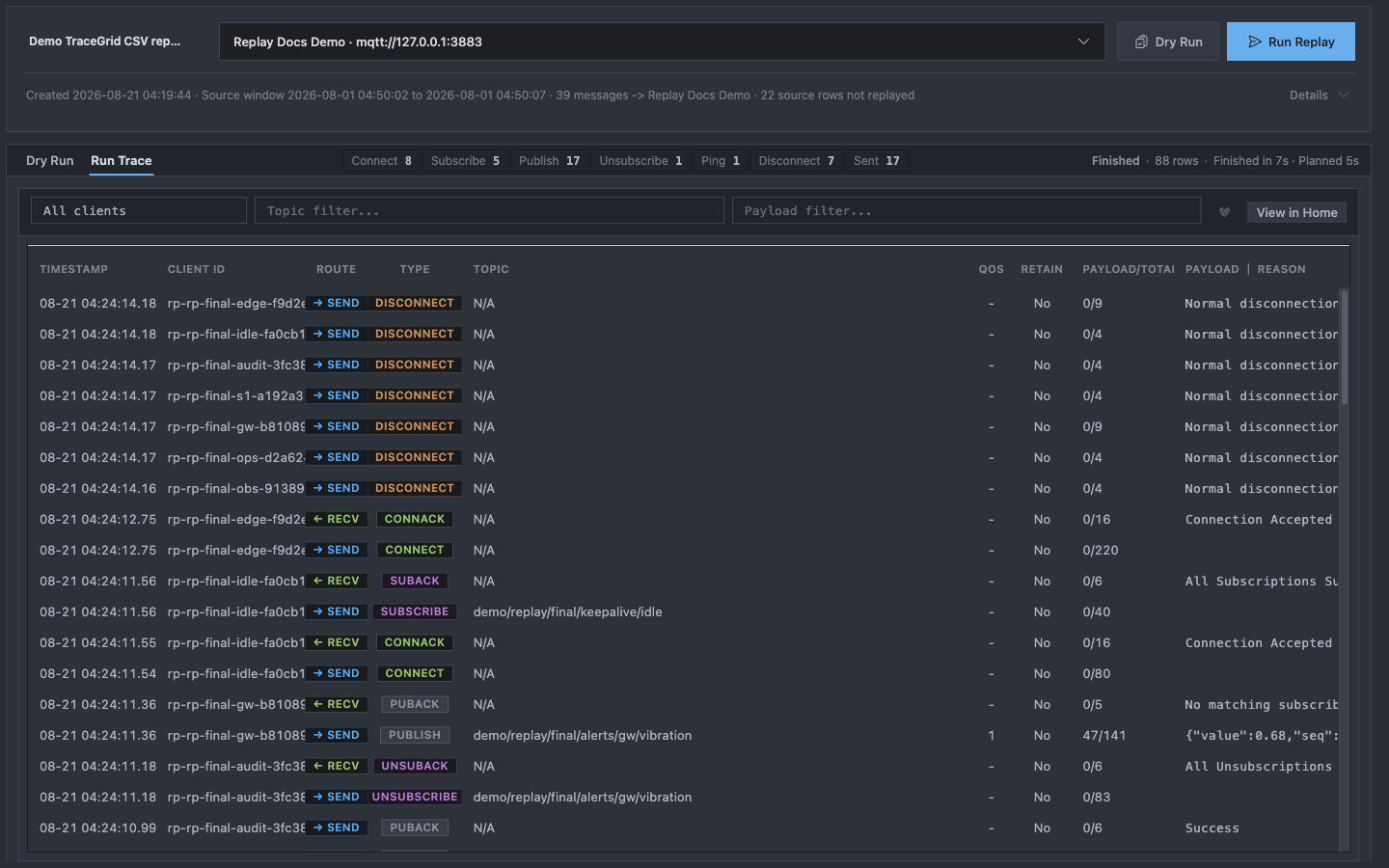
Run Trace shows the complete execution result: lifecycle totals, status, filters, and the MQTT rows captured from this run.
1Finished means the Scenario actions completed; the header also reports rows and elapsed time.
2Filter by Replay client, Topic, Payload, or Ping/Pong without changing the saved Scenario.
3SEND, RECV, PUBLISH, acknowledgements, and disconnects remain available as row-level evidence.
The lifecycle totals answer how much work ran. The rows answer what happened. A sent PUBLISH proves that a replay client dispatched the command; a matching RECV PUBLISH proves that a subscribed replay client received the delivery.
Run Trace is process-memory evidence. Restarting Mqttable or pruning old run sessions can remove it, while the Scenario and saved Expected results remain.
Save a received message as an expected result
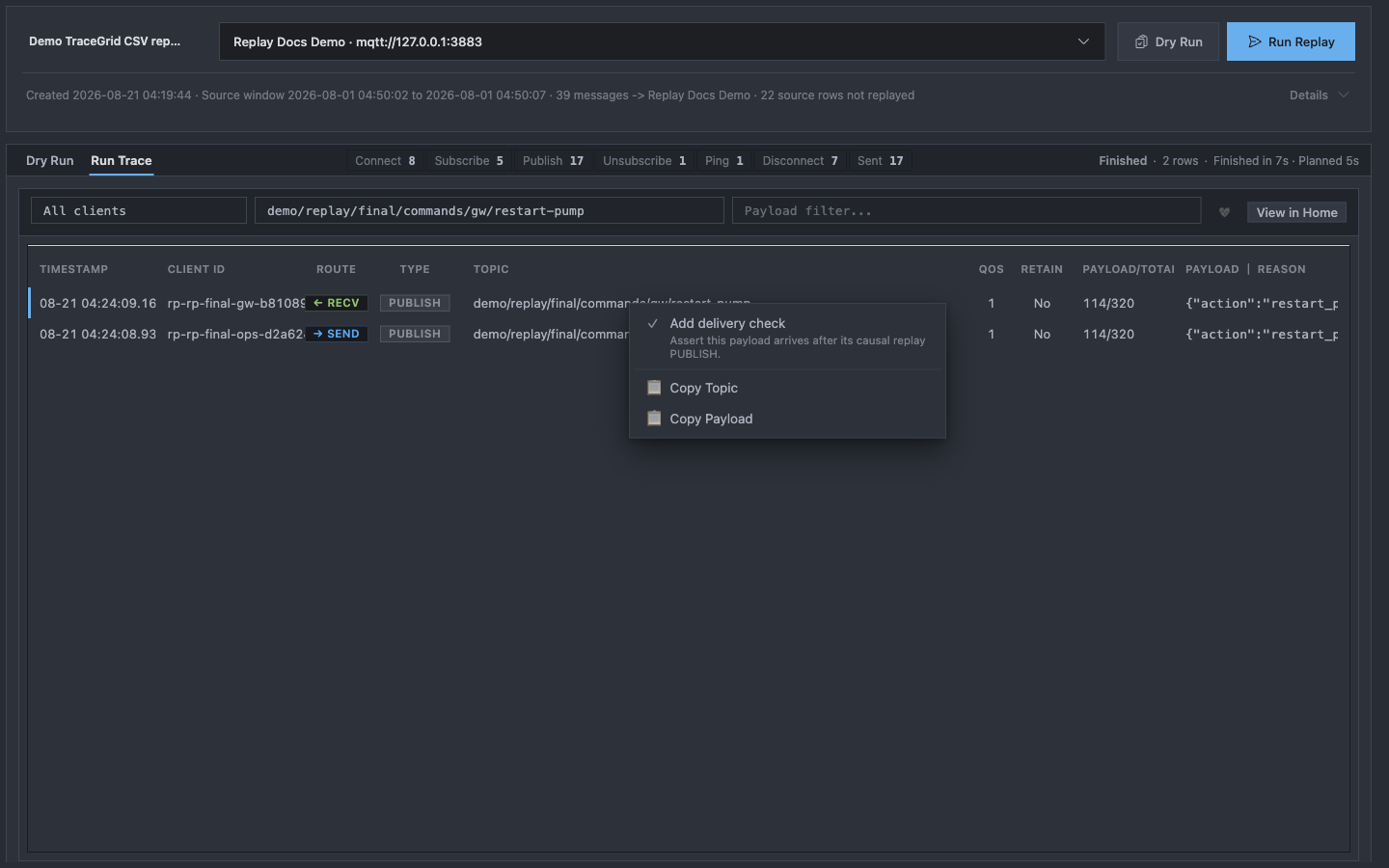
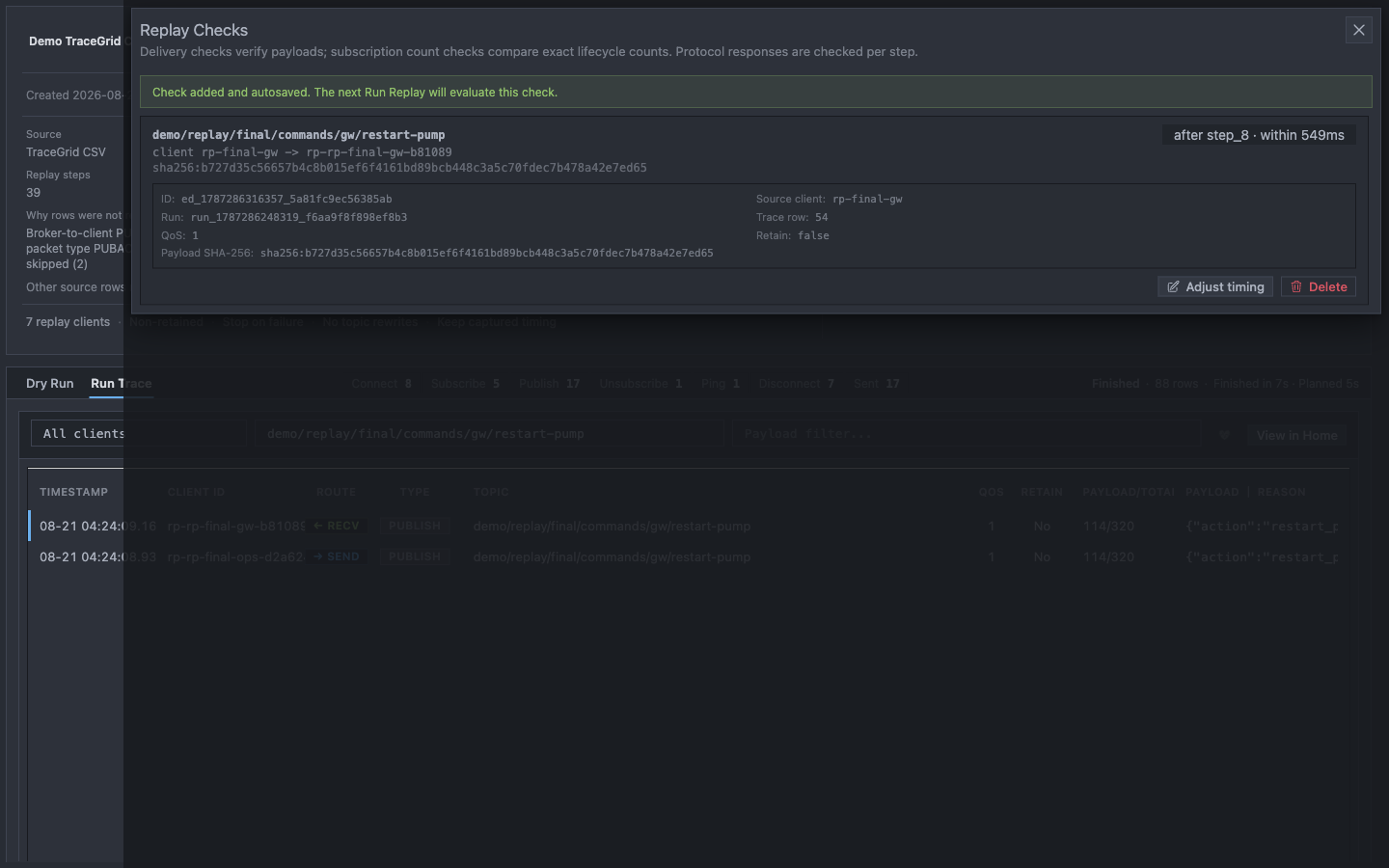
Filter Run Trace to demo/replay/final/commands/gw/restart-pump. Find the sent command and the matching received PUBLISH. Right-click the RECV PUBLISH row and select Set this message as expected.
The saved delivery condition stores received content, QoS, Retain, causal step, and wait window while keeping technical evidence inspectable.
1The result binds Topic, Payload SHA-256, QoS, Retain, and the expected receive path.
2PUBLISH step 8 and the wait window define when the delivery must arrive.
3The result is autosaved with the Scenario and evaluated on the next run.
Protocol responses such as CONNACK, SUBACK, PUBACK, UNSUBACK, and PINGRESP are checked by their Replay Steps. Expected results handle the business delivery. You can also save an exact subscription count from a replay client's SEND SUBSCRIBE row.
Rerun and verify the expected result
Close Expected results and select Run Replay again. Adding or adjusting an Expected result does not change the MQTT execution fingerprint, so the passed Dry Run remains current when no execution input changed.
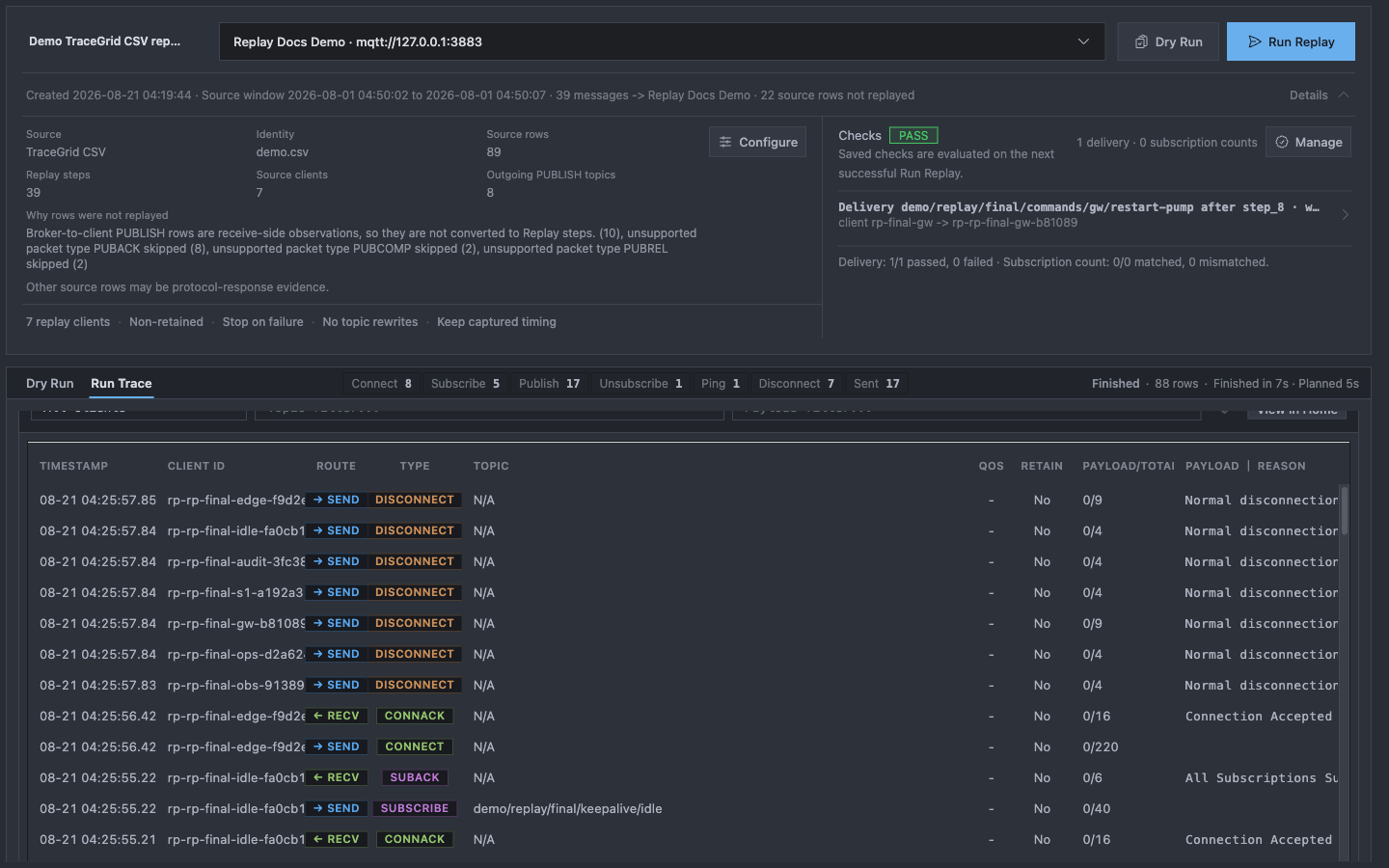
After the rerun finishes, expand Details so the Expected results summary and Run Trace are visible together. In the Chinese local capture, the initial 293 ms wait was too short: the nearest matching receive arrived after 564 ms. The sheet allowed adjusting only the wait to one second, without changing the expected Topic or Payload; the following rerun matched. The English capture matched at its original 303 ms window. If your own result misses its wait window, inspect the nearest evidence before widening it.
Scenario completion and the saved delivery condition are separate: execution finished, and the expected receive matched.
1The saved received-message condition matched this run.
2Finished means the MQTT Scenario completed, even when an Expected result may not match.
3Run Trace preserves the concrete rows used to explain the verdict.
Replay preserves execution status separately from the Expected results summary:
Finished: the Scenario's MQTT actions completed.
1/1 match expectations: the saved delivery condition matched this run.
1 result does not match expectations: execution may have finished, but the saved result differed or arrived outside its wait window. Inspect the nearest evidence, client mapping, time window, or count mismatch.
Sources, limits, and safety
After learning the workflow with the demo, create your own Scenario from:
a current Trace snapshot or bounded time window;
a Mqttable TraceGrid CSV export;
decoded PCAP packets, Findings, Insights, or Check evidence.
Replay is semantic MQTT replay. It reproduces client actions, session lifecycles, timing, protocol expectations, and selected business results. It does not reproduce exact TCP segmentation, network jitter, or Broker internal state.
Keep these boundaries:
Use an isolated Broker, test credentials, generated Replay Client IDs, and a dedicated Topic namespace.
Review Retain, Will Message, credentials, target, and Topic rewrites in every Dry Run.
Use Proxy for controlled latency, loss, bandwidth limits, or disconnects.
Use Benchmark for throughput, latency, and connection-scale measurements.
The trusted bundled demo can run all 39 steps and use every pace mode without an account. For your own Free scenarios, you can keep up to three Scenario tabs, run up to 15 executable Replay Steps, and use immediate or captured timing. Pro removes those depth limits and adds scaled or condensed timing.