Create an isolated Proxy, route MQTT test traffic through it, add 500 ms downstream latency, compare Trace evidence, then remove the toxic and prove recovery.
Author:
Mqttable
Updated:
On this page8 sections
Loading...
This guide follows one complete experiment: prove a clean MQTT path, add 500 ms of downstream latency, observe the delay, remove it, and prove recovery. The screenshots let you inspect the whole workflow without Mqttable installed. Running it requires Mqttable and an MQTT Broker that you own or are authorized to test.
The guide supplies every Proxy name, Client ID, Topic, and Payload. You enter those values; Mqttable does not generate them.
The current light screenshots use a loopback Broker at 127.0.0.1:18883; the historical dark screenshots used 127.0.0.1:1883. The steps below follow the light capture. Start your own authorized loopback listener before trying them, and keep that upstream endpoint separate from the Proxy listener on 3883.
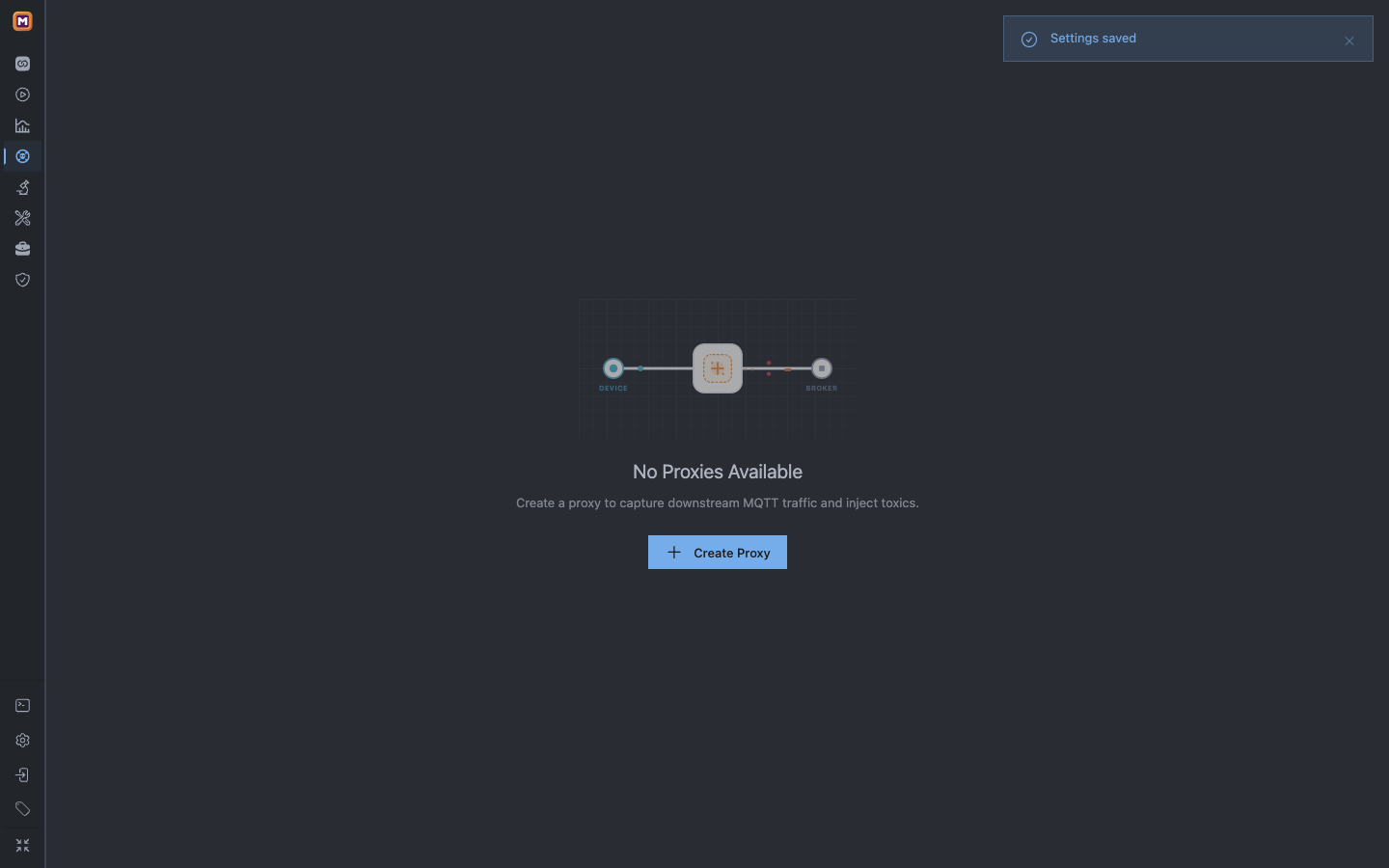
Start from the empty Proxy workspace so no existing listener, toxic, or Trace can contaminate the experiment.
1Proxy is the selected workspace in the left sidebar.
2No Proxies Available proves that the tutorial has not reused an existing listener.
3Select Create Proxy to add the only Proxy used by this guide.
Mqttable does not include an MQTT Broker. This experiment uses an authorized Broker already listening on 127.0.0.1:18883. Do not substitute a public, shared, or production Broker: adding a toxic immediately changes real traffic routed through this Proxy.
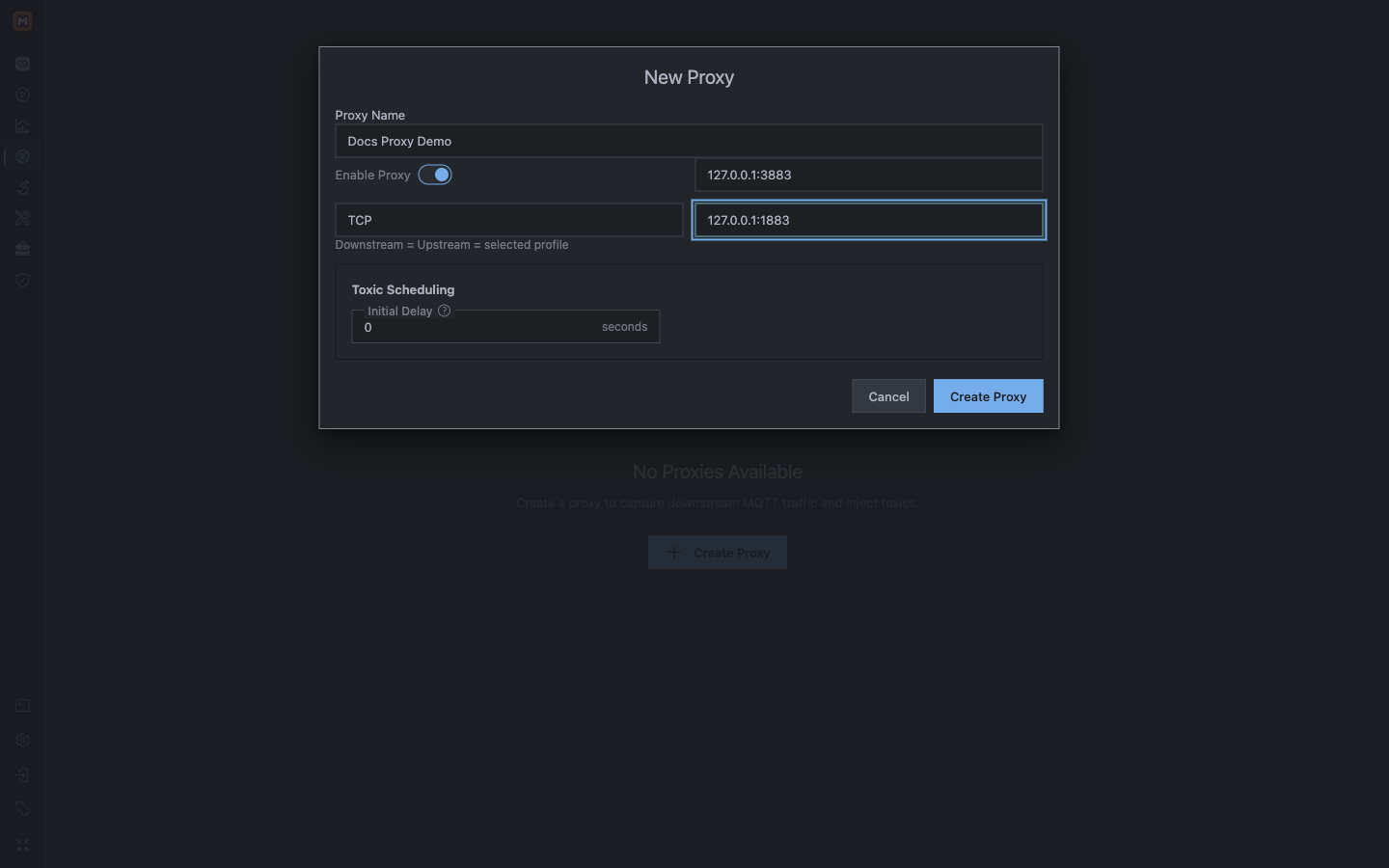
Select Create Proxy and enter:
Proxy Name:Docs Proxy Demo
Enable Proxy: On
Listen Address:127.0.0.1:3883
Transport Profile:TCP
Upstream Address:127.0.0.1:18883
Initial Delay:0 seconds
The form defaults to Listen 127.0.0.1:1883, which is not the dedicated 3883 listener for this exercise, and to the public broker.emqx.io:1883 Upstream. Replace both values. Initial Delay controls when periodic toxics begin after Proxy start or after this value changes; the Always On toxic used here does not need a delay.
The dedicated loopback listener keeps fault traffic separate from the Broker's direct endpoint.
1Name the user-supplied workspace Docs Proxy Demo and keep Enable Proxy on.
2Use TCP and route the 3883 listener to your isolated loopback Broker.
3Leave Initial Delay at 0, then select Create Proxy.
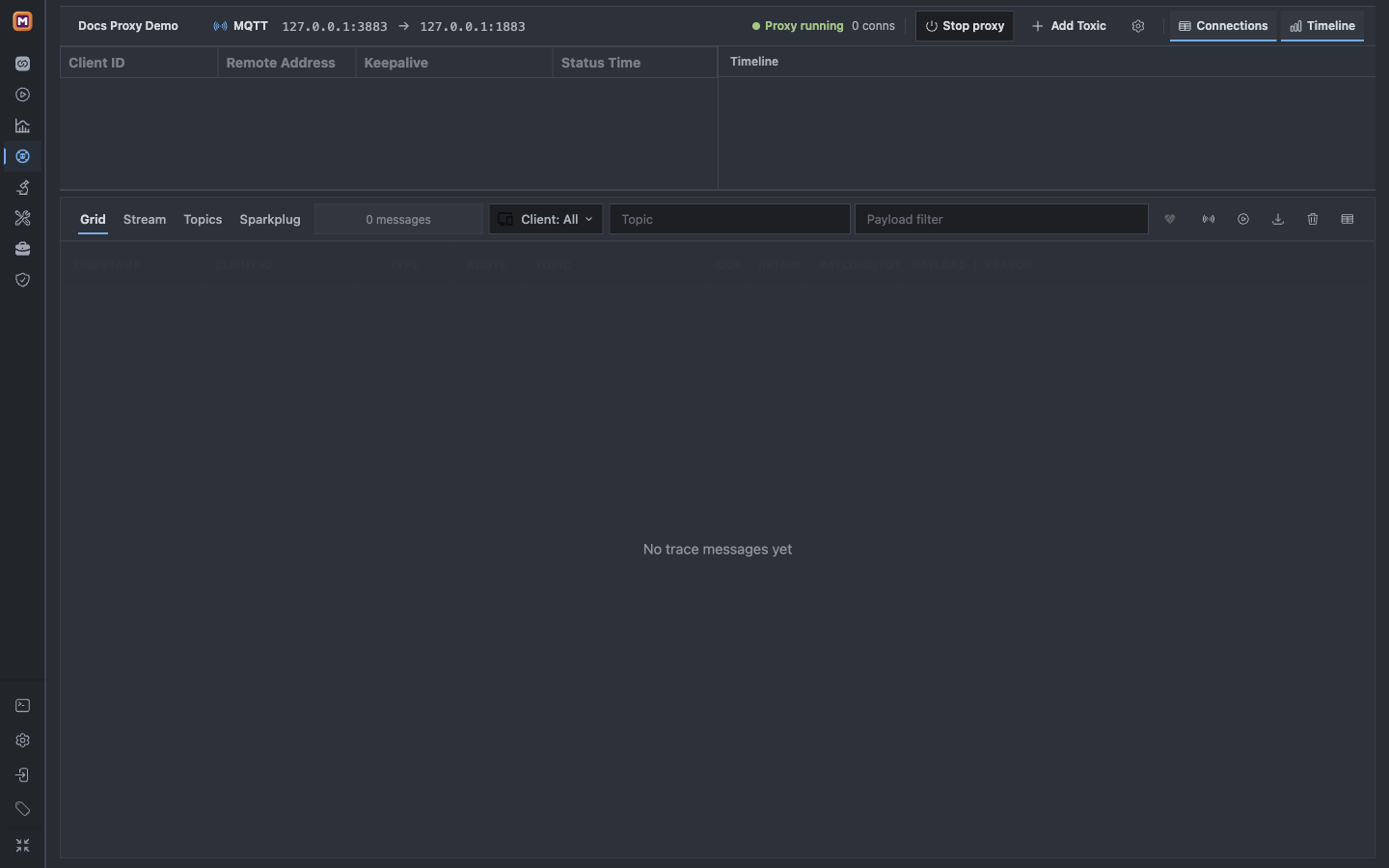
After creation, confirm that Docs Proxy Demo is selected, the route reads 127.0.0.1:3883 → 127.0.0.1:18883, status is Proxy running, Connections is 0, and Toxics is empty.
A running listener is only setup evidence; it does not yet prove that a client can reach the Broker through Proxy.
1Docs Proxy Demo identifies the isolated workspace.
2The command bar preserves the selected listen and upstream endpoints.
3Proxy running with 0 connections and no Toxic is the clean setup state.
Stop here if the status is not running. A busy Listen port, unreachable Upstream, or unsupported address must be fixed before a toxic is added.
Route Mqttable clients through Proxy
Keep the authorized Broker on 18883, then open Connections and create a dedicated Broker workspace that points to the Proxy listener instead of the Upstream:
Name:Docs Proxy Route
Protocol:mqtt
Host:127.0.0.1
Port:3883
Select Test Connection and check the displayed MQTT version results, then select Create. The displayed endpoint must be mqtt://127.0.0.1:3883; 18883 would bypass Proxy.
The Broker Test Connection sends no MQTT username or password and uses the configured TLS settings. Authentication refusal is not a transport failure or a save restriction. For an authenticated endpoint, save the Broker and test the credentials in the Client form; successful CONNECT does not verify publish/subscribe permissions.
In Docs Proxy Route, create and connect the built-in MQTT 5 client:
Name:subscriber
Client ID:mqttable-docs-proxy-subscriber-01
MQTT version:5.0
On the connected subscriber row, select Add subscription and enter Topic mqttable/docs/proxy/temperature with QoS 1. Keep this Mqttable client connected until cleanup. The Client ID and Topic are tutorial values supplied here, not values generated by Mqttable.
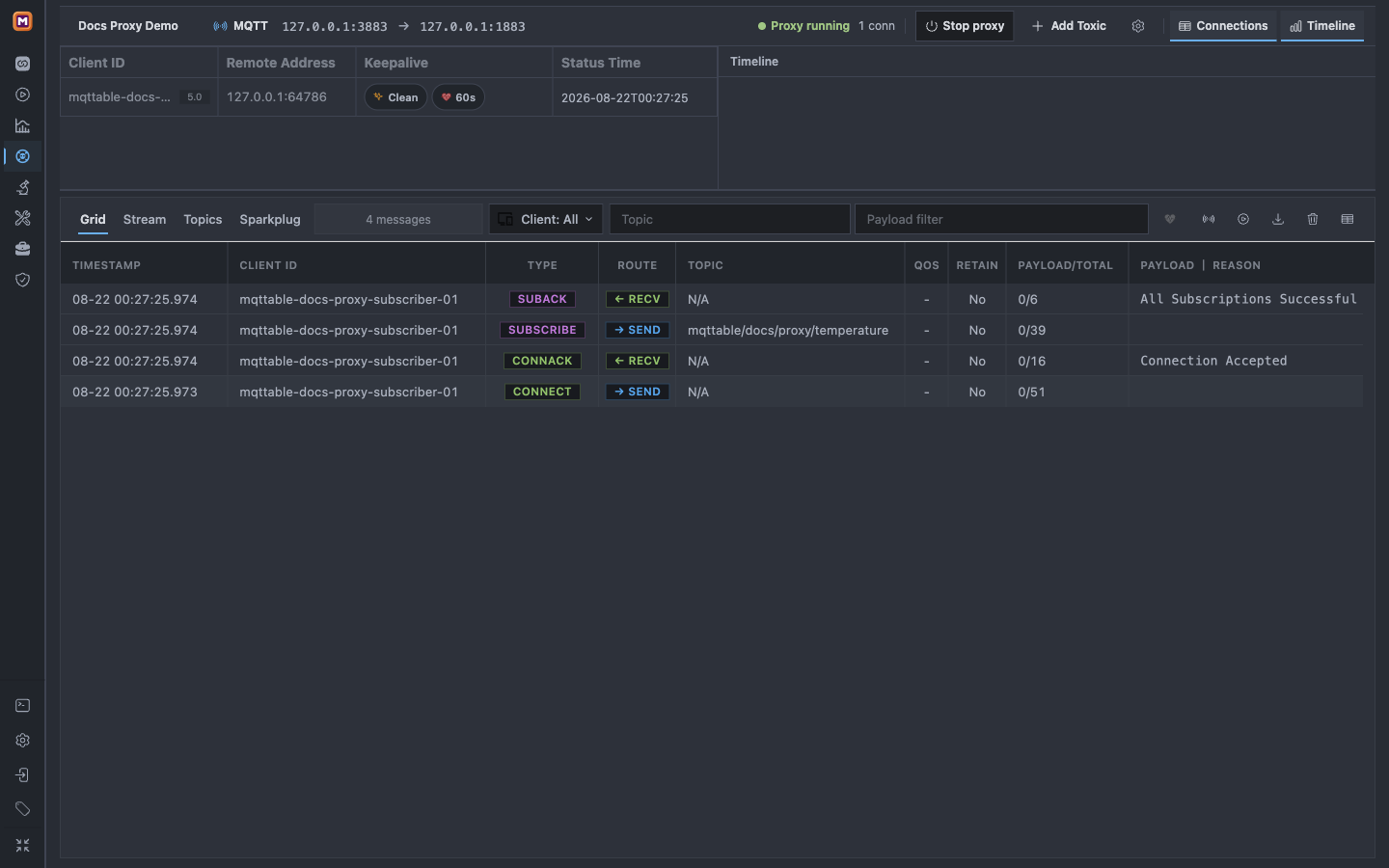
Continue only after Proxy shows one downstream Connection and Trace contains a successful SUBSCRIBE → SEND followed by SUBACK ← RECV.
The Connection row proves the client entered through port 3883; SUBACK proves that the upstream Broker accepted the Topic Filter.
1Connections now contains mqttable-docs-proxy-subscriber-01.
2SUBSCRIBE sends mqttable/docs/proxy/temperature through Proxy.
3SUBACK reports All Subscriptions Successful before any test Payload is published.
If the subscriber works but Proxy still shows 0 Connections and no Trace rows, it is probably bypassing Proxy and connecting directly to 18883. Fix the client port before continuing.
Prove the clean baseline
Return to Connections → Docs Proxy Route and create a second built-in MQTT 5 client:
Name:publisher
Client ID:mqttable-docs-proxy-publisher-01
MQTT version:5.0
Connect publisher. In the Composer, select it and enter Topic mqttable/docs/proxy/temperature, QoS 1, Retain Off, and this JSON Payload:
{"phase":"baseline","temperature":21.5}
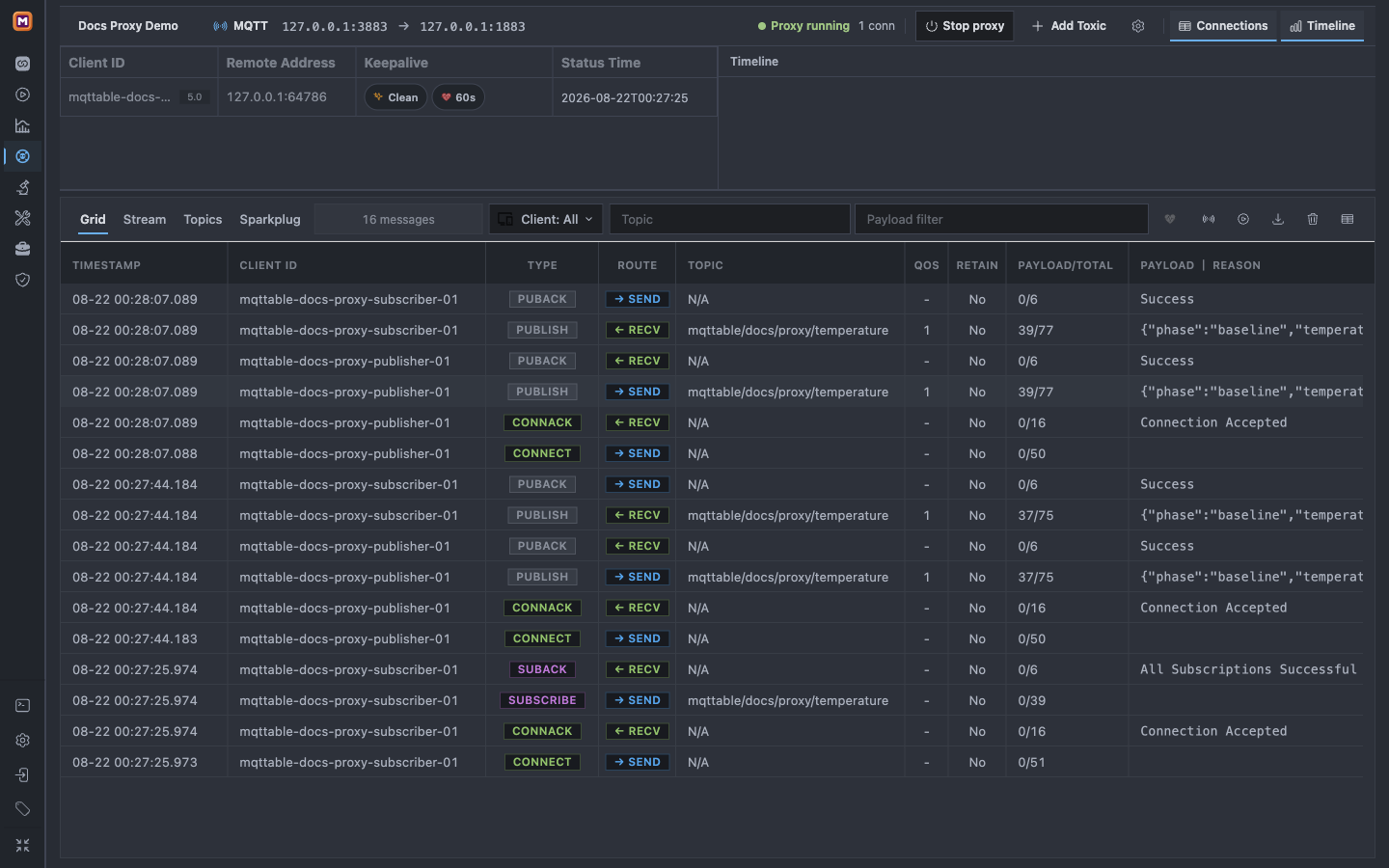
Select Send once, minimize the Composer, and return to Proxy. Pressing Send is not the success condition. Require publisher PUBLISH → SEND and PUBACK ← RECV, subscriber PUBLISH ← RECV and PUBACK → SEND, plus the matching phase=baseline Payload in Trace.
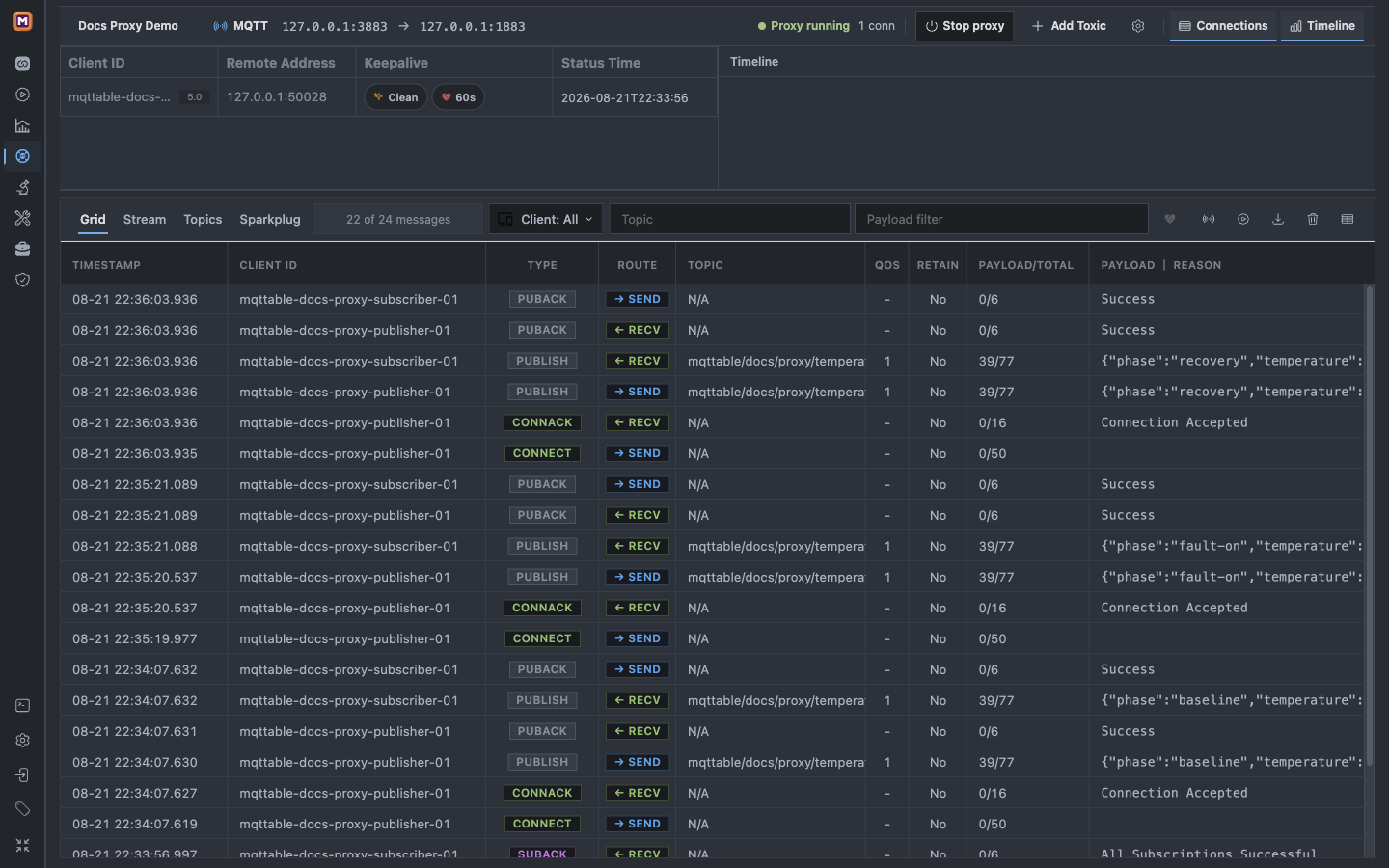
PUBACK proves Broker acceptance; the independent subscriber PUBLISH and PUBACK prove end-to-end delivery through Proxy.
1mqttable-docs-proxy-publisher-01 sends the baseline PUBLISH and receives PUBACK.
2mqttable-docs-proxy-subscriber-01 receives the same 39-byte Payload.
3The subscriber PUBACK completes the QoS 1 route.
In the new light capture, publisher PUBLISH and subscriber PUBLISH appear at the same millisecond; the earlier dark capture also showed only a short gap. Treat that Trace spacing only as this experiment's comparison baseline, not as a Benchmark result. Return to Connections and disconnect publisher; leave subscriber connected so the next sample includes a fresh publisher connection.
Add 500 ms downstream latency
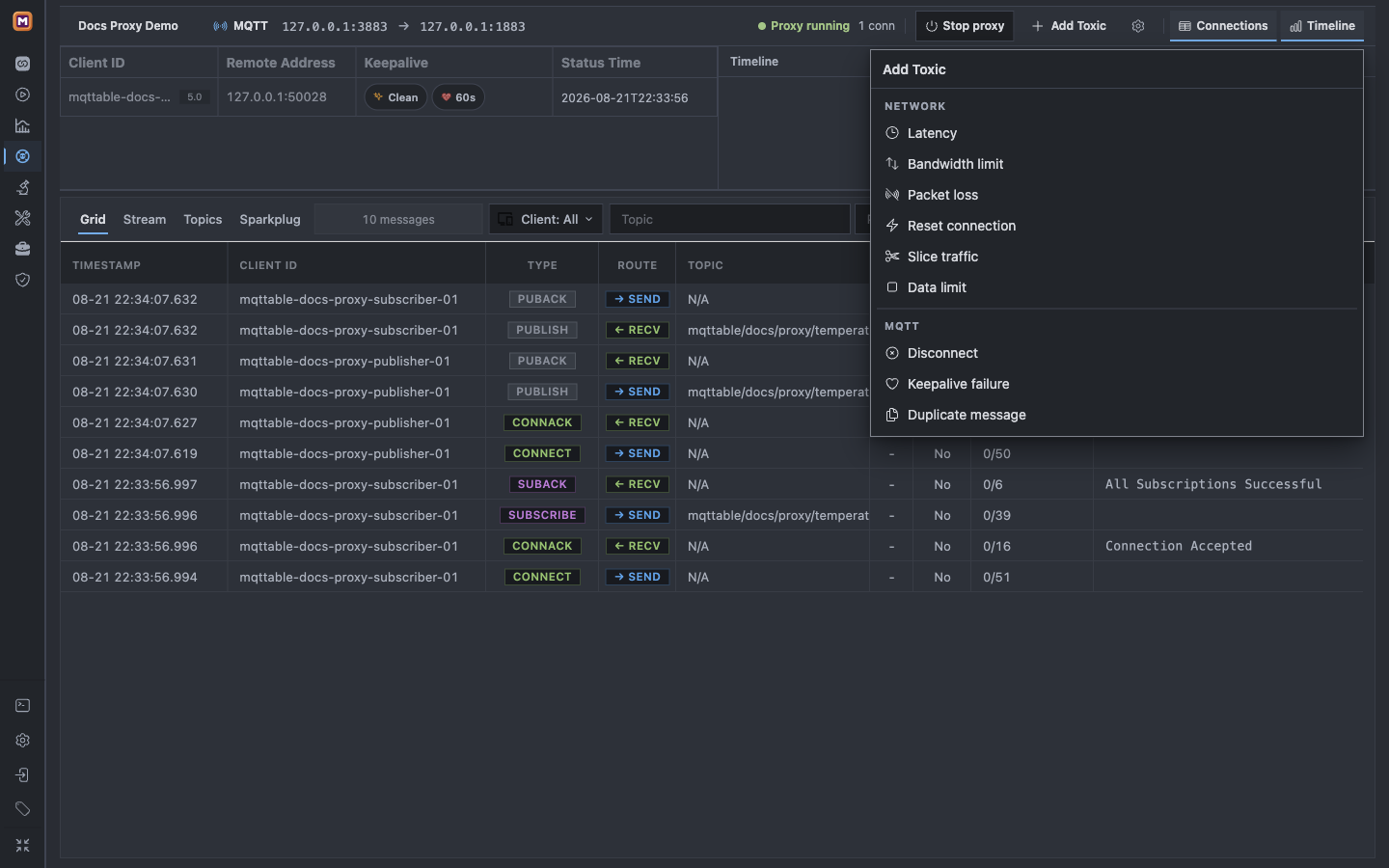
Select Add Toxic. Mqttable currently provides six network toxics and three MQTT-aware toxics in the same Proxy workspace.
The picker combines generic link faults with MQTT-specific disconnect, keepalive, and duplicate-message behavior.
1Network contains Latency, Bandwidth limit, Packet loss, Reset connection, Slice traffic, and Data limit.
2MQTT contains Disconnect, Keepalive failure, and Duplicate message.
3Choose only Latency so the first result has one cause.
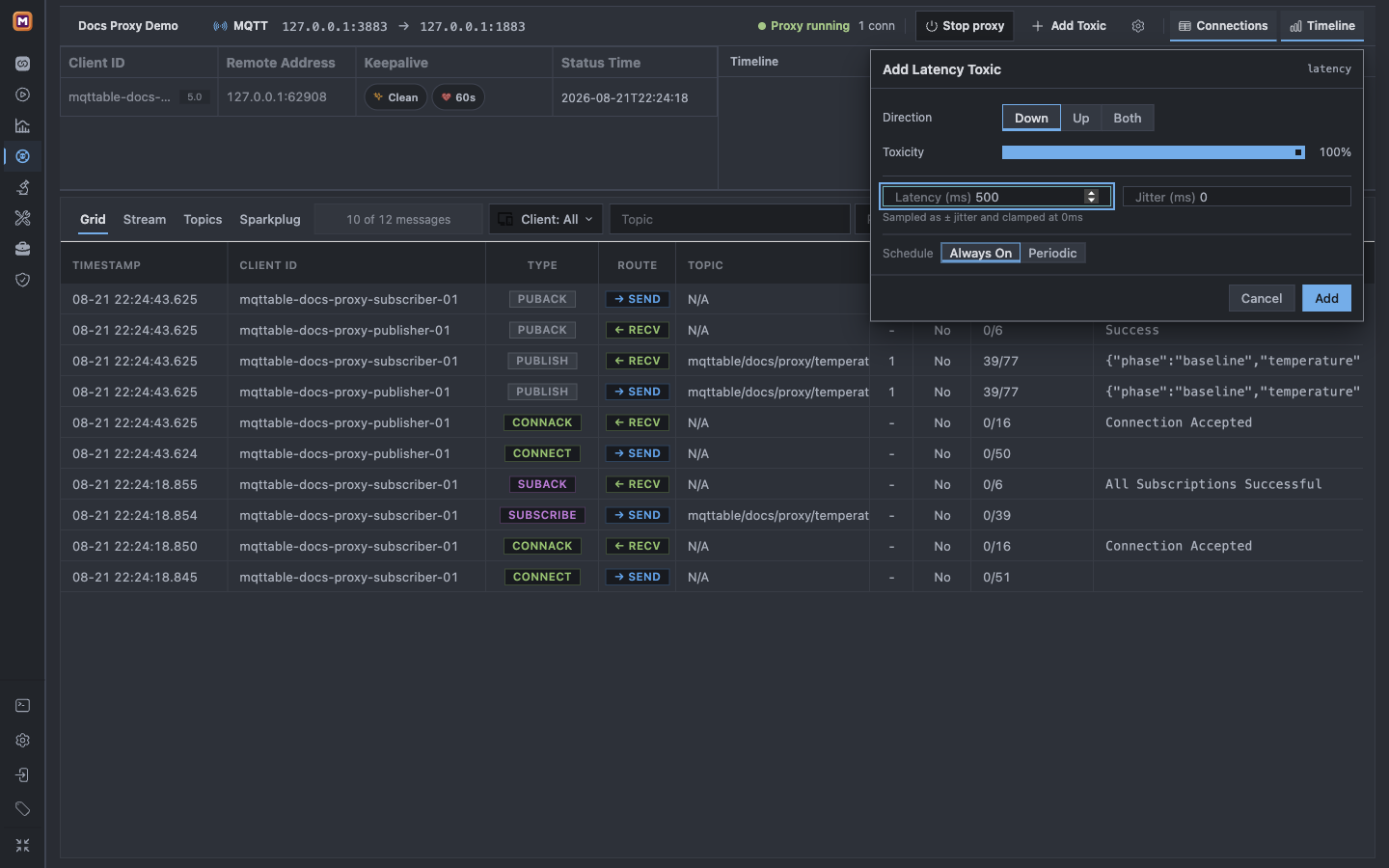
Choose Latency and enter:
Direction: Down
Toxicity:100%
Latency:500 ms
Jitter:0 ms
Schedule: Always On
Down means Broker → client. It delays the publisher's incoming CONNACK and PUBACK as well as the subscriber's incoming PUBLISH. Toxicity is the probability of applying the toxic, not an extra latency percentage.
Review the isolated target and every field before Add; the Engineer UI has no Dry Run for this operation.
1Down scopes the fault to Broker-to-client packets; Toxicity 100% makes it deterministic.
2Set Latency to 500ms and Jitter to 0ms.
3Always On applies continuously; selecting Add changes live Proxy traffic immediately.
Select Add only after confirming that no unrelated client depends on 127.0.0.1:3883.
Measure the fault in Trace
Return to Connections → Docs Proxy Route and connect publisher again. After it reaches Connected, use the Composer to send the same-size fault Payload once with the same Topic, QoS 1, and Retain Off:
{"phase":"fault-on","temperature":21.5}
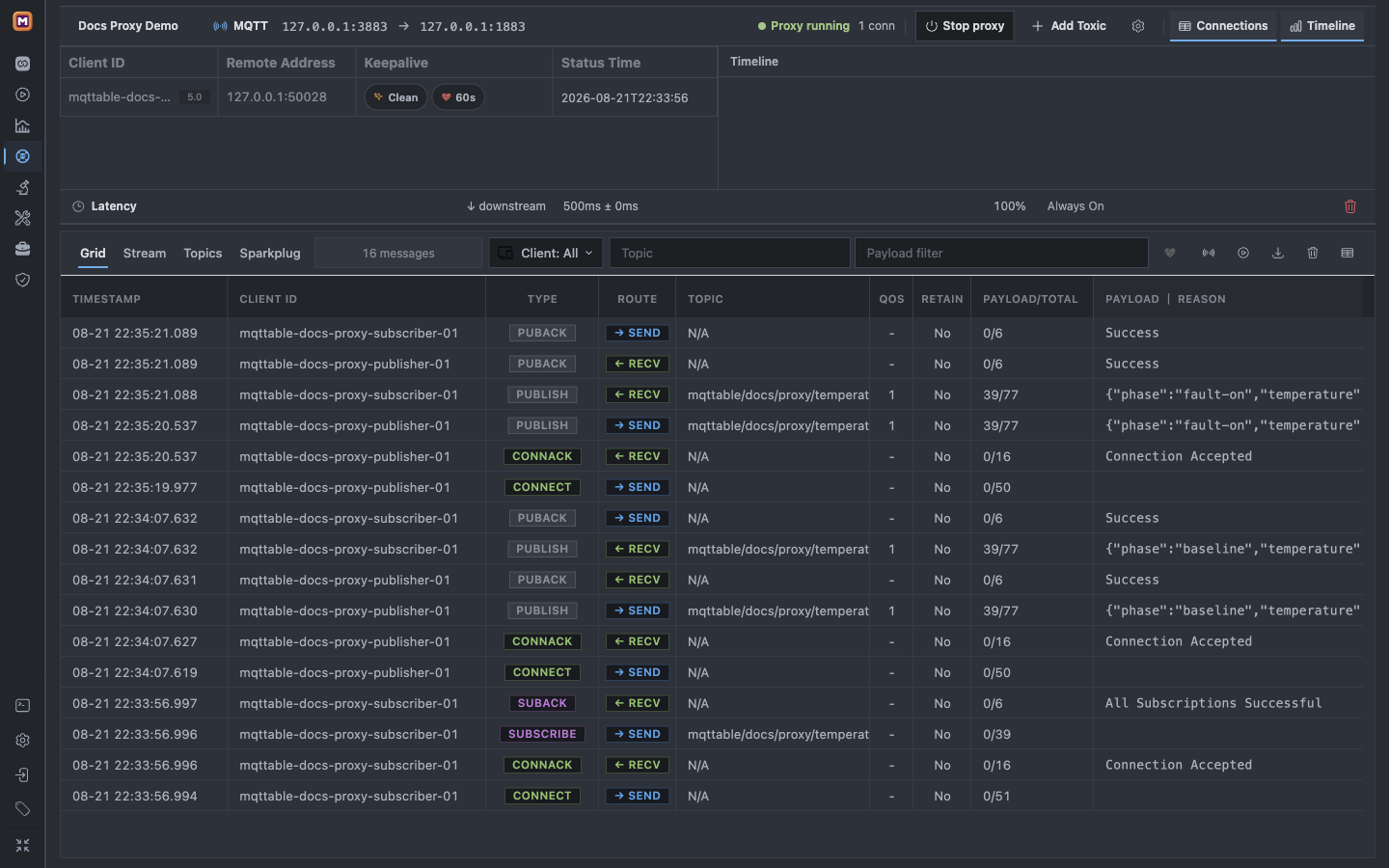
The Toxic row proves configuration, not impact. Use Trace timestamps to inspect publisher CONNECT → SEND to CONNACK ← RECV, publisher PUBLISH → SEND to subscriber PUBLISH ← RECV, and the matching subscriber Payload and PUBACK.
The active Toxic and MQTT rows preserve the exact fault condition, affected packets, and delivered Payload in one workbench.
1The Toxic row records downstream, 500ms ± 0ms, 100%, and Always On.
2The publisher CONNECT-to-CONNACK gap is about 550 ms with the fault active.
3The subscriber receives phase=fault-on about 550 ms after the publisher PUBLISH.
The light Trace shows about 550 ms from publisher CONNECT to CONNACK and from publisher PUBLISH to subscriber PUBLISH; the two locale runs differ by a few milliseconds. Do not expect every interval to equal exactly 500 ms: protocol and processing overhead remains around the injected delay. Use Benchmark for statistically meaningful latency or capacity measurements. Disconnect publisher again before removing the Toxic.
Remove the toxic and prove recovery
Select the delete action on the exact latency_downstream row. The Toxic area must become empty immediately. Do not stop Proxy as a substitute: stopping the listener does not express that this saved fault was removed.
Return to Connections, connect publisher, and use the Composer to send the same-size recovery Payload once with the same Topic, QoS 1, and Retain Off:
Recovery requires a fresh publication: an empty Toxic area plus delivered recovery Payload and comparable timestamps.
1No Toxic row remains between Connections and Trace while Proxy keeps running on the same endpoints.
2The recovery CONNECT, CONNACK, PUBLISH, and PUBACK rows return to near-baseline spacing.
3The subscriber receives the matching phase=recovery Payload and sends PUBACK.
In both light captures, the recovery CONNECT-to-CONNACK gap is about one millisecond and the publisher/subscriber PUBLISH rows are within one millisecond, comparable to the clean baseline. Recovery is not complete if clients keep reconnecting, duplicate messages continue, or an old backlog is still draining.
Stop and remove the demo
Only clean up Connections workspace Docs Proxy Route, its two built-in Client IDs, Proxy Docs Proxy Demo, Topic traffic under mqttable/docs/proxy/temperature, and Toxic latency_downstream, which should already be absent.
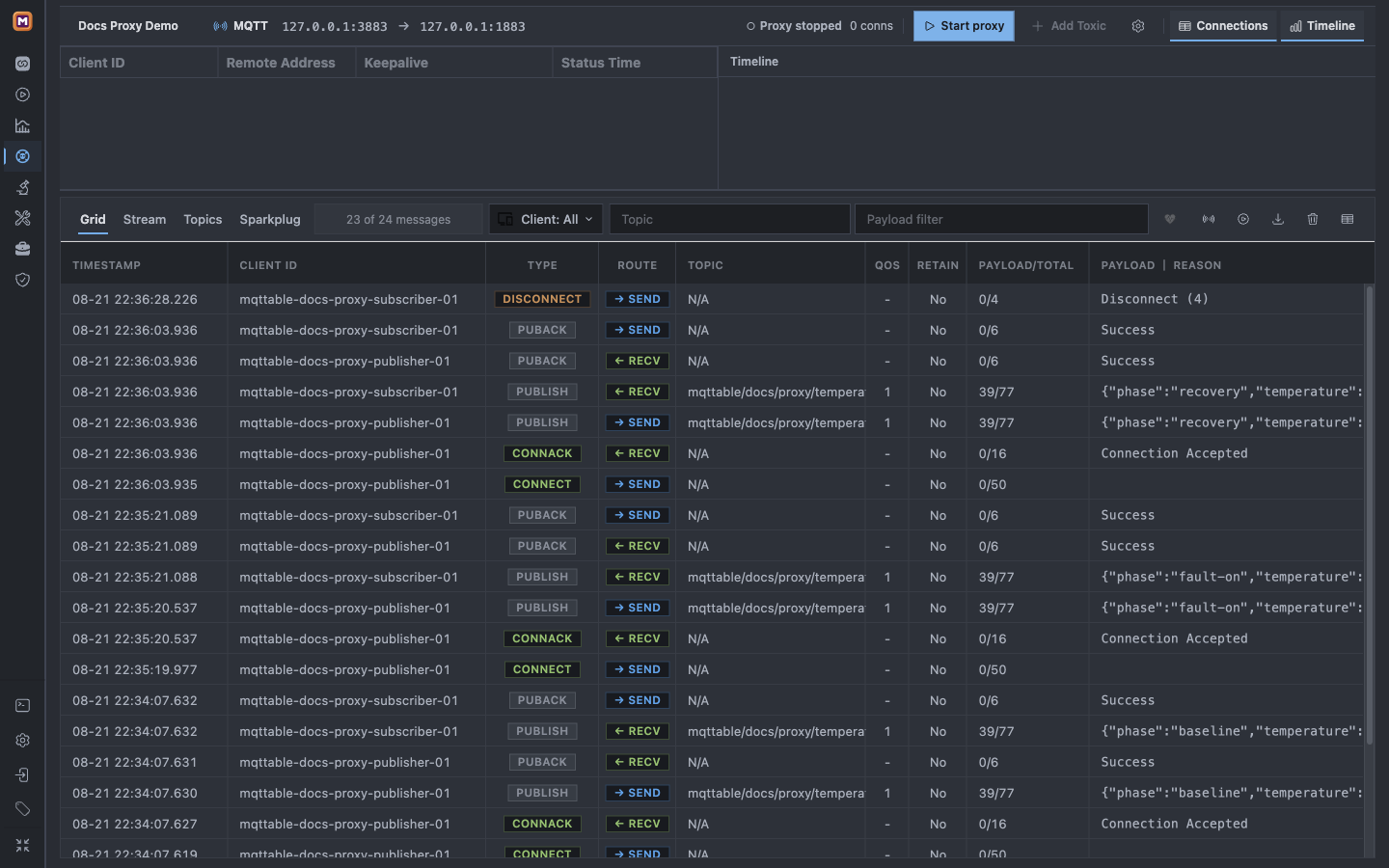
Open Connections, open the settings for Docs Proxy Route, and select Delete. Confirm only after checking that the dialog names this dedicated workspace. This disconnects mqttable-docs-proxy-publisher-01 and mqttable-docs-proxy-subscriber-01; it does not delete the authorized Upstream Broker on 18883. Return to Proxy, wait for Connections to reach 0, then select Stop proxy.
The test client is gone, the listener is stopped, and no Toxic remains before the persistent workspace is deleted.
1Proxy stopped confirms that the 3883 listener is no longer accepting tutorial traffic.
20 conns proves the persistent subscriber has exited.
3Add Toxic is disabled and the Toxic area is empty.
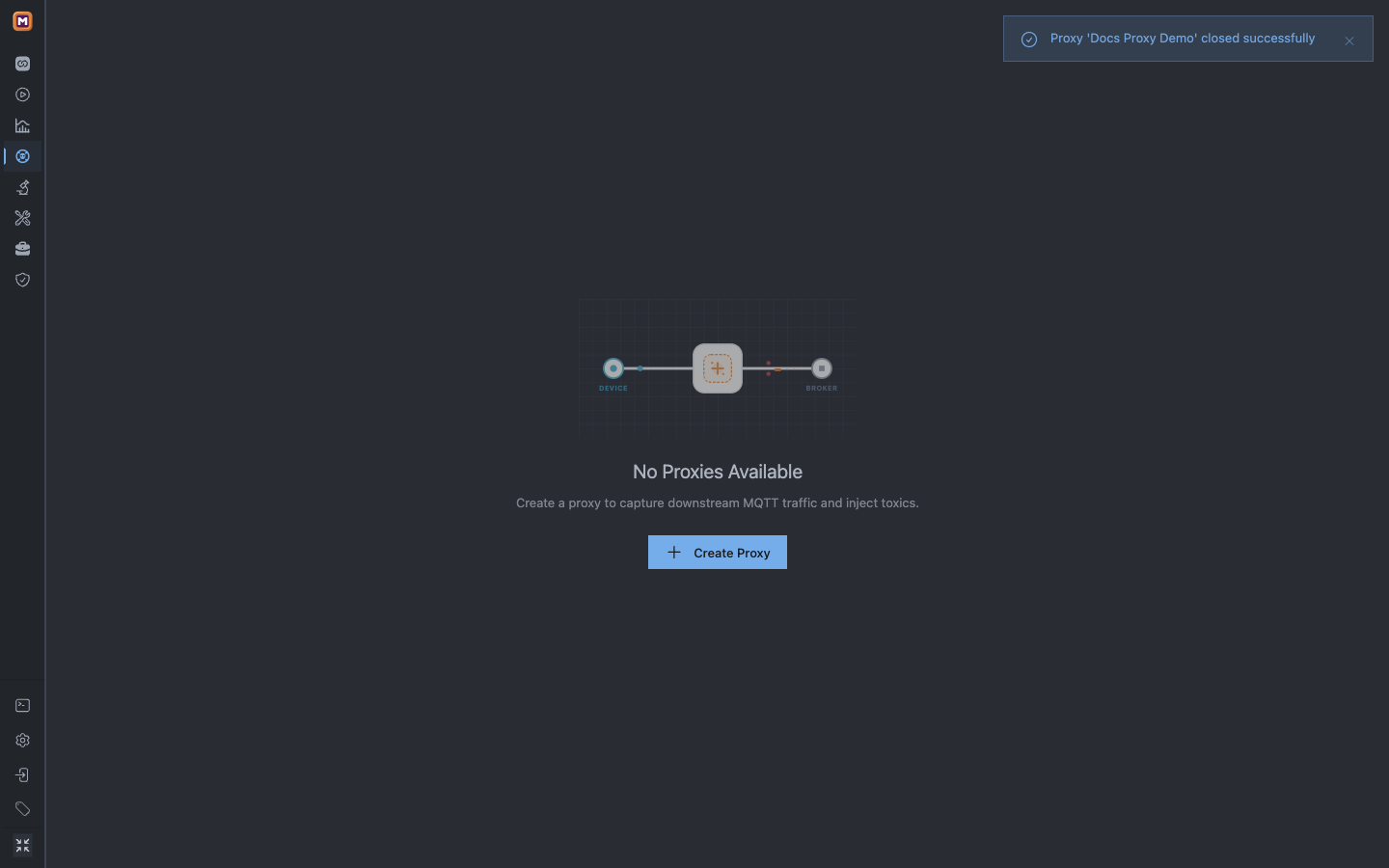
In the current version, exit Zen Mode to expose the workspace-tab delete action. Delete only Docs Proxy Demo; the confirmation states that deletion stops the Proxy and removes its Trace data. Re-enter Zen Mode and verify the final empty state.
The empty Proxy workspace after deletion confirms that the tutorial listener, Trace, Connection, and Toxic state no longer remain.
1No Proxies Available proves that the workspace and listener were removed.
2Create Proxy is the only remaining Proxy action.
Do not clear another Proxy's Trace, delete a shared Broker configuration, or stop an unrelated local Broker during this cleanup.
Choose the next fault safely
After the first complete latency experiment, use one different Toxic at a time:
Latency
ChangeDelay matching packets with optional jitter.
EvidenceTrace timestamp gaps and client duration.
Main riskTimeouts and delayed acknowledgements.
Bandwidth limit
ChangeCap throughput in one direction.
EvidenceTransfer duration, backlog, and Trace progress.
Main riskSlow or incomplete large Payload transfers.
Packet loss
ChangeDrop selected MQTT packet types by percentage.
EvidenceMissing packets, retransmission, or timeout.
Main riskLost acknowledgements and repeated delivery.
Reset connection
ChangeSend TCP RST immediately or after a timeout.
EvidenceConnection loss and bounded reconnect evidence.
Main riskUnacknowledged messages and reconnect storms.
Slice traffic
ChangeSplit traffic into chunks with delay.
EvidenceApplication behavior plus PCAP when needed.
Main riskDecoder edge cases and slow reads.
Data limit
ChangeClose after a cumulative byte limit.
EvidenceTrace stops at the configured boundary.
Main riskPartial transfers and interrupted sessions.
Disconnect
ChangeInject MQTT DISCONNECT by time, packet count, or probability.
EvidenceReason Code and subsequent client state.
Main riskReal session and reconnect side effects.
Keepalive failure
ChangeDrop or delay PINGREQ/PINGRESP.
EvidenceKeep Alive timeout and state transition.
Main riskHalf-open sessions and delayed detection.
Duplicate message
ChangeCreate extra PUBLISH copies with optional DUP flags.
EvidenceMultiple subscriber rows for one source message.
Main riskDuplicate business actions without idempotency.
Every Toxic also has Direction and Toxicity. Always On applies continuously. Periodic adds Duration, Break, Repeat, and Offset; Repeat = 0 is displayed as ∞. Start with one Toxic because stacking Latency and Packet loss makes a timeout harder to attribute.
Current Proxy profiles are TCP, TLS, WS, and WSS, with the same selected profile used downstream and upstream. TLS and WSS certificate setup is outside this loopback tutorial; do not substitute placeholder credentials and claim the route works.
Free supports up to three Proxy workspaces. Pro removes that workspace-count limit. Remote Runtime requires Pro, and 127.0.0.1 then refers to the Runtime host rather than necessarily to your desktop.
Mqttable follows the same route-through-a-proxy idea as Shopify Toxiproxy, but it is not compatible with the Toxiproxy CLI or HTTP API. Its distinctive value is keeping MQTT-aware toxics, active downstream Connections, configuration, and protocol Trace evidence in one workbench.
Proxy Trace proves MQTT protocol and routing behavior, not TCP fragmentation, retransmission, or complete packet capture. Use PCAP analysis for packet-level evidence, or turn the clean and fault messages into a repeatable Replay Scenario.