
Publish dynamic MQTT test data
Insert the Live Sensor Snapshot Recipe into a five-second scheduled message, then verify changing JSON in both SEND and RECV Trace rows.
- Author:
- Mqttable
- Updated:
On this page12 sections
Loading...
Insert the Live Sensor Snapshot Recipe into a five-second scheduled message, then verify changing JSON in both SEND and RECV Trace rows.
Loading...
Payload Templates let you continuously generate dynamic MQTT test data that follows your business schema, without manually editing every message. This guide shows you how to create a scheduled message that runs every five seconds, insert the Live Sensor Snapshot Recipe, and use SEND and RECV records in Trace to confirm that the data was sent and received successfully.
The dark screenshots record the 1.0.1 tutorial workflow. The light screenshots use the current 1.5.0 source, including inline JSON line numbers and explicit snapshot controls. The workflow is the same in both themes; installed versions may show the earlier editor.
Open Connections and select an isolated test Broker. The captured workflow uses an isolated local Broker:
Docs Template Demomqtt127.0.0.118883 in the light screenshots (2883 in the historical dark screenshots)template-publishermqttable-docs-template-publisherMqttable connects to this listener; it does not start the Broker. If you do not yet have a connected Client, use MQTT Quickstart or Broker and connection settings, then return when this Client shows Connected. If the Broker reports the Client ID is already in use, stop the older tutorial connection or choose a suffix yourself; Mqttable does not generate the Client ID used by this guide.
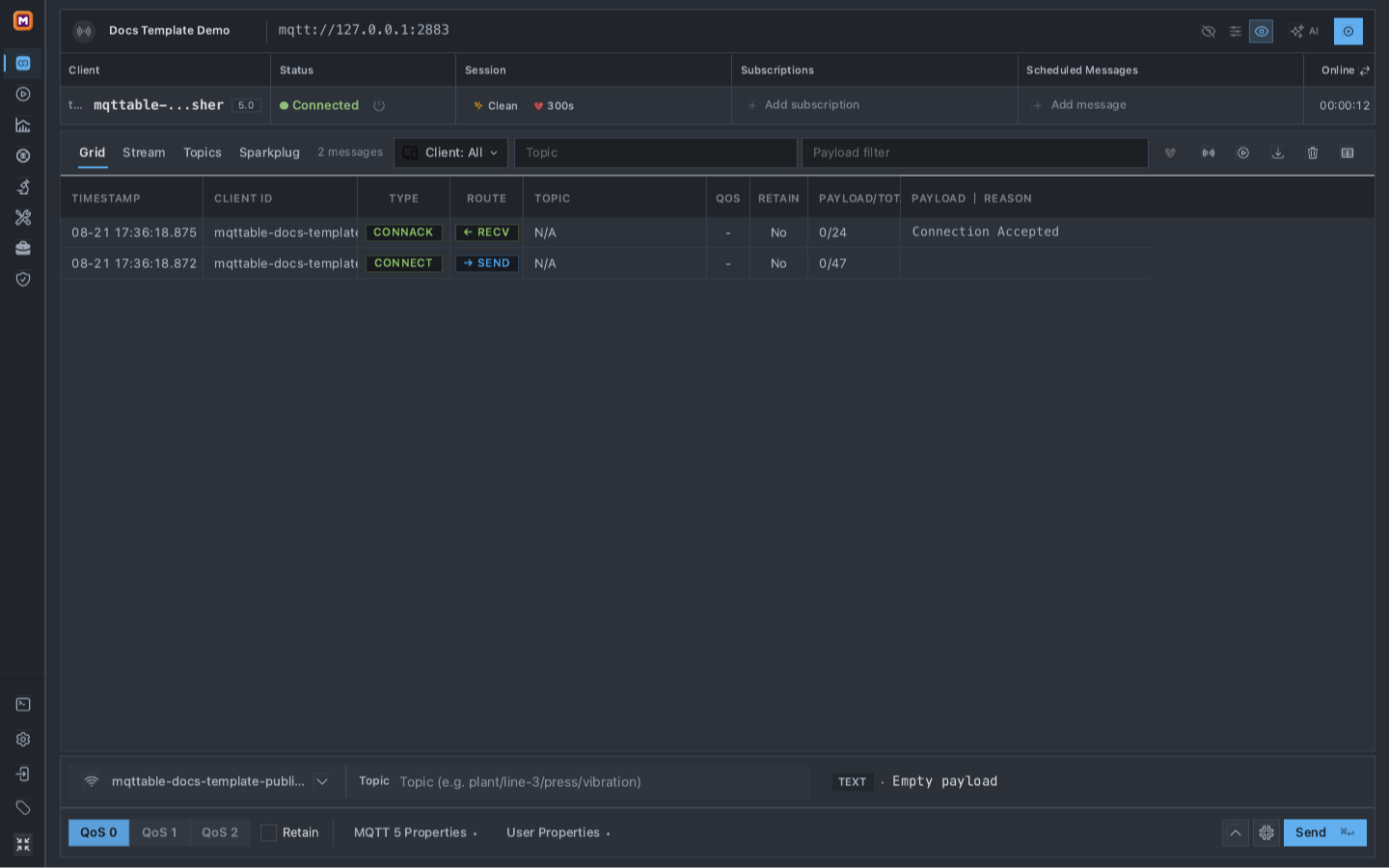
Begin on the connected Client row; the two empty columns are the entry points for the receiving and sending sides of the proof.
Do not use a production listener, shared customer Topic, real device identifier, or sensitive Payload for this exercise.
On the mqttable-docs-template-publisher row, select Add subscription and enter:
mqttable/docs/template-seriesKeeping No Local off is essential: it allows this Client to receive the messages that it publishes. Turning it on would remove the second, Broker-delivery layer of this guide.
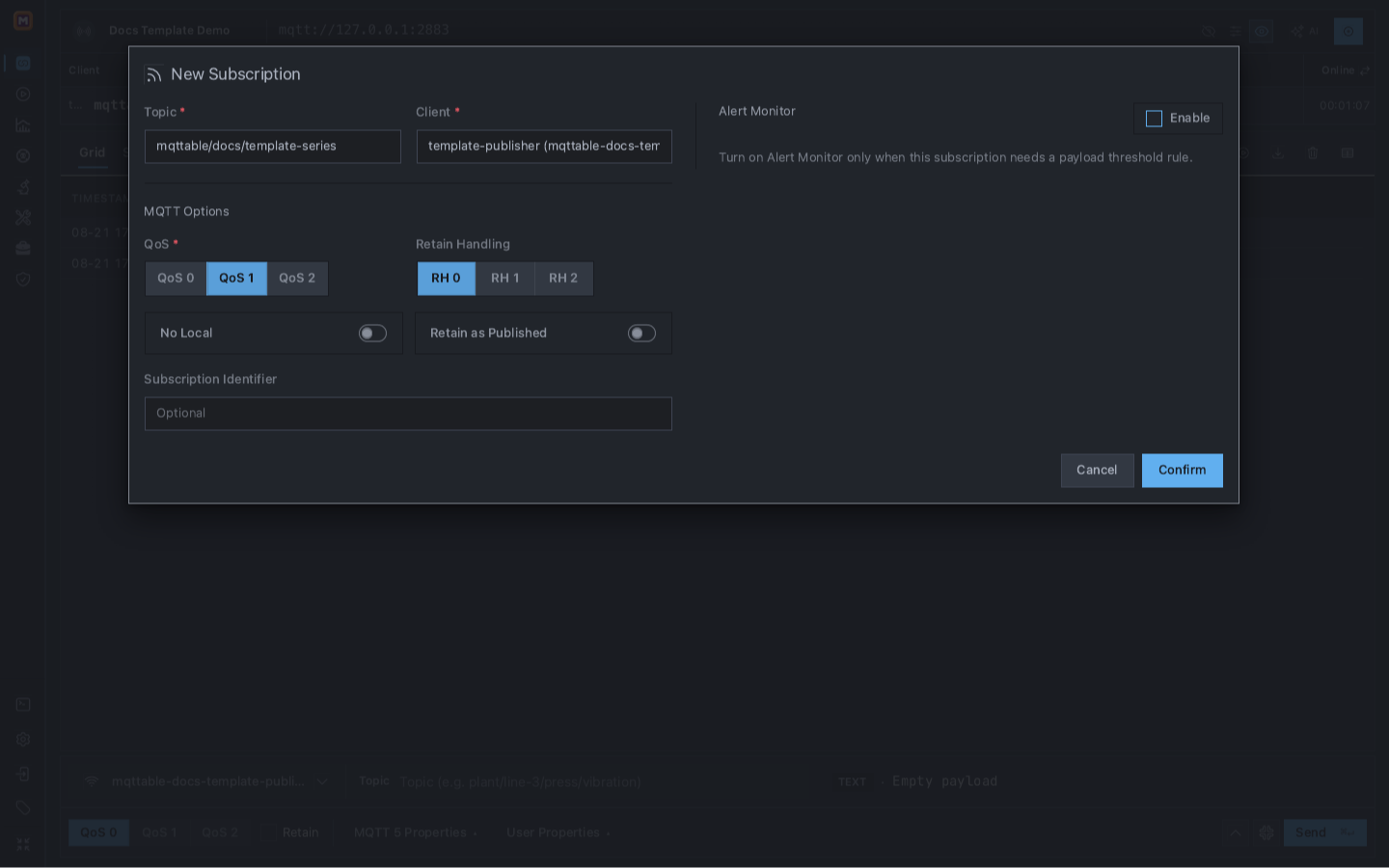
Subscribe before creating the schedule so every generated publication has an independent RECV result.
Select Confirm. Continue only after the Subscription pill appears on the Client row.
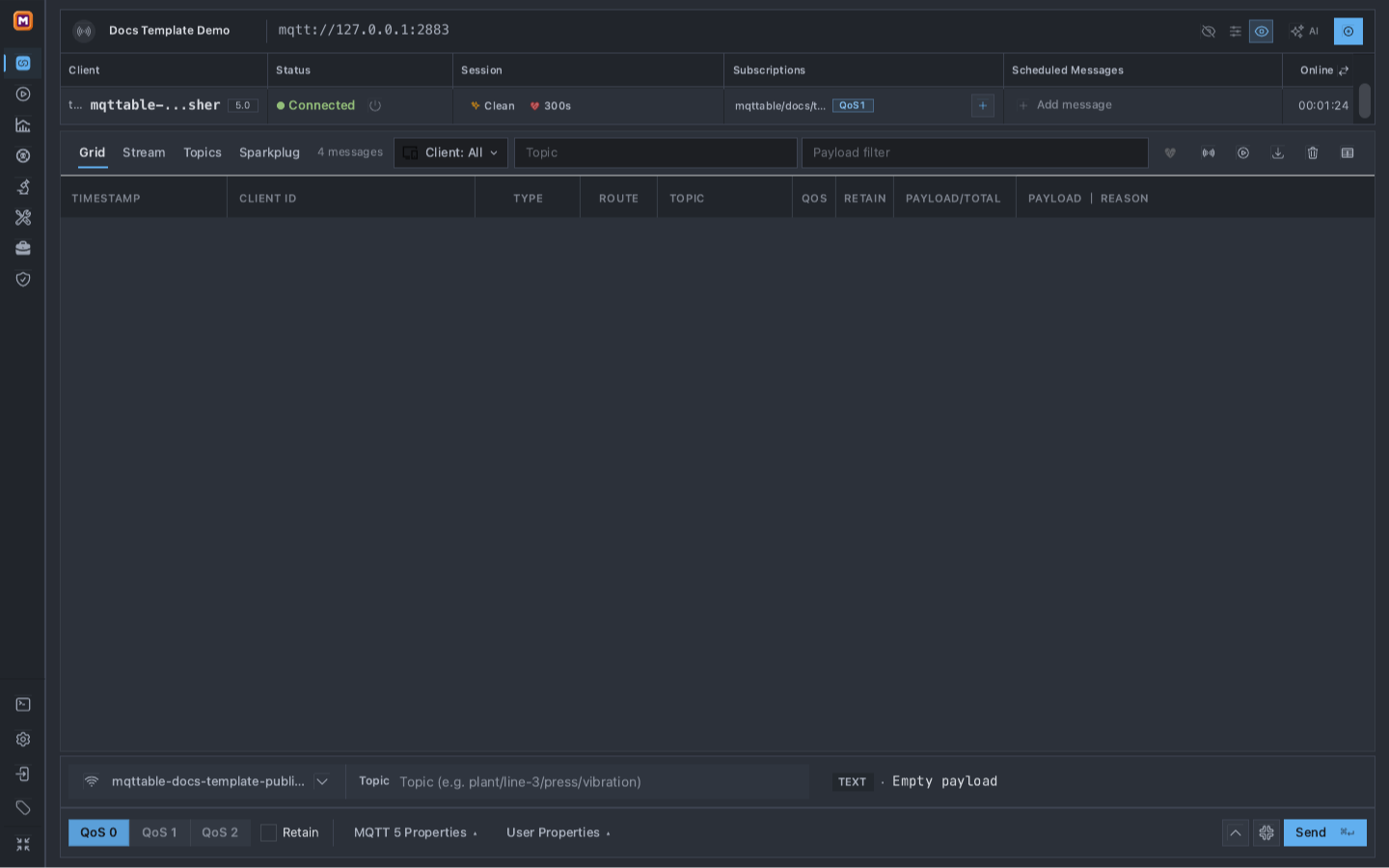
The Topic pill proves the Subscription is saved; Scheduled Messages is still empty until the next step.
Select Add message on the same Client row. In New Scheduled Message:
mqttable/docs/template-series5 secondsFive seconds is the current form default and is slow enough to inspect without creating unnecessary traffic. The first publication occurs after one complete interval.
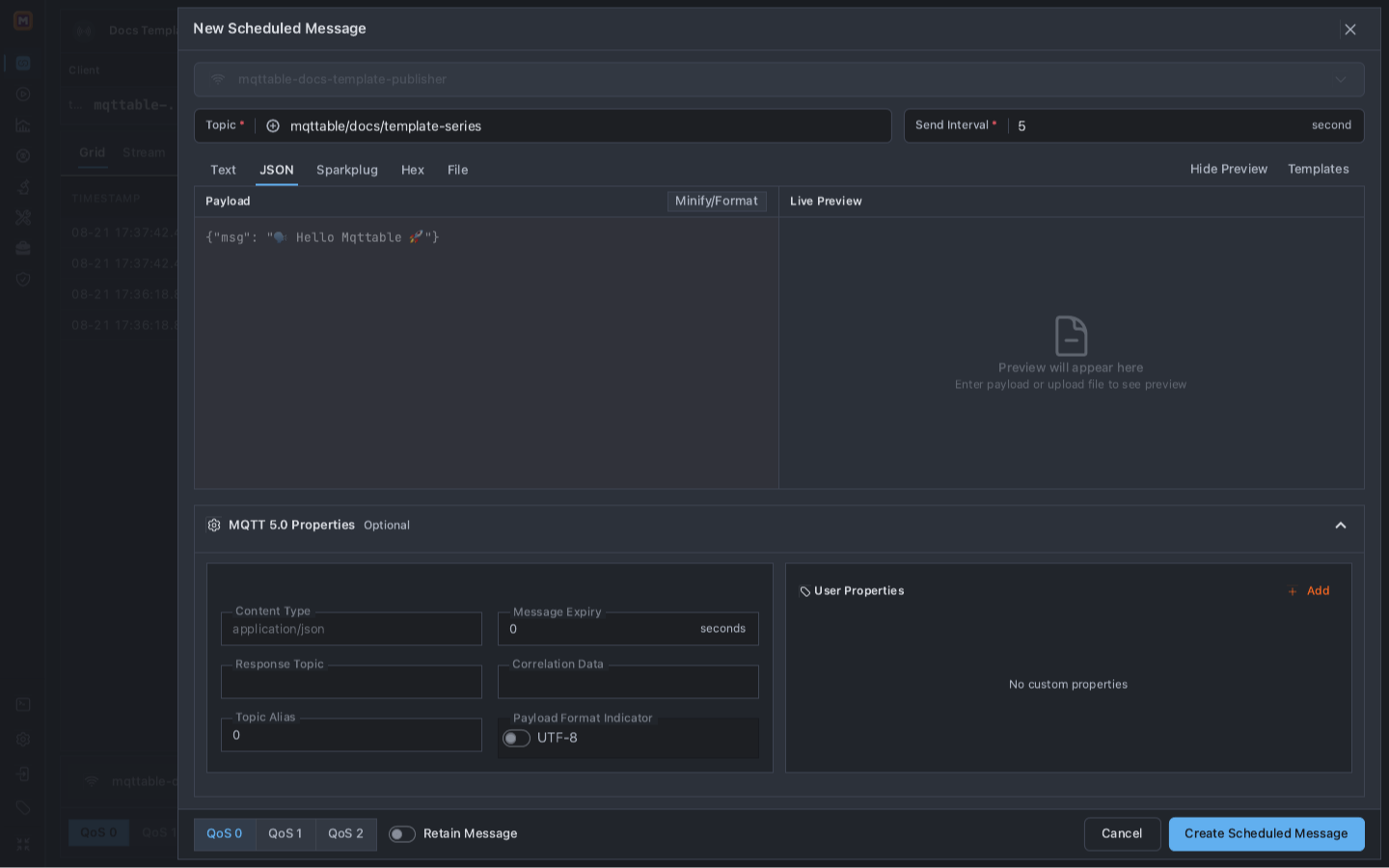
Set the stable destination and timing before adding any generated fields.
Select Templates, open Recipes, then locate Live Sensor Snapshot. This Recipe inserts one complete JSON object rather than making you assemble a test Payload field by field.
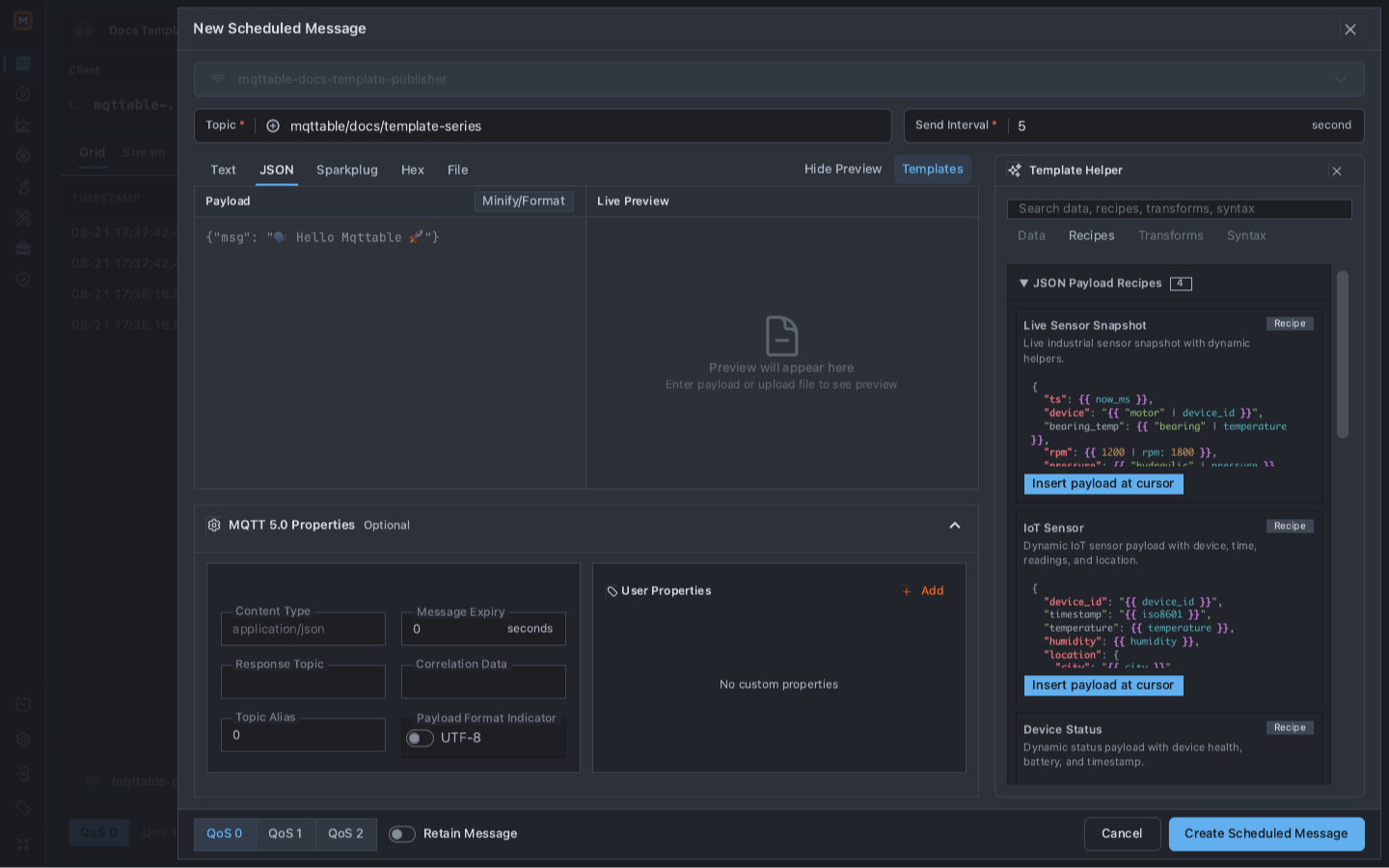
The Recipe is an editable starting contract, not a saved opaque template object.
After insertion, the left pane is Liquid-compatible source. Render with variables is automatic in Composer, Send Window, and Scheduled Message editors; there is no template-policy selector. Entering Liquid source in the active payload or Topic also enables rendering for a draft previously saved as literal. Fixed snapshots returned from a workbench remain fixed until you add template source. Opening a tool or preview does not publish a message.
The editors render the Topic first, then use that resolved Topic for {{ topic }} in the Payload. {{ client_id }} uses the selected Client, and the saved draft keeps its source expressions. In Bench scheduled messages, entering supported single-brace placeholders such as {index} or {clientid} in Topic or Text/JSON/Sparkplug source also re-enables dynamic sending for a previously fixed draft.
The right pane is one snapshot made with the current Client, Topic, enabled Broker Variables, and built-in dynamic helpers. Static JSON previews start collapsed; template output is shown by default. The snapshot displays its generation time in the Settings timezone and can be refreshed explicitly. Editing the template source reuses snapshotted built-in variables such as uuid and now_ms. Refreshing or changing the target context samples those variables again; waiting alone does not change the preview.
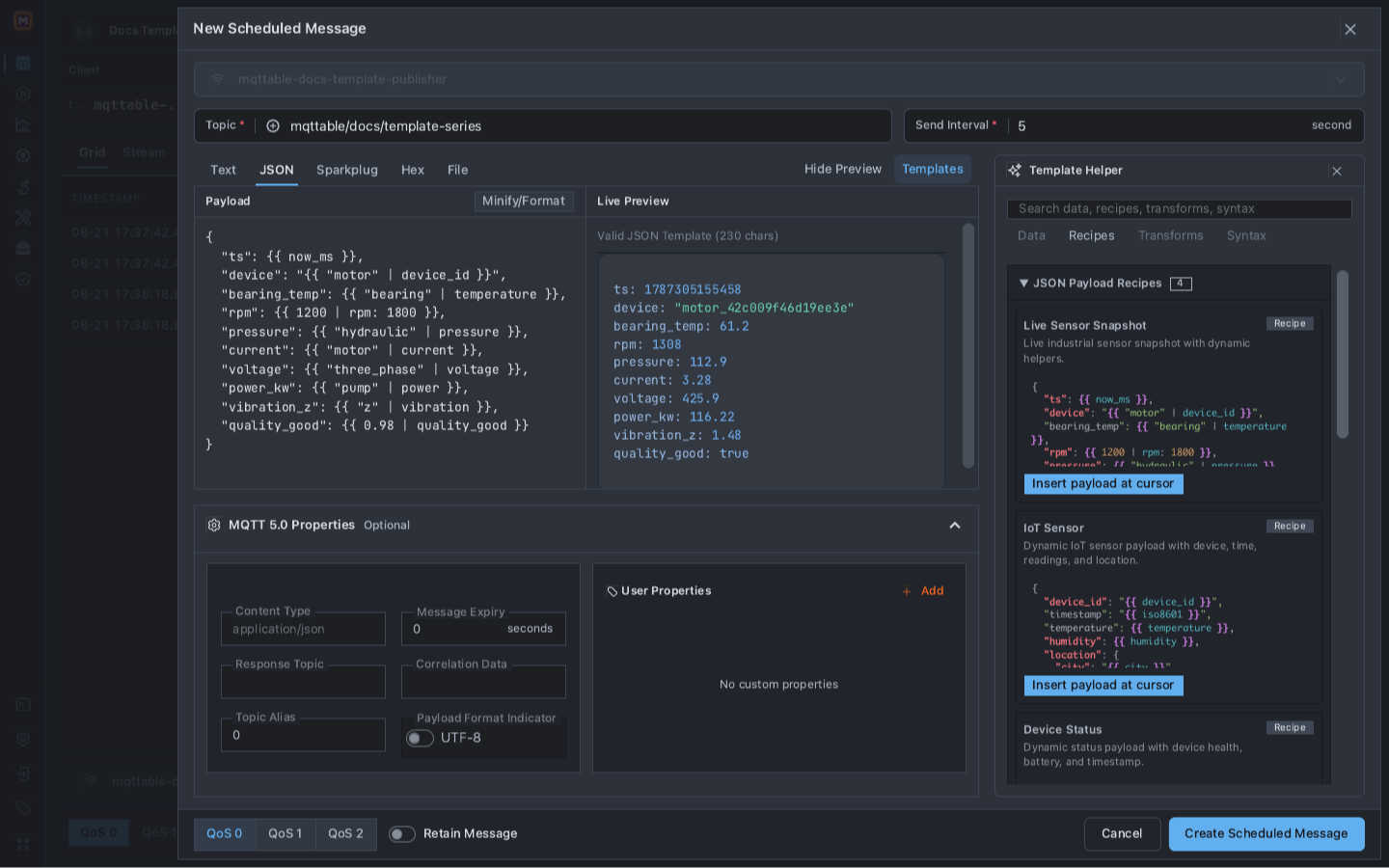
Source defines the contract; Live Preview proves that the current source can produce one valid JSON sample.
The current Live Sensor Snapshot Recipe source is:
{
  "ts": {{ now_ms }},
  "device": "{{ "motor" | device_id }}",
  "bearing_temp": {{ "bearing" | temperature }},
  "rpm": {{ 1200 | rpm: 1800 }},
  "pressure": {{ "hydraulic" | pressure }},
  "current": {{ "motor" | current }},
  "voltage": {{ "three_phase" | voltage }},
  "power_kw": {{ "pump" | power }},
  "vibration_z": {{ "z" | vibration }},
  "quality_good": {{ 0.98 | quality_good }}
}
Preview is not evidence of the bytes sent later. An explicitly refreshed snapshot and each scheduled tick can produce different values; Trace is the publication evidence. Keep the Liquid source in the editor for this exercise rather than replacing it with the rendered snapshot.
Close the Template Helper so the source, Preview, and final delivery controls have enough room. Before saving, verify:
mqttable-docs-template-publishermqttable/docs/template-series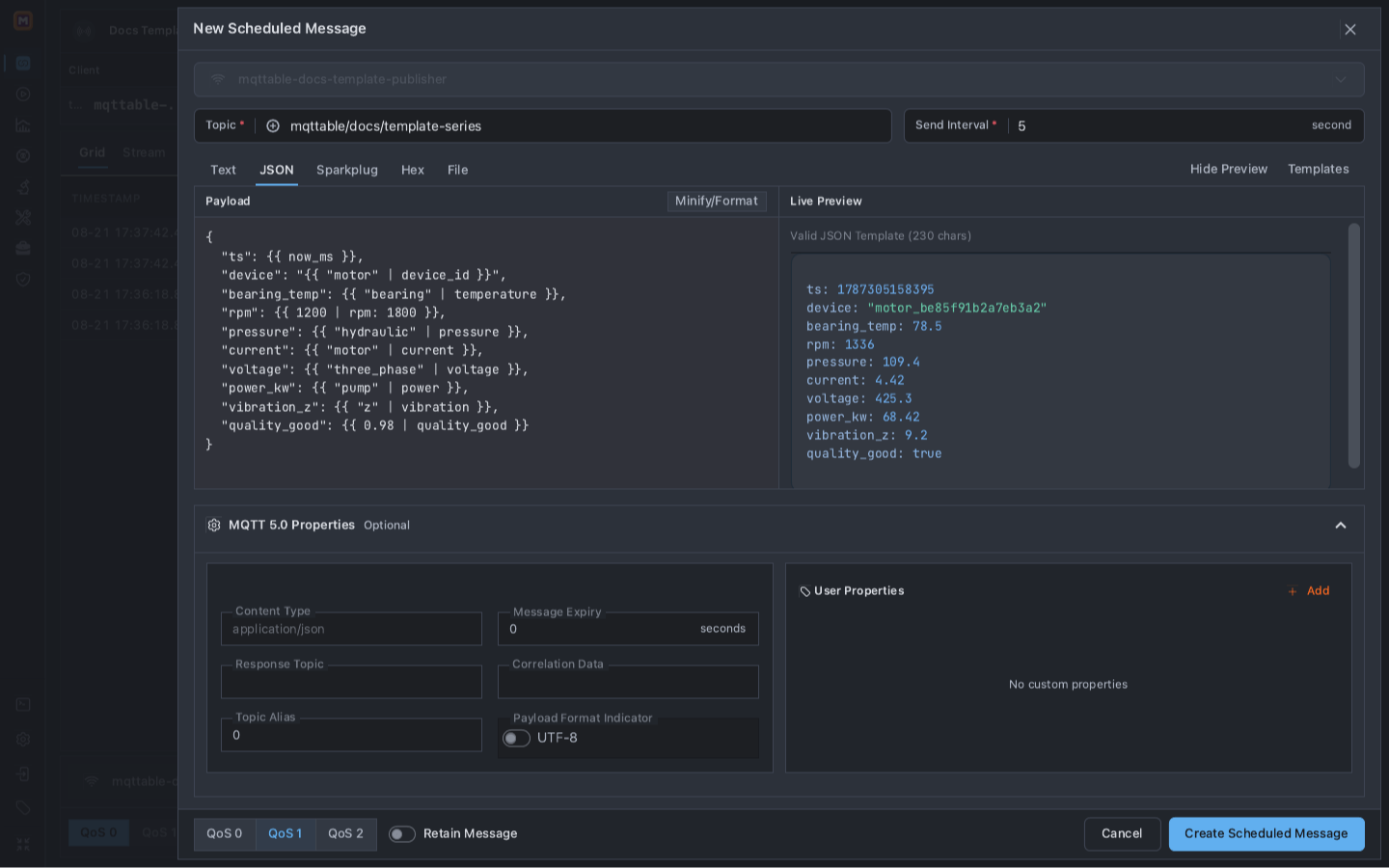
Run the final delivery check before creating a schedule that has no built-in message count or end time.
Select Create Scheduled Message. The new pill proves the configuration was saved and synchronized; it does not yet prove that a message was delivered.
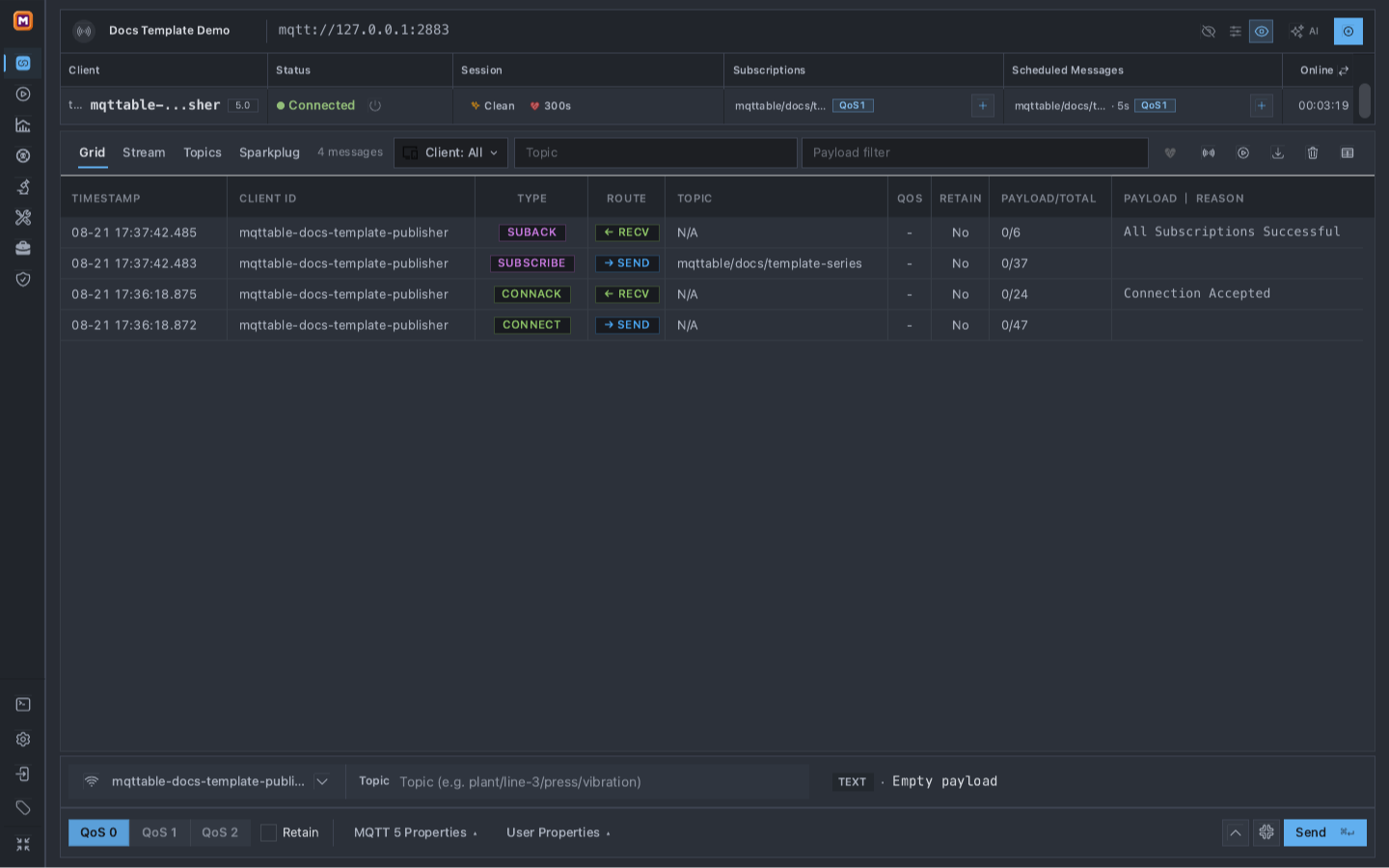
Both halves of the test are now active: one schedule publishes and one Subscription receives.
Wait about 15 seconds to collect at least three five-second renders, then remove the Scheduled Message to freeze the evidence before comparing Trace. Keep the Subscription until after the RECV check.
Enter mqttable/docs/template-series in the Topic filter. In Grid, compare at least two PUBLISH rows whose Route is SEND.
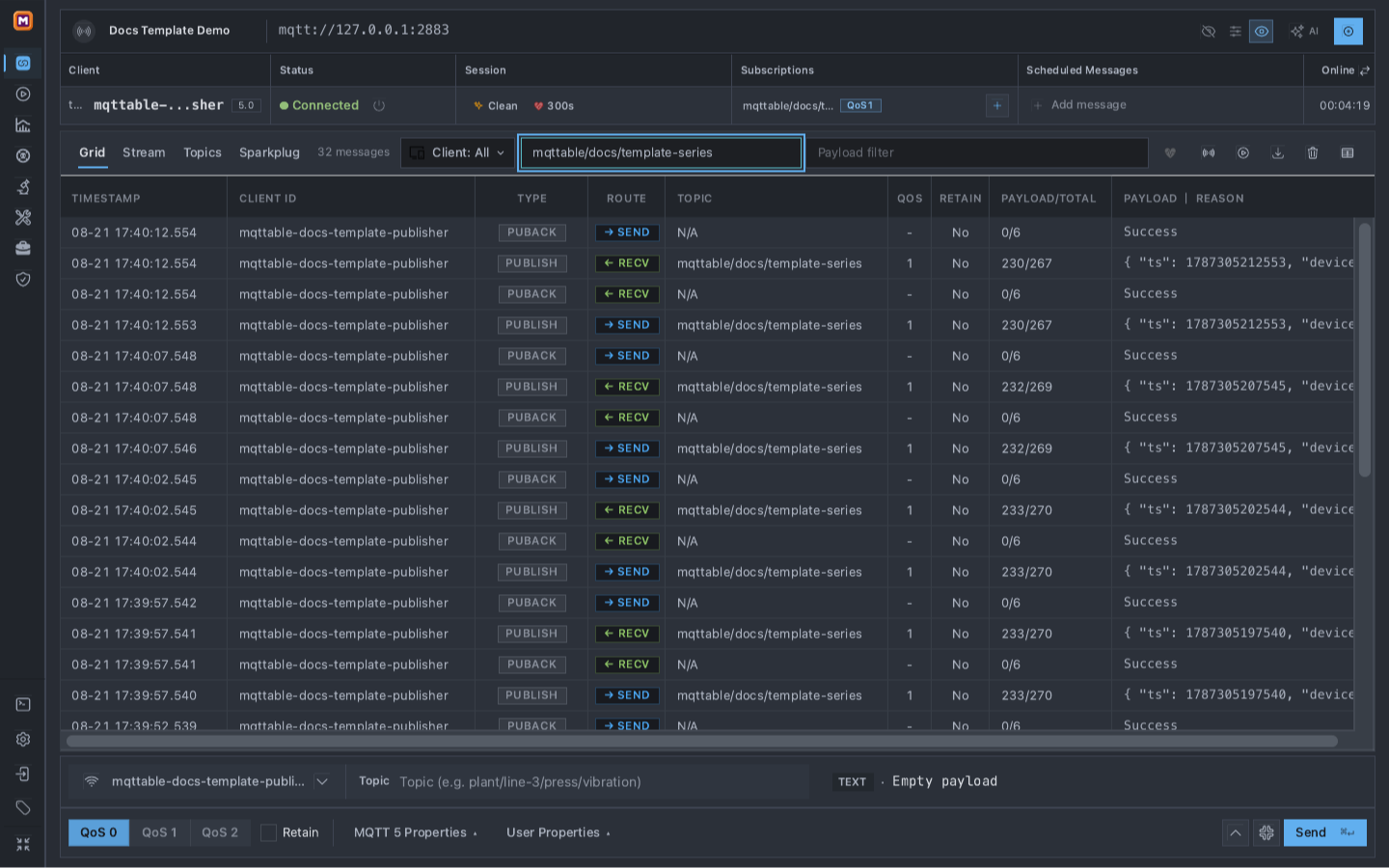
The filtered series proves that one saved schedule rendered fresh JSON repeatedly.
A successful SEND series has all of these properties:
PUBLISH rows;mqttable/docs/template-series;1 and Retain is No;ts, the motor_… device suffix, and multiple readings change.Select a matching PUBLISH row whose Route is RECV and open its details. SEND proves that Mqttable called publish; RECV proves that the Broker delivered the message to the Subscription created earlier.
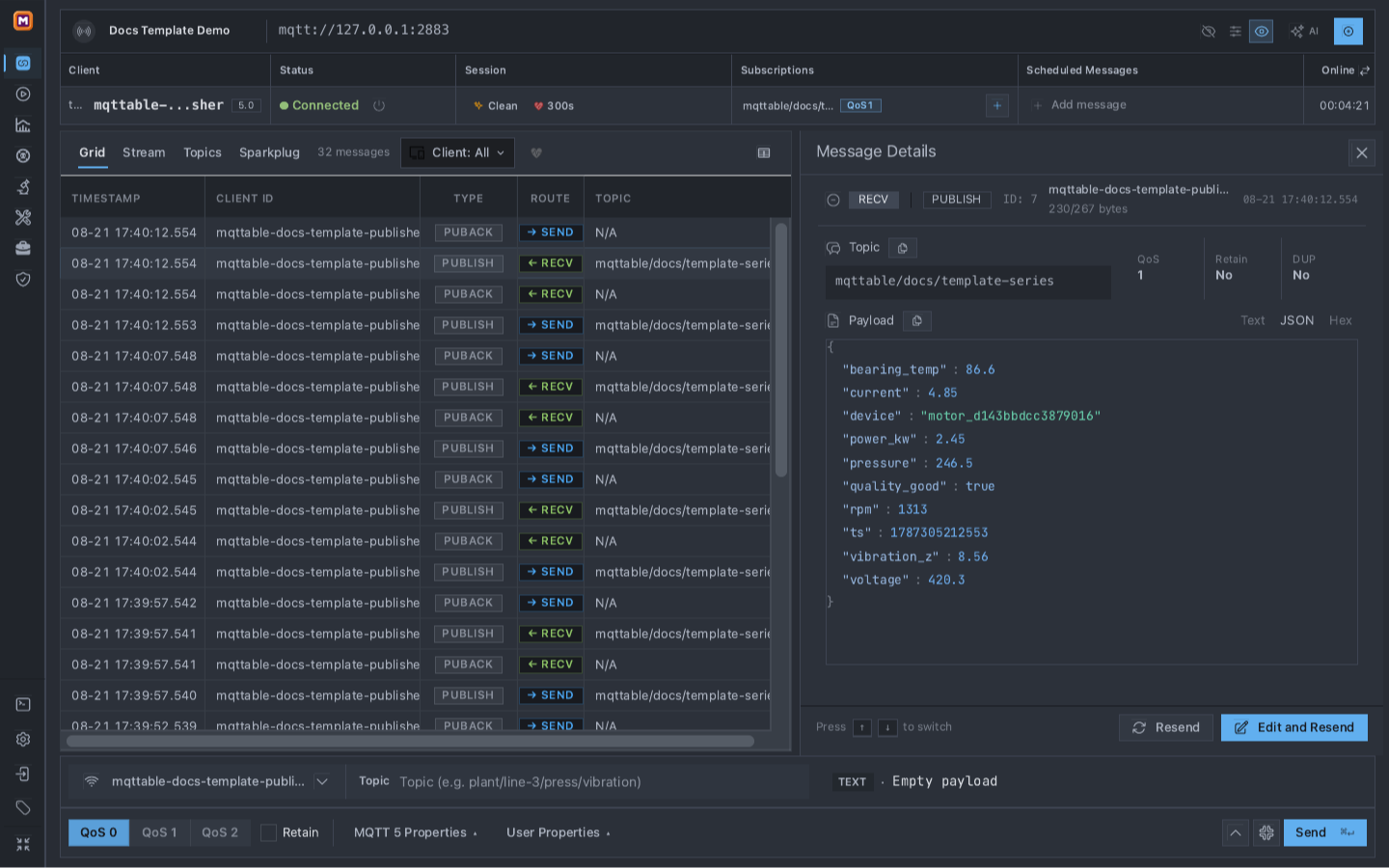
The received-message detail is the second layer of evidence; the saved schedule alone cannot prove Broker delivery.
Do not treat Preview, the Scheduled Message pill, or one SEND row as the complete result. Continue only when the changing SEND series and matching RECV evidence are both present.
Value | Owner | Expected behavior |
|---|---|---|
Broker, Client ID, Topic | You or this guide | Remain fixed so every result belongs to the approved test boundary. |
Interval, QoS, Retain | You | Remain fixed until you intentionally edit the schedule. |
| now_ms helper | Changes on every render to the current Unix millisecond time. |
| device_id helper | Keeps the |
Readings and quality | Profile, Range, and probability helpers | Change within the Recipe's declared bounds. |
Use another Recipe only when its JSON contract matches the consumer. Use Data to insert one field, Transforms to modify an existing value, and Syntax for supported Liquid control flow. Enabled Broker Variables may add small, non-sensitive environment values; they are template context, not a credential store.
Remove only the two objects created by this guide:
mqttable-docs-template-publisher for mqttable/docs/template-series, 5 seconds, QoS 1.The Scheduled Message should already be gone after the 15-second evidence window. If it is still present, remove it now. Wait at least six seconds—longer than one interval—and confirm the filtered Trace count does not increase. Then remove the Subscription. Do not use Clear messages on a shared Broker merely to clean this tutorial; it would remove unrelated Trace evidence.
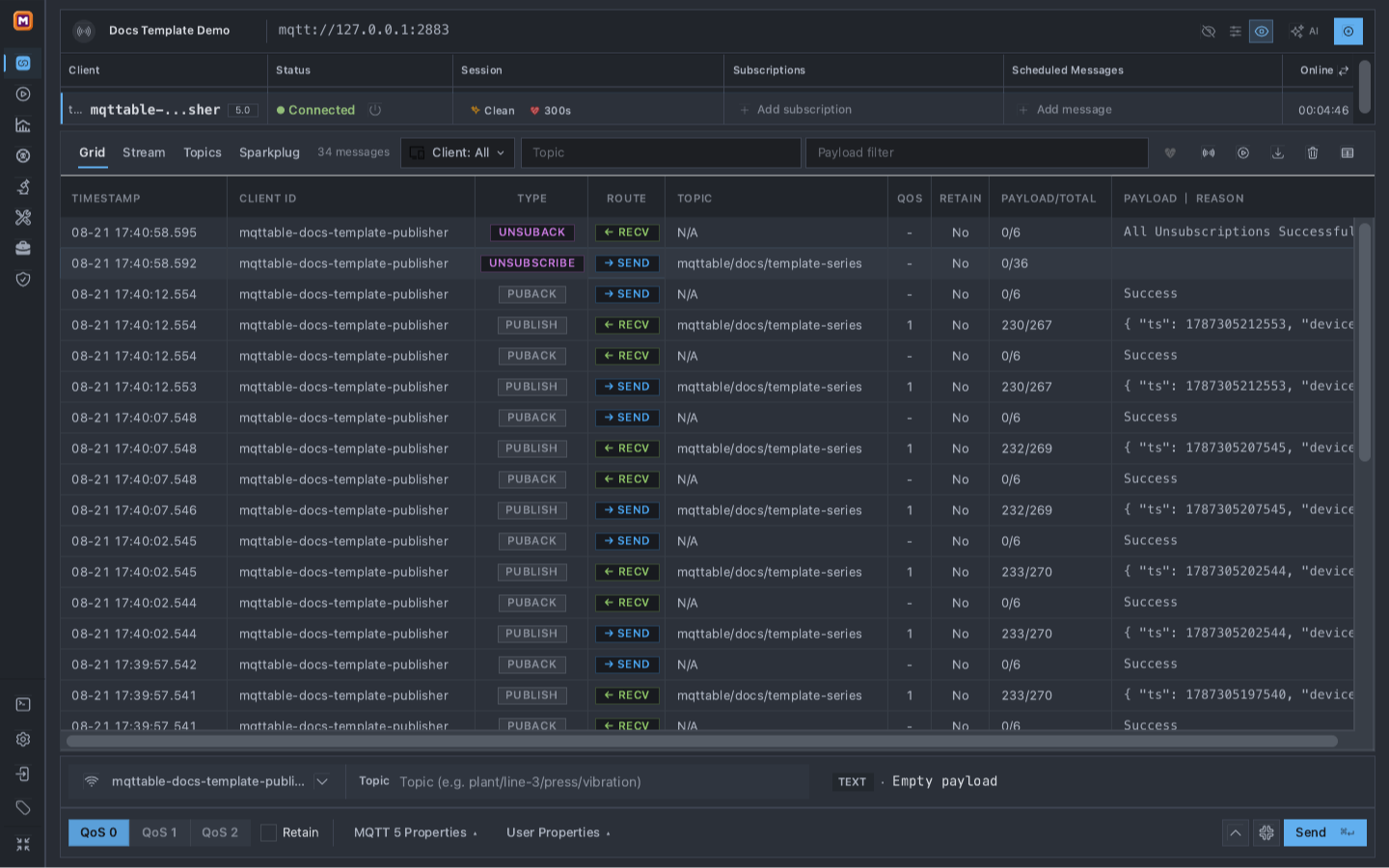
Cleanup is complete when both temporary columns are empty and no new scheduled PUBLISH appears after the wait window.
Payload Templates are available in Local Runtime without a separate Pro gate. Remote Runtime requires a current online Pro entitlement, a signed-in session, and the connections:write plus messages:publish permissions for this workflow.
Unknown variables, unknown filters, invalid arguments, malformed rendered JSON, timeouts, and renderer resource limits fail closed instead of publishing a partial value. A scheduled message has no message-count or end-time field and resumes when its saved Client reconnects, so remove it before leaving the test boundary.
Use Publish, verify, and schedule MQTT messages for literal messages and MQTT 5 delivery options. Use Trace for deeper packet inspection. Use Bench when you need controlled client counts, rates, duration, thresholds, and a report.