
Decode and verify a JWT
Decode a JWT and verify an HMAC signature with JWT Debugger.
- Author:
- Mqttable
- Updated:
On this page5 sections
Loading...
Decode a JWT and verify an HMAC signature with JWT Debugger.
Loading...
Use a disposable token and secret while learning. Never paste a production credential into screenshots or shared debugging notes.
The current source groups Tools into Data & Text, Images, and Files & Time, with JWT Debugger and Text Compare under Data & Text. Search accepts aliases such as JWT / Token / 令牌 and Binary / Hex / 二进制. Up to five matches appear without group headings; clearing the search restores the groups. Existing installers and the screenshots below may still show the previous directory.
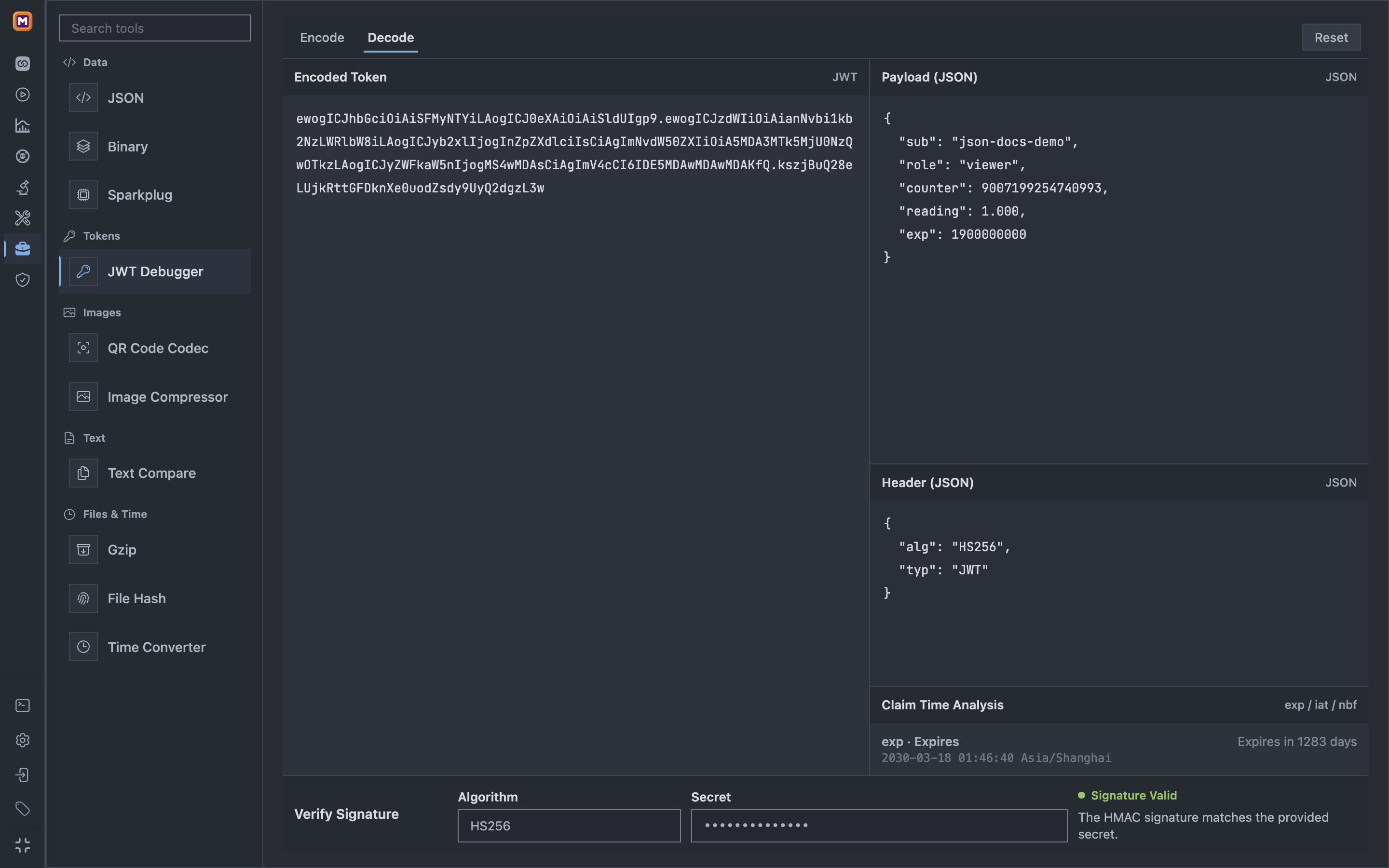
Decode the token first, then verify its signature with the expected algorithm and secret.
The current source adds line-numbered Header/Payload editors with Undo and lossless Format. Decoding displays the original decoded UTF-8 JSON, not a reconstructed floating-point object. Encoding rejects duplicate keys, isolated surrogates, and numbers that cannot be represented safely. Formatting does not regenerate a signature; decoding alone is not verification.
The current source includes the entry points below; this does not mean an existing installer includes these changes. The screenshot above shows the standalone decode and signature-verification area.
For client and Benchmark sources, Return with original draft restores the unsaved form and inline JWT draft. Use this token and return fills only the password draft after confirmation; it does not save, connect or start a benchmark. Replacing a credential reference or password template requires an explicit notice. The original Credentials entry is unchanged.
The standalone debugger does not retrieve hidden saved passwords or receive the inline generator’s signing keys. It still generates and verifies HMAC signatures only; the inline HS256/RS256 generator is unchanged. Decoding, signature verification and time validity are separate checks, and none alone guarantees broker acceptance. Times follow the Settings timezone. Password backfill is limited to 65,535 bytes.
Tokens, keys and temporary drafts stay in the current window’s memory without new automatic persistence. Navigation URLs contain only a one-time random ID. Transfer contexts expire after ten minutes; refresh or full reload also clears memory. An unavailable source cannot overwrite another form. Explicit backfill still uses the current application Runtime, so a Remote Runtime does not imply that the entire workflow stays in the browser.
The JSON tool is available by default under Tools → Data & Text in the current source, with Inspect, Query, and Compare. No environment variable is required; open it from the tool list or at /tools?tool=json-workbench. This does not mean an existing installed release includes the feature.
Open, Paste, Format, Copy, and Save sit beside the input. Internal replacement and Clear are undoable; repair, redaction, and returning a changed payload use a literal text diff and explicit confirmation. Formatting the content preserves numeric spelling, escapes, member order, and duplicate keys. Formatted display in Compare changes only the view.
Reset is directly available at the top of the workbench, with a reset icon before its label.
Duplicate members are not silently collapsed. Ambiguous paths and unsafe decoded Unicode operations are disabled; Compare falls back to original-text comparison without Pointer/Patch export. Raw JSON tokens remain available. Display limits are reported rather than presenting a partial view as complete.
Message details link from a limited preview to the full source. Invalid JSON has an explicit raw repair entry that still enforces completeness, UTF-8, size, and authorization. A previous-message comparison uses the same Broker, Client, and Topic; a manual baseline can be inspected or cleared. Monitor imports authorized redacted metadata, not an original MQTT payload.
Composer, Send Window, scheduled messages, and Bench share basic JSON editing and template snapshots. Will fields support bounded tool return to the unsaved connection or group form. Return with original draft and Apply and return are separate actions; failed restoration offers continuation or an original-draft retry. These actions do not publish, save connection configuration, reconnect, start Replay, or start a benchmark. Copy and Save use the existing application adapters; cancellation is not a second download, and suggested filenames distinguish inputs, results, and Patch files without exposing source directories.
Documents are limited to 25 MiB; above 5 MiB, choose Analyze explicitly. Ordinary send editors retain their 1 MiB limit, file return its 16 MiB limit, and Will its 65,535 UTF-8-byte limit. Drafts, copy state, and transfers stay in the current browser/WebView memory; transfer IDs expire after ten minutes. Refreshing clears that memory. Existing Local payload history is a separate mechanism. Explicit return uses the current application Runtime, so Remote Runtime is not a promise that all processing stays on the user's device.
Subscription alerts keep dot-path syntax and show searchable sampled fields with type/value hints; keys that cannot be represented are disabled rather than reinterpreted as JSON Pointer. Field evaluation preserves integers and refuses duplicate keys or JSON values that cannot be represented safely; :raw remains available for matching the source text. Webhook Headers use key-value rows with an advanced JSON mode, preserving invalid input and rejecting duplicate names, non-string values, and control characters before saving or delivery.
Schema validation and Topic Schema binding are awaiting upstream JSV work. Replay JSON Pointer checks, native cross-platform certification, JSON Lines, documents above 25 MiB, remote URL fetching, remote Schema loading, and cloud sharing are not added here.
The Sparkplug tool is implemented in the development branch under Tools → Data & Text, at /tools?tool=sparkplug-workbench. Acceptance is still in progress; this is not an announcement that an installed release contains the feature.
From a send editor, Sparkplug opens ordinary messages as structured documents and dynamic drafts as template source automatically. An explicit preview action beside the Sparkplug entry opens a rendered snapshot without changing the original draft. Applying that snapshot requires confirmation that dynamic expressions will become fixed values. Draft confirmations show message changes, not internal execution policies or editor state.
Open a workbench JSON document, or import a raw payload with its Topic, QoS, and retain information. Confirm replacement of the current document, then choose Analyze when needed. Inspect, Edit, Validate, and Compare share the document. Typed editors cover scalars, Arrays, DataSets, Templates, Properties, and Metadata. Exact integers remain decimal text; binary values use explicit Hex. Optional fields remain distinct from zero, false, or empty values.
Original payload export preserves the imported bytes. Editing and encoding produce a supported representation, not a promise of identical Protobuf bytes. Unsafe unknown or conflicting wire structures prevent ordinary edited output; creating a supported copy requires an explicit choice. Message, State, and Byte comparisons answer different questions. Missing DATA metrics do not imply state deletion, and incomplete context cannot prove complete equality.
For alias-only DATA/CMD metrics in Message diff, explicitly enable Birth Context and select a cutoff for each side. Both documents must belong to compatible entities within the same source scope. Each side uses its own Birth evidence; resolved names and datatypes are not written back into the messages. Nested Template members use their definition paths rather than node-level aliases. Without Context, ambiguous identities stay unresolved; missing cutoffs and incompatible scopes are rejected. Reports include the selected Birth references, while the complete report retains the imported evidence without exporting Runtime capability tokens.
Hex and Base64 text inputs display at most 4,096 characters per page. Offsets and totals refer to text characters, not decoded bytes. Paging retains the complete draft, and applying it still requires preview confirmation. Composition input is saved when composition ends; unsupported characters are not silently removed. File replacement and original-byte export keep their existing boundaries.
Birth context is scoped to its source and historical cutoff. Preview and confirm any return to an editable draft; stale targets are rejected. These operations do not publish MQTT messages, reconnect, or start scheduled work, Replay, or benchmarks. Monitor metadata is not a raw Sparkplug payload source. The current application Runtime handles analysis and encoding, so a Broker connection is unnecessary, but Remote Runtime processing is not browser-only processing.
Workbench text is limited to 25 MiB and raw binary to 16 MiB, with additional depth, node, and operation limits. Hex expansion can exceed the editable-document budget. Draft destinations retain their own limits. Large-file browser round trips and isolated macOS startup have been checked, but full native interaction, performance, and workflow acceptance are not complete. No simulator, automatic lifecycle management, cloud sync, general Protobuf editor, or new MCP/CLI execution interface is included.
The Binary tool is available under Tools → Data, at /tools?tool=binary-workbench. The following workflow describes the current source, not a promise that an installed release already includes it.
Choose Hex, Base64, UTF-8, or a raw file explicitly. 41 42 00 FF in Hex produces four bytes; UTF-8 produces the eleven text bytes instead. Hex accepts pairs and ASCII whitespace only. A B is one byte AB; odd digits, non-ASCII whitespace, 0x lists, and unknown characters are rejected without trimming or padding the source.
The grid is the initial editing surface; Inspector and Builder start closed. Find and Go to offset open on demand, moving into More when toolbar space is tight. Go to accepts decimal or 0x positions and a precise selection length; zero length places an insertion caret. Click either Hex or ASCII to select bytes. Empty-document and end-of-document pastes are undoable without a replacement dialog; unequal replacements and mid-document insertion still require confirmation. The main button and the grid’s Cmd/Ctrl+C copy all bytes when there is no selection, or the selected bytes otherwise. The button names the range; copy feedback names the side, encoding and byte count. Cut, Delete and Export selected bytes never fall back to the whole document. Menus distinguish Base64 from strict UTF-8, and current bytes from the original source.
The collapsible, resizable Inspector is read-first. Expand Modify value for exact-width numeric or bit writes; type and byte-order changes alone do not edit bytes. The 256-byte UTF-8 window has strict and escaped views. Small text imports preview after a 200 ms pause, up to 64 Ki UTF-16 code units; larger input and raw files use an explicit preview. Applying validates the captured range again and adds one undo step. Builder lives in the collapsible lower panel and shows each field’s offset, bytes, actual encoded value, and float rounding; Float32 0.1 is not represented as an exact decimal tenth.
Compare remains positional, not insertion-aware. A/B headers identify the source, length, read-only state and modifications; B is always read-only. Inspector, Find, Go to, copying and export follow the active side. Load bytes confirms a text B once; opening a B file loads it directly. Both start comparison automatically, while valid A edits and undo/redo update after a 300 ms pause. Canceling the input dialog keeps the previously loaded B. Incomplete or invalid input cannot keep an old result current.
Results distinguish difference ranges from differing byte positions and identify extra bytes on either side. Equal contents need no navigation; one range offers Reveal difference, and multiple ranges use Previous/Next with internal paging. Automatic updates preserve the user's caret, selection, active side and logical scroll position. Only explicit difference navigation selects a range. Differences only keeps real offsets, two context rows and expandable hidden bytes; copying still uses the actual bytes.
Two panes sit side by side when each can fit 8 columns at the actual font and grid width; otherwise they stack. Both choose matching 8/16 columns. Background comparison does not block ordinary copying or overwrite its feedback; search, file reads and export take priority. Close comparison clears B, its input draft and results, while retaining A, undo and editor-return permission. Reopening starts with an empty B. Ordinary navigation in the same window can restore an open valid comparison; refresh and restart do not promise recovery.
Open file loads an immutable source. Edit copy and Restore original bytes change only the workbench draft; restoration is undoable. File → New draft is distinct from restoring the source. Only an authorized Composer or Send Window Hex draft can offer Apply to original Hex draft, with target and byte-change confirmation. Received messages can return to their source page but cannot be overwritten. Import, apply, restore, and return never publish MQTT or start scheduled work.
Limits apply separately: 25 MiB read-only inspection, 1 MiB editing or comparison per input, 512 KiB Hex return, 64 KiB text copying, and the existing 16 MiB File upload limit. The 64 MiB workspace budget also counts undo and temporary buffers. Unavailable actions explain their limit or state; exporting raw bytes does not silently convert them. Export names use a safe basename, with original, edited, and selection suffixes rather than duplicate .bin extensions.