
Diagnose a QoS 1 publish with Trace
Send one isolated QoS 1 JSON message and confirm both PUBLISH directions and their PUBACK acknowledgements in Trace.
- Author:
- Mqttable
- Updated:
On this page4 sections
Loading...
Send one isolated QoS 1 JSON message and confirm both PUBLISH directions and their PUBACK acknowledgements in Trace.
Loading...
You will send one synthetic QoS 1 JSON message through broker.emqx.io:1883, then use Trace to confirm the outgoing and incoming PUBLISH rows and both matching PUBACK rows.
Use a unique temporary Topic because the public Broker is shared. Stop rather than switching endpoints if it is unavailable.
Send this single paragraph to the Agent connected to Mqttable:
Main prompt
Use the connected Mqttable MCP tools to send one QoS 1 JSON message through broker.emqx.io:1883 and confirm both PUBLISH directions with their PUBACKs in Trace. Choose isolated temporary names, preserve existing configuration, and report the exact cleanup list.
The Agent chooses temporary names, creates only isolated test objects, leaves existing configuration unchanged, and returns the exact object list in its completed report for cleanup.
After a successful run, confirm these signals in Mqttable:
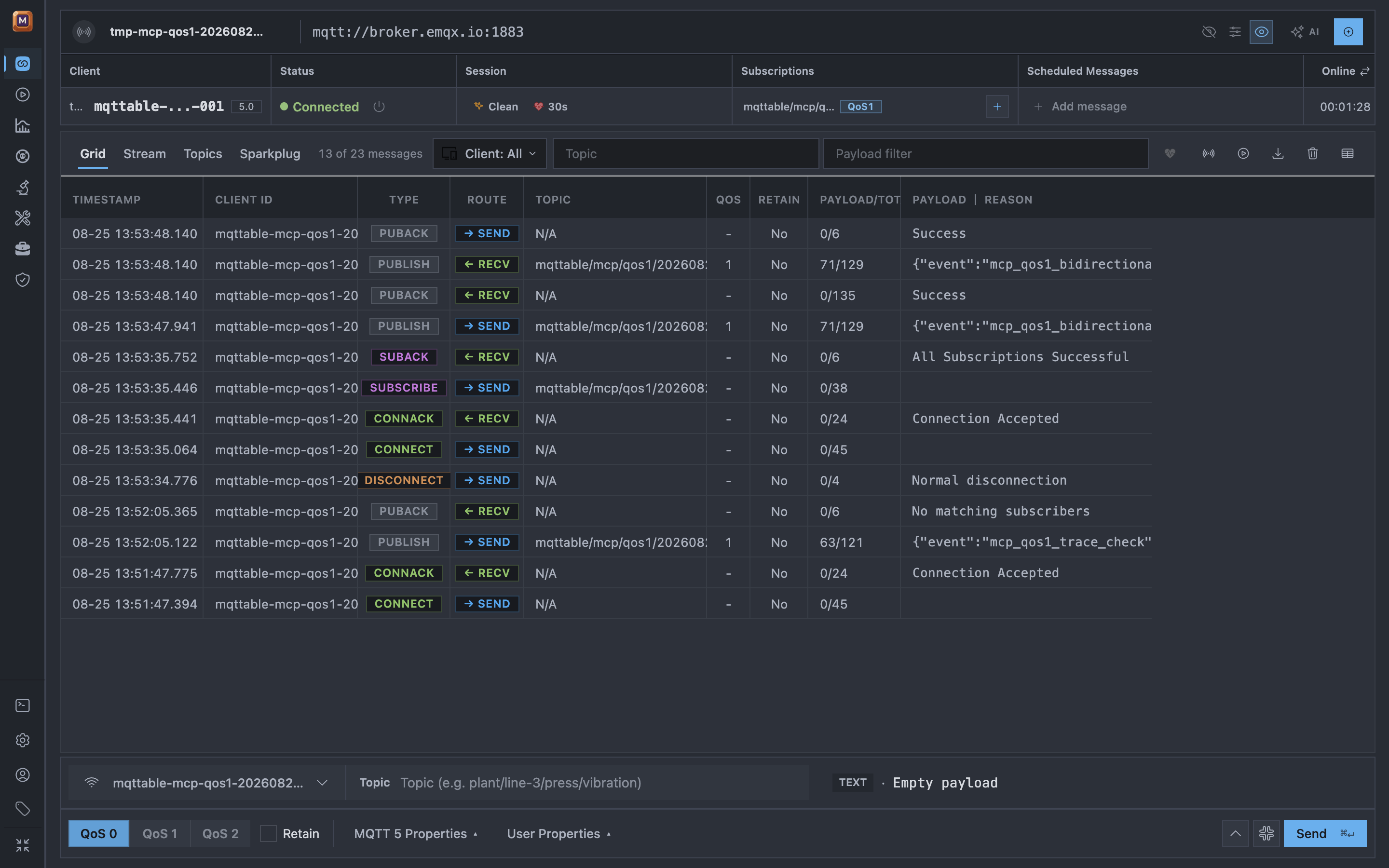
One QoS 1 round trip produces two PUBLISH directions and two successful acknowledgements; the selected packet exposes its ID in Message Details.
If any success signal is missing, stop without expanding the scope and use Troubleshooting.
In the same Agent conversation, send:
Cleanup prompt
Remove only the temporary objects listed in your completed report. Leave everything else unchanged, then confirm those exact objects are gone.
Continue with Benchmark to run a short local load test.