
Inject 200 ms latency and verify recovery
Use an isolated local Proxy to compare normal, delayed, and recovered MQTT behavior without touching existing Proxies.
- Author:
- Mqttable
- Updated:
On this page4 sections
Loading...
Use an isolated local Proxy to compare normal, delayed, and recovered MQTT behavior without touching existing Proxies.
Loading...
You will create an isolated loopback Proxy from 127.0.0.1:28883 to 127.0.0.1:18883, run scheduled messages through one test Connection, establish a baseline, and keep about 200 ms downstream latency active for review. Cleanup removes the fault and confirms recovery. The historical dark screenshot used upstream port 1883; the current light capture uses the disposable local listener on 18883.
Both ports must belong to your disposable local environment. Stop if either endpoint is not loopback or is already used by another task.
Send this single paragraph to the Agent connected to Mqttable:
Main prompt
Use the connected Mqttable MCP tools to create an isolated Proxy from 127.0.0.1:28883 to 127.0.0.1:18883 and one test Connection through it. Schedule messages, establish a baseline, then add 200 ms downstream delay and leave traffic running for review. Preserve existing objects and return the exact cleanup list.
The Agent chooses temporary names, creates only isolated test objects, leaves existing configuration unchanged, and returns the exact object list in its completed report for cleanup.
After a successful run, confirm these signals in Mqttable:
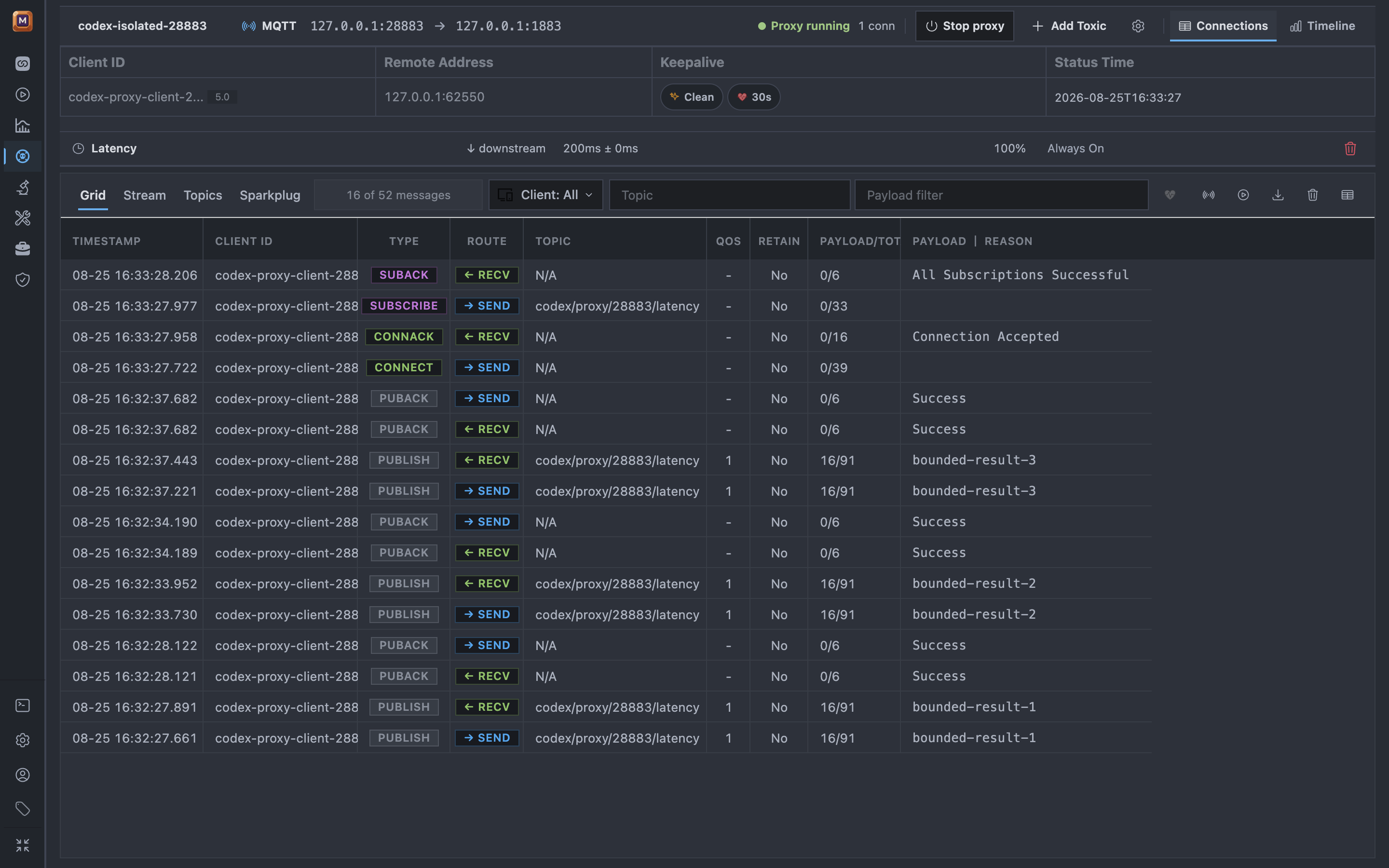
The isolated Connection keeps the Proxy route active while the 200 ms downstream toxic and QoS 1 traffic remain visible for a short review window.
In the light capture, the QoS 1 PUBLISH rows receive PUBACK with No matching subscribers. That confirms Broker acceptance, not subscriber delivery. The scheduled stream keeps sending until the Agent stops it; keep the review short and perform the cleanup below promptly.
If any success signal is missing, stop without expanding the scope and use Troubleshooting.
In the same Agent conversation, send:
Cleanup prompt
Stop only the reported schedule, then remove this Broker, Connection, delay Toxic, and Proxy. Preserve everything else and confirm recovery.
Continue with PCAP Analysis to diagnose an existing capture analysis.