
Analyze the built-in PCAP demo and report the root cause
ProAnalyze retained demo.pcapng evidence without exposing raw capture data, local paths, payloads, or running Replay.
- Author:
- Mqttable
- Updated:
On this page4 sections
Loading...
Analyze retained demo.pcapng evidence without exposing raw capture data, local paths, payloads, or running Replay.
Loading...
You will analyze Mqttable’s built-in retained demo.pcapng, read no more than 100 bounded evidence rows, and receive a root-cause summary tied to the analysis.
The built-in Analyze Demo Capture UI is available without Pro. The Agent MCP pcap.root_cause_report action in this guide is Pro-gated: if it returns locked, stop and review Pricing. Analyze the Demo once in Mqttable to prepare the retained result. Never provide a local path or raw capture bytes, reveal raw Payload, or run Replay.
Send this single paragraph to the Agent connected to Mqttable:
Main prompt
Use the connected Mqttable MCP tools to analyze the retained built-in demo.pcapng and return at most 100 bounded evidence rows with a root-cause summary. Do not accept local paths or raw capture bytes, expose raw Payload, or run Replay.
The Agent chooses temporary names, creates only isolated test objects, leaves existing configuration unchanged, and returns the exact object list in its completed report for cleanup.
After a successful run, confirm these signals in Mqttable:
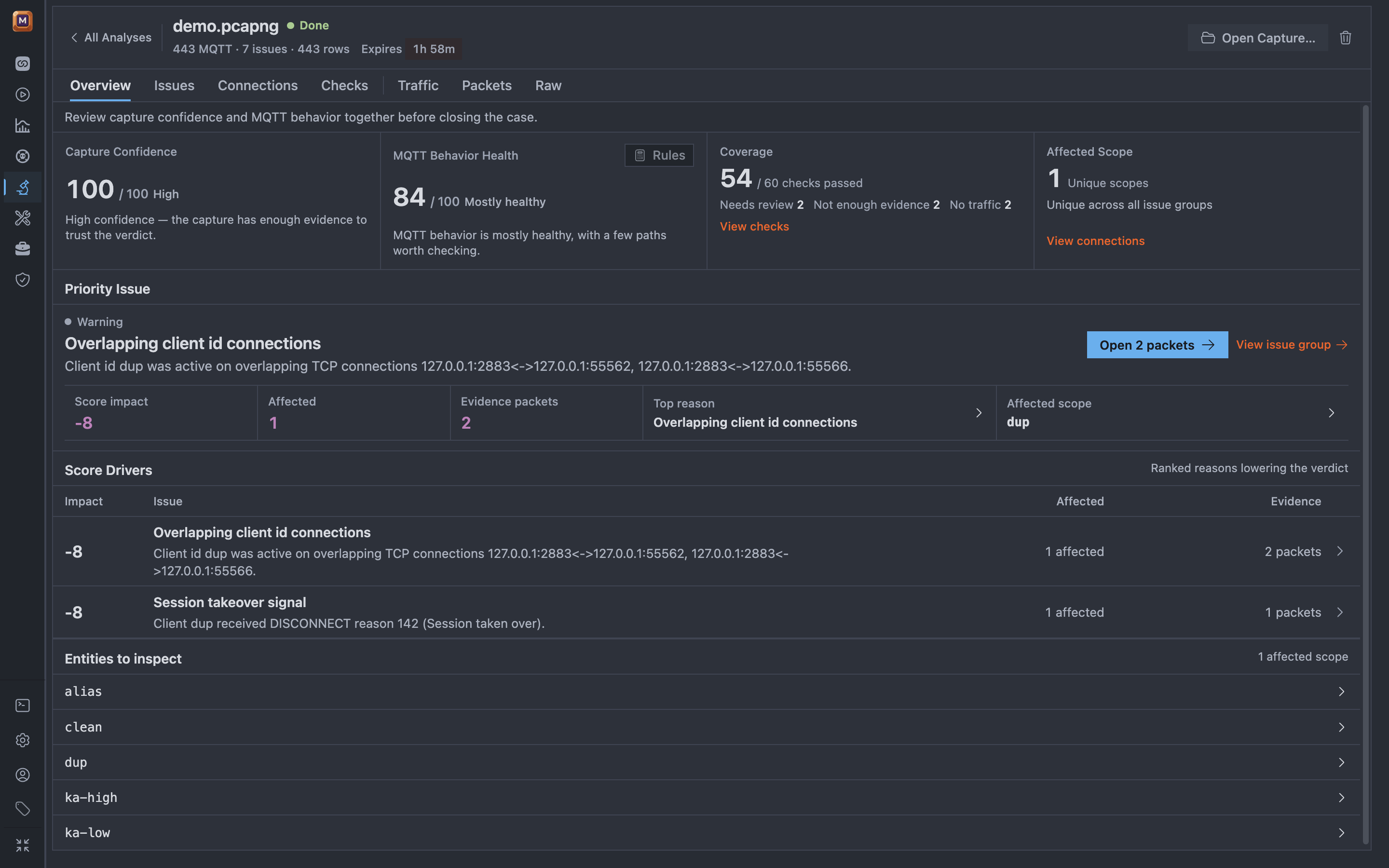
The retained demo result shows high-confidence evidence and the two diagnosis drivers without exposing raw Payload.
If any success signal is missing, stop without expanding the scope and use Troubleshooting.
In the same Agent conversation, send:
Cleanup prompt
Remove only the retained demo analysis named in your completed report. Leave everything else unchanged and confirm whether Mqttable requires the PCAP screen to finish cleanup.
Continue with Credentials & TLS to bind disposable test material through secure Intake.